






About Improved FPS Booster
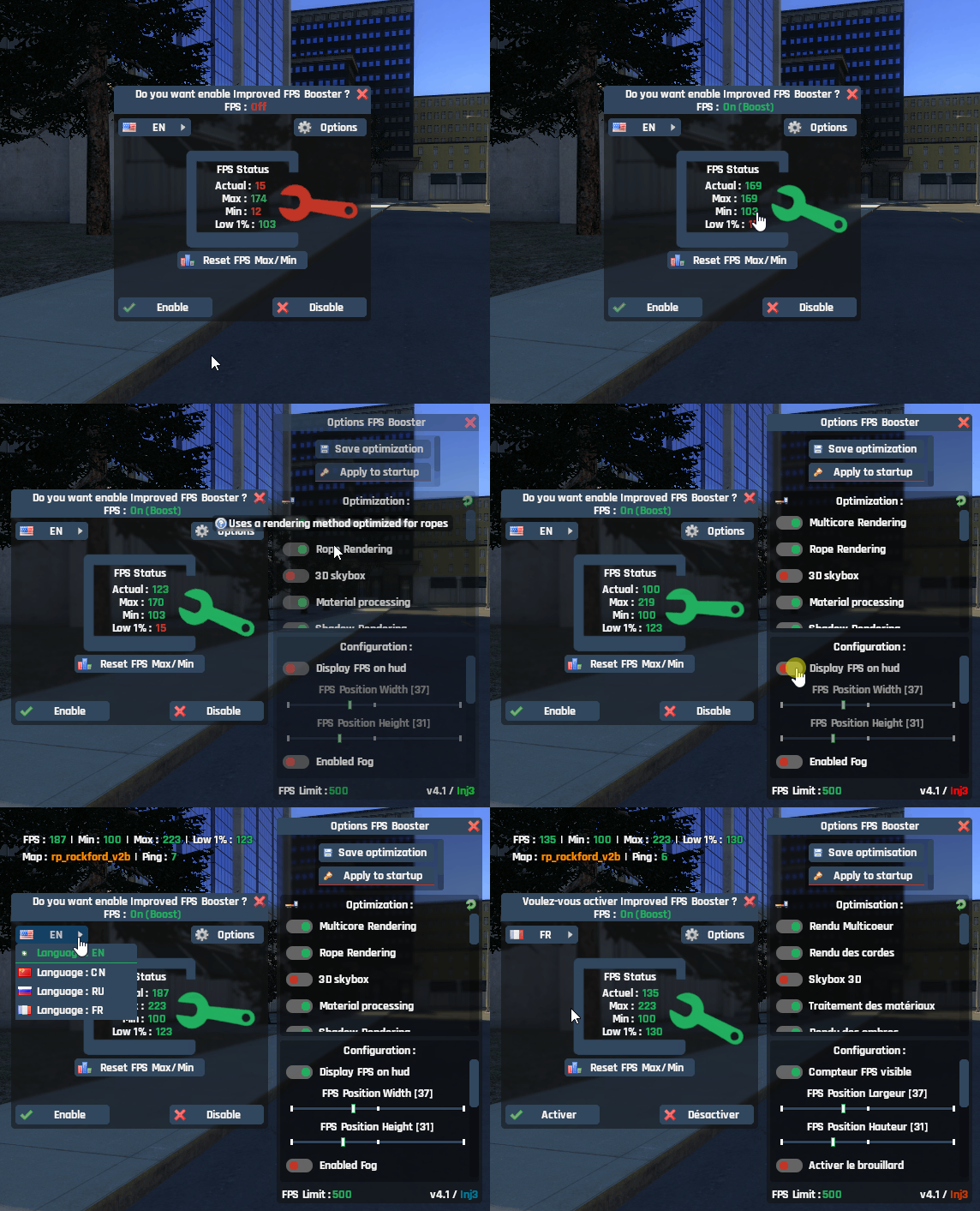
From Steam WorkshopEssential for your players ! ⇨ Opens on first connection. ⇨ Status indicator shows whether it's enabled or disabled. ⇨ Returns your current FPS, along with your maximum and minimum rates. ⇨ Displays…
Essential for your players !
⇨ Opens on first connection.
⇨ Status indicator shows whether it's enabled or disabled.
⇨ Returns your current FPS, along with your maximum and minimum rates.
⇨ Displays your 1% Low, the framerate below which the lowest 1% of frames fall.
This gives you a better sense of performance stability, especially during micro-stutters or FPS drops.
⇨ FPS counter on your HUD.
❘ You can position it in any direction, and enable/disable it (see Options).
⇨ You can manage all commands using checkboxes.
⇨ All checkboxes/sliders are saved locally.
⇨ Has its own saving system and convar support.
⇨ Compatible with all gamemodes.
⇨ Compatible with all addons.
⇨ Works on both servers and local games.
⇨ Compatible when the game is paused.
⇨ Clientside optimization.
⇨ Does not distort the graphical rendering.
⇨ Translation into FR/EN/CN/RU.
❘ You can manually select a language via a dropdown list if automatic localization isn’t accurate enough.
⇨ [Chat/Console] !boost to open the panel.
⇨ [Chat/Console] !reset to restore the default values.

✔ Gain between 5 to 50 fps (variable).
✔ Optimized / Lightweight.
✔ No config file, fully configurable in game.
Source code : https://github.com/Inj3-GT/Improved-Fps-Booster
Developed by Inj3.
⇨ Any re-publication is strictly prohibited.[/code]

Youtube : https://www.youtube.com/@Inj3
Discord : Inj3Highlights
From source dataFootprint
A 476 KB download, rated a light load on a server.
Last update
Its author last shipped an update 3 mo ago.
Improved FPS Booster on Nxeon
From our catalogue- One-click install
- Supported on Nxeon Garry's Mod servers. We download it from Steam Workshop, place it, and restart the server.
- Server load
- light
- Smallest plan we suggest
- Garry's Mod — 2 GB (2 GB RAM). This follows our own load rating above, not a benchmark.
- Latest build
- 2026-07-26, released 2026-07-26, 476 KB
Game versions by loader
| Loader | Game versions | Newest |
|---|---|---|
| Workshop |
From 1 recorded build of Improved FPS Booster.
Run Improved FPS Booster on a Garry's Mod server
Pick a server or deploy a new one above; it is installed in one click.
What kind of mod it is
From the catalogListed on Steam Workshop as “Workshop”
Performance
Makes the game or server run faster or lighter without changing how it plays.
Compatibility
- Game
- Garry's Mod
- File size
- 476 KB
Verified at the source
- ✓Steam WorkshopOfficial listing, checked 2026-10-10Open ↗
- ✓AuthorInj3, as published on Steam Workshop
- ✓LicenseNot published by the sourceFree














