About Map Retexturizer
From Steam Workshop----------------------------------------------------------- BRASIL , Junte-se: https://discord.gg/ytkXGNU GMBR, criadores BR de addons e vídeos e tudo.…
----------------------------------------------------------- BRASIL, Junte-se: https://discord.gg/ytkXGNU GMBR, criadores BR de addons e vídeos e tudo. -----------------------------------------------------------
Introduction
Hello, there!
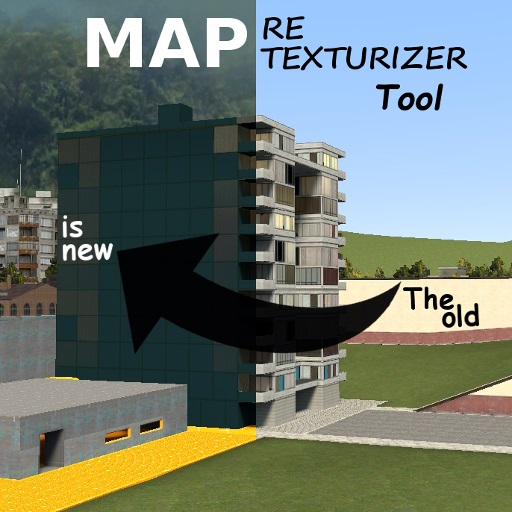
I've created Map Retexturizer for players to play around, for server owners to make unique outdoors / advertisement / maps and for filmmakers to reinvent their scenes more freely.
It's important to note that changing materials of a map doesn't change the original files on the disk, they're always intact. What I do is manipulate the materials in RAM and backup files, having everything managed by custom saving, loading and synchronizing systems.
That's it, and it took me a LOT of work to get to where we are!
Thank you very much for being here and I hope you have a good experience with the tool.
> TO-DO + Requests and bug reports > Source code on GitHub > My other tools > my HL1 mod, Hu3-Life

Features
- Copy, paste and restore materials;
- Manipulate materials of brushes, models and decals;
- Change many material properties;
- Tool gun and undo support for almost everything;
- Works with any mounted game and manually installed vmt/vtf files;
- Fully prepared for singleplayer, listen servers and dedicated servers;
- Full support for GMod saves;
- Save / Autosave / Load / Autoload;
- Change all map materials at once (but water and models);
- Full cleanup by categories;
- Preview mode;
- Material Browser;
- Console commands.
Server Owners / Admins
Here are our commands:
mr_admin        1/0     =  Turn on/off the admin protections;
mr_materials            =  List all the map materials;
mr_cleanup              =  Clean all the modifications;
mr_browser              =  Open the Material Browser;

mr_list                 =  List the saved game names;
mr_load        "name"   =  Load the saved game called "name";
mr_autoload    "name"   =  Set a saved game called "name" to load when the server starts;
mr_save        "name"   =  Save the current tool modifications into a file called "name";
mr_autosave     1/0     =  Enable/Disable the autosaving;
mr_delete      "name"   =  Delete the save called "name";

mr_delay                =  The delay between each materiall application on a load;
mr_dup_cleanup  1/0     =  Enable/Disable cleanup before starting a load;
mr_progress_bar 1/0     =  Enable/Disable the progress bar;
mr_instant_cleanup 1/0  =  Clear the map as fast as possible (may cause a temporary freeze);
mr_notifications 1/0    =  Enable/Disable tool chat notifications

mr_add_disp "material"  =  Add displacement to the menu;
mr_rem_disp "material"  =  Remove displacement from the menu.
Changing the Skybox
You can apply any material on the skybox using the tool gun.
If you want to use a 6-sided sky, install it and write the name in the skybox path, omitting the suffix. For example, on sigleplayer:
[b]1)[/b] Download: https://gamebanana.com/textures/4446
[b]2)[/b] Place in the addons folder;
[b]3)[/b] Open the game (or disconnect, run reload_legacy_addons and restart);
[b]4)[/b] Go to the tool skybox textbox and write:
[quote][b]skybox/jungle_csgo[u]ft[/u][/b][/quote]
Then you are going to see the material repeated. Just remove the suffix "ft" and try again:
[quote][b]skybox/jungle_csgo[/b][/quote]
Result: 
Note: Check the documentation if you want to create your own sky materials Note 2: If the map has a customizable skybox like the one in gm_construct, changing it has a small impact on performance, otherwise the impact is null.
Adding Materials
You can use your own materials by correctly creating and placing them in the folder:
[...]\steamapps\common\GarrysMod\garrysmod\addons\mystuff\materials[/code]

In the above path, change "mystuff" as desired.

[b]Requirements:[/b]
[code]
- [url=http://nemesis.thewavelength.net/index.php?c=238]VTFEdit[/url] to edit/create .VTF;
(OR [url=https://www.gimp.org/]Gimp[/url] with the [url=https://github.com/Artfunkel/gimp-vtf/releases]gimp-vtf[/url] plug-in)
- A nice text editor like [url=]Notepad++[/url] to edit/create .VMF.
Sharing Your Saves
The save files are organized per map and located in the folder:
[...]\steamapps\common\GarrysMod\garrysmod\data\mapret[/code]

You can zip everything up and send the file to others, that's it.

[b]Note[/b]: in multiplayer, save files are kept only with the server owner, that is, clients don't receive copies of them (only a list of names).

[h1]Developers[/h1]

I added some custom server hooks:

[code]
-- Called when any load starts
hook.Add("MRStartLoading", "Unique name 1", function(loadName, ply)
	-- Your code
end)

-- Called when any load ends
hook.Add("MRFinishLoading", "Unique name 2", function(loadName, ply)
	-- Your code
end)
ply is nil if the load is being done by the tool itself.
You can initiate a load directly by calling this function in the server scope:
MR.SV.Load:Start(ply, loadName)
ply = The player who is starting the load. You can use MR.SV.Ply:GetFakeHostPly() so we'll consider the tool is applying the save; loadName = The name of the load file.
Highlights
From source dataFootprint
Rated a light load on a server.
Last update
Its author last shipped an update 38d ago.
Map Retexturizer on Nxeon
From our catalogue- One-click install
- Supported on Nxeon Garry's Mod servers. We download it from Steam Workshop, place it, and restart the server.
- Server load
- light
- Smallest plan we suggest
- Garry's Mod — 2 GB (2 GB RAM). This follows our own load rating above, not a benchmark.
- Latest build
- 2026-09-07, released 2026-09-07
Game versions by loader
| Loader | Game versions | Newest |
|---|---|---|
| Workshop |
From 1 recorded build of Map Retexturizer.
Run Map Retexturizer on a Garry's Mod server
Pick a server or deploy a new one above; it is installed in one click.
What kind of mod it is
From the catalogQuality of life & UI
Small conveniences, tweaks and interface improvements players notice straight away.
Compatibility
- Game
- Garry's Mod
Verified at the source
- ✓Steam WorkshopOfficial listing, checked 2026-10-10Open ↗
- ✓AuthorXalalau, as published on Steam Workshop
- ✓LicenseNot published by the sourceFree