






About mCompass
From Steam WorkshopmCompass adds a clean and minimalistic compass to the players HUD. Features: - Ability to modify compass width, height, x and y position on the screen, color, etc. - 3 different styles taking…
mCompass adds a clean and minimalistic compass to the players HUD.
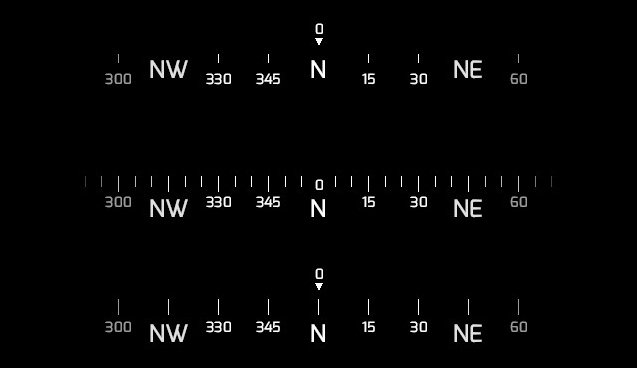
Features: - Ability to modify compass width, height, x and y position on the screen, color, etc. - 3 different styles taking inspiration from Fortnite, Squad, and PUBG - A waypoint/spotting system (can be disabled) - Server friendly (other settings in the script)
Current commands: - "mcompass_enabled" - Turns compass on and off. (0/1) - "mcompass_style" - Changes compass style; Can be seen in the image above. (1/2/3) - "mcompass_heading" - Enable or disable precise heading on the compass. (0/1) - "mcompass_xposition" - Change the compass X position. (0-1) - "mcompass_yposition" - Change the compass Y position. (0-1) - "mcompass_width" - Change the compass width. (0-1) - "mcompass_height" - Change the compass height. (0-1) - "mcompass_multiplier" - Change the spacing in between ticks/text. (1-10) - "mcompass_ratio" - Change the compass text and height ratio; Smaller value = bigger text. (0-10) - "mcompass_color" - Change the compass color. - Command should be something like: "mcompass_color 255 255 255" -"mcompass_spot (color)" - Adds in a marker for others to see. - Command should be something like: "mcompass_spot 255 255 255" -"mcompass_reset" - Resets all settings back to default.
The plan is to remove the multiplier and ratio commands in a future version to simplify things. Standby for that.
https://discord.gg/n9HhqtA Heads up if anyone needs quick support, you'll reach me faster here as I'm not online on Steam as much these days. @me if you need any help or have any suggestions.
Credits: Natanael Gama for the font. The font license, as required by the license.
Highlights
From source dataFootprint
Rated a light load on a server.
Last update
Its author last shipped an update 6 yr ago.
mCompass on Nxeon
From our catalogue- One-click install
- Supported on Nxeon Garry's Mod servers. We download it from Steam Workshop, place it, and restart the server.
- Server load
- light
- Smallest plan we suggest
- Garry's Mod — 2 GB (2 GB RAM). This follows our own load rating above, not a benchmark.
- Latest build
- 2020-05-12, released 2020-05-12
Game versions by loader
| Loader | Game versions | Newest |
|---|---|---|
| Workshop |
From 1 recorded build of mCompass.
Run mCompass on a Garry's Mod server
Pick a server or deploy a new one above; it is installed in one click.
What kind of mod it is
From the catalogQuality of life & UI
Small conveniences, tweaks and interface improvements players notice straight away.
Compatibility
- Game
- Garry's Mod
Verified at the source
- ✓Steam WorkshopOfficial listing, checked 2026-10-10Open ↗
- ✓Authorbear, as published on Steam Workshop
- ✓LicenseNot published by the sourceFree














