







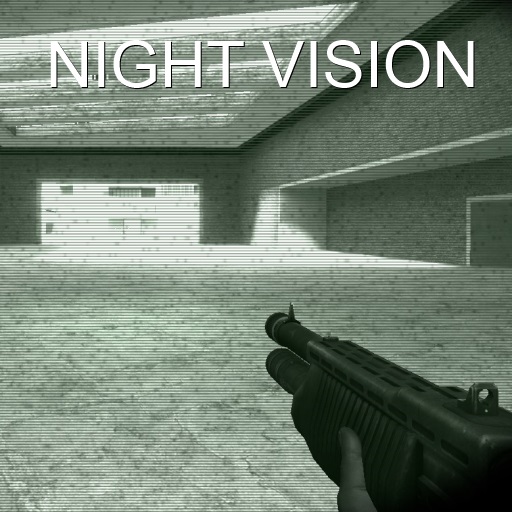
About Night Vision
From Steam WorkshopFeatures: - Completely client-side (other people won't see you use this) - Highly customizable - Night Vision and Forward-Looking Infrared Thermal Vision goggle types - ID (Illumination-Detection) -…
Features: - Completely client-side (other people won't see you use this) - Highly customizable - Night Vision and Forward-Looking Infrared Thermal Vision goggle types - ID (Illumination-Detection) - ETISD (Eye Trace Illumination-Sensitive Detection) - ISIB (Illumination-Smart Intensity Balancing) - AIM (Alternate Illuminating Method) - FLIR (Forward-Looking Infrared)
Q: How different is it from other night vision scripts?
A: Unlike most scripts, this script actually illuminates the area around you instead of simply modifying on-screen colors
Q: How customizable is it?
A: You can: - Modify the illumination radius - Modify the brightness of the illumination - Modify the speed of how fast the night vision turns on - Modify the needed darkness level for ID work (described below) - Modify the reaction time of ID - Modify the range at which ETISD works (described below) - Modify the sensitivity of ISIB - Modify the range at which AIM works - Switch between FLIR thermal vision and the regular night vision - Toggle on/off a distortion effect - Toggle on/off a blur effect - Modify the intensity of the blur effect - Toggle on/off a green overlay effect - Toggle on/off a goggle effect - Toggle on/off a bloom effect - Toggle on/off a grain effect - Customize the amount of alpha passes - Easily reset everything
Q: I bet it works only on console commands
A: Yes, and no. You can access an in-game menu by going to Q > Options > NVScript > Client. You can also control everything using the console commands (command names are below)
Q: Do I need any additional games for this to work?
A: No, all the needed materials are included. (5 materials)
Q: My night vision goes all crazy when I have ETISD turned on!
A: Turn it off or decrease the range at which it works.
Q: ETISD doesn't seem to work.
A: ETISD only works with ID turned on.
Q: I've been playing around with the controls, and was writing in numbers instead of using the slider, and now the night-vision is messed up!
A: You should only use values within the slider limits. Press the "Reset Settings" button.
Q: I'm having performance issues.
A: Reduce Illumination range, increase Brightness to 1.0 (100%), turn OFF the Distort effect, turn OFF the Bloom effect, turn OFF the Goggle effect, turn OFF Blur, turn ON ISIB. The recommended settings of the night-vision are set when you reset the settings.
Q: The menu looks complicated, and I don't even know what does stuff like ID or ETISD do!
A: Read below.
Q: Can I get banned for using this?
A: If you run around the server and scream "I'M USING A NIGHT-VISION SCRIPT", then maybe. Although you shouldn't get banned unless you're using this in a gamemode where the enemy needs to be lurking in the shadows and you openly brag about using a night-vision script. And no, you can't get VAC banned for this either.
Console Commands: nv_togg - toggle the night-vision nv_id_status <0 - 1> - turn ID (Illumination-Detection) on/off nv_id_reaction_time <0.1 - 1.0> - time for ID (Illumination-Detection) to react when entering a dark/bright area (in seconds) (higher = slower) nv_id_sens_darkness <0.05 - 1.0> - darkness scale at which ID (Illumination-Detection) starts functioning (higher = darker) nv_etisd_status <0 - 1> - turn ETISD (Eye Trace Illumination-Sensitive Detection) on/off nv_etisd_sensitivity_range <100 - 500> - set the range at which ETISD (Eye Trace Illumination-Sensitive Detection) is functional nv_isib_status <0 - 1> - turn ISIB (Illumination-Smart Intensity Balancing) on/off nv_isib_sensitivity <2 - 10> - control the sensitivity of ISIB (Illumination-Sensitive Intensity Balancing) nv_aim_status <0 - 1> - turn AIM (Alternate Illumination Method) on/off nv_aim_range <50 - 300> - range at which AIM (Alternate Illumination Method) works nv_fx_blur_status <0 - 1> - turn Blur effect on/off nv_fx_blur_intensity <0.2 - 1.75> - control how intense the blur effect is nv_fx_distort_status <0 - 1> - turn Distort effect on/off nv_fx_colormod_status <0 - 1> - turn Green Overlay effect on/off nv_fx_goggle_status <0 - 1> - turn Goggle effect on/off nv_fx_noise_status <0 - 1> - turn Noise effect on/off nv_fx_noise_variety <0 - 40> - specify amount of Noise textures to generate for use within the Noise effect nv_fx_bloom_status <0 - 1> - turn Bloom effect on/off nv_toggspeed <0.02 - 1.0> - set the speed at which your night vision turns on nv_illum_area <64 - 1024> - set the distance which is illuminated whenever night vision is turned on nv_illum_bright <0.2 - 1.0> - set the brightness of the night-vision nv_type <1 - 2> - 1 is night vision, 2 is FLIR thermal vision nv_reset_everything - self-explanatory
What do ID/ETISD/ISIB/AIM do? ID (Illumination-Detection): Automatically turns on your night-vision whenever you enter a dark area.
Customizable: - Sensitivity - Reaction time
ETISD (Eye Trace Illumination-Sensitive Detection): Automatically turns off your night-vision when looking at a bright area from a dark area.
Customizable: - Range
ISIB (Illumination-Sensitive Intensity Balancing): Automatically balances the intensity of your night-vision depending on current area's level of darkness.
Customizable: - Sensitivity
AIM (Alternate Illuminating Method): Illuminates towards your aim direction.
Customizable: - Range
Credits (initial release, in 2010): blackops7799 - darkness illuminating light, blur effect Kogitsune - helped me out with ETISD TetaBonita - sound effects/turn on effect
Highlights
From source dataFootprint
A 26 KB download, rated a light load on a server.
Last update
Its author last shipped an update 13 yr ago.
Night Vision on Nxeon
From our catalogue- One-click install
- Supported on Nxeon Garry's Mod servers. We download it from Steam Workshop, place it, and restart the server.
- Server load
- light
- Smallest plan we suggest
- Garry's Mod — 2 GB (2 GB RAM). This follows our own load rating above, not a benchmark.
- Latest build
- 2014-02-05, released 2014-02-05, 26 KB
Game versions by loader
| Loader | Game versions | Newest |
|---|---|---|
| Workshop |
From 1 recorded build of Night Vision.
Run Night Vision on a Garry's Mod server
Pick a server or deploy a new one above; it is installed in one click.
What kind of mod it is
From the catalogWorkshop
Its source category doesn’t say more about what it does, so NxLabs lists it under Other.
Compatibility
- Game
- Garry's Mod
- File size
- 26 KB
Verified at the source
- ✓Steam WorkshopOfficial listing, checked 2026-10-10Open ↗
- ✓Authorsрy, as published on Steam Workshop
- ✓LicenseNot published by the sourceFree














