







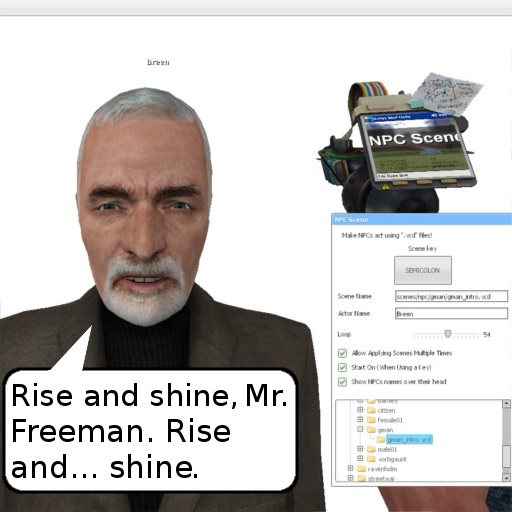
About NPC Scene
From Steam Workshop----------------------------------------------------------- BRAZIL , Join us: https://discord.gg/ytkXGNU GMBR, Brazilian creators of addons, videos, and more.…
----------------------------------------------------------- BRAZIL, Join us: https://discord.gg/ytkXGNU GMBR, Brazilian creators of addons, videos, and more. -----------------------------------------------------------
Introduction
Play animations from .vcd files using NPC Scene.
This addon started as a fix for the old v1.2, but evolved into a standalone tool.

How to ensure that scenes will play
Scenes may fail if the game cannot find an actor with the correct name. Check the console for missing names and define them properly using the tool.

TF2 scenes are limited: NPCs may play sounds and facial expressions, but usually won’t lip sync or animate. TF2 uses a different phoneme table than HL2.
As a workaround, Model Manipulator can convert NPCs (e.g. Father Grigori) into Standard TF2 ragdolls like Heavy, allowing basic movement.
Game Support
Half-Life 2 scenes are always included.
These scenes are available when their respective games are mounted:
- Half-Life 2 Episode 1
- Half-Life 2 Episode 2
- Half-Life 2 Lost Coast
- Left 4 Dead 2
- Portal (Requires: https://steamcommunity.com/sharedfiles/filedetails/?id=1456559884)
Not supported:
- Left 4 Dead (already included in L4D2)
- Team Fortress 2
- Portal 2
Creating scenes / Automatic lip sync
Add custom scenes by placing .vcd files in "garrysmod\scenes" or "garrysmod\addons\myaddon\scenes". Scenes are created with hlfaceposer. See the official guide: Choreography creation
Avoid GMod’s bundled hlfaceposer (21.07.13), as it crashes frequently. Follow the steps below instead.
A) Icons fix:
Extract this into the SDK bin folder (or hl2 game directory), or extract gfx/hlfaceposer from the main VPK.
B) Enable automatic lip sync (E.g. HL2):
- Get the fix files from my zip and copy them to your "common" folder; - Open "common\Half-Life 2\bin\hlfaceposer.exe".
or you can manually get the fix files:
- Install Source Filmmaker; - Copy "Half-Life 2\hl2\gameinfo.txt" to "Half-Life 2\bin"; - Copy "SourceFilmmaker\game\bin\lipsinc_data" to "Half-Life 2\bin"; - Open "Half-Life 2\bin\hlfaceposer.exe".
C) Using automatic lip sync:
- Load a model (File -> Load Model); - Open the Phoneme Editor; - Change Speech API to "Lipsinc Speech API"; - CTRL + O: load a .wav; - CTRL + R: detect phonemes; - Commit extraction and save.
We use this method to dub Half-Life games into Brazilian Portuguese: Project page
Extracting VCD files
TL;DR; Download [url=https://mega.nz/file/1MtmVAgS#GqJrAEMXucfuC9-Q9s80YERv_Tmiq6p9xMFYFKVBBhc]VCDs for HL2, Ep1, Ep2 and BM[/ur] I extracted using VSIF2VCD.
Valve packs VCD files into scenes.image. To edit or reuse animations, they must be extracted first.
File names are stored as CRC checksums and cannot always be recovered. Cross-referencing maps helps, but many files remain unnamed. I’m not entirely sure why this happens (and honestly don’t remember anymore), but I’ve had good experiences with the extracted files. Once the names are recovered, everything that really matters seems to be there.
Therefore: - Use GCF Scape to get the scenes.image file; - Use VSIF2VCD to extract VCDs from the scenes.image file.
Note: VSIF2VCD requires a maplist.txt in the game root, for example:
d1_canals_12 d1_canals_13 d1_eli_01 d1_eli_02 d1_town_01
Recompiling VCDs into scenes.image
> This information was passed on to me by Dejoota and David Macalister — thank you very much! > Guide for Half-Life 2, Half-Life 2: Episode One, and Half-Life 2: Episode Two. > Not tested with the Half-Life 2 Anniversary Update:
- Locate hlfaceposer.exe in the bin folder of your game. To run the program without issues, carefully read the “Issues” section of Valve’s official documentation, as some compatibility fixes are required.
- The scenes.image file will NOT compile if the VCD directory tree does not exist on your system — and you'll never know, because the error is silent (no warnings at all). Therefore, make sure ALL VCD files from the target game are extracted into the scenes folder, strictly preserving the original folder and file names. You can obtain these files online or extract them yourself using VSIF2VCD, as stated in the earlier section.
- At this point, the file should compile correctly in Half-Life 2. However, for Episode One and Episode Two, additional adjustments to gameinfo.txt are still required so the game can properly mount the folders and allow hlfaceposer to function correctly.
Source code
https://github.com/Xalalau/NPC-Scene
Special thanks
Testers: HomemCamisinhaCósmico, Pepeu.
Cool things
Enable "Apply Scenes Multiple Times" and try:
Highlights
From source dataFootprint
Rated a light load on a server.
Last update
Its author last shipped an update 38d ago.
NPC Scene on Nxeon
From our catalogue- One-click install
- Supported on Nxeon Garry's Mod servers. We download it from Steam Workshop, place it, and restart the server.
- Server load
- light
- Smallest plan we suggest
- Garry's Mod — 2 GB (2 GB RAM). This follows our own load rating above, not a benchmark.
- Latest build
- 2026-09-07, released 2026-09-07
Game versions by loader
| Loader | Game versions | Newest |
|---|---|---|
| Workshop |
From 1 recorded build of NPC Scene.
Run NPC Scene on a Garry's Mod server
Pick a server or deploy a new one above; it is installed in one click.
What kind of mod it is
From the catalogCreatures & NPCs
Adds or changes creatures, NPCs and how they behave.
Compatibility
- Game
- Garry's Mod
Verified at the source
- ✓Steam WorkshopOfficial listing, checked 2026-10-10Open ↗
- ✓AuthorXalalau, as published on Steam Workshop
- ✓LicenseNot published by the sourceFree














