






About Omega Device
From Steam WorkshopOmega Device — Rick Prime's Omega Sphere & Tablet Erase anything from existence, just like in Rick and Morty. The huge Omega Sphere deletes props, NPCs, weapons, vehicles and even players, and erased…
Omega Device — Rick Prime's Omega Sphere & Tablet
Erase anything from existence, just like in Rick and Morty. The huge Omega Sphere deletes props, NPCs, weapons, vehicles and even players, and erased things can't be spawned again. The device is switched on and off and configured with a tablet. Works in singleplayer, on listen servers and on dedicated servers. The interface and messages are available in English and Russian.
What's included
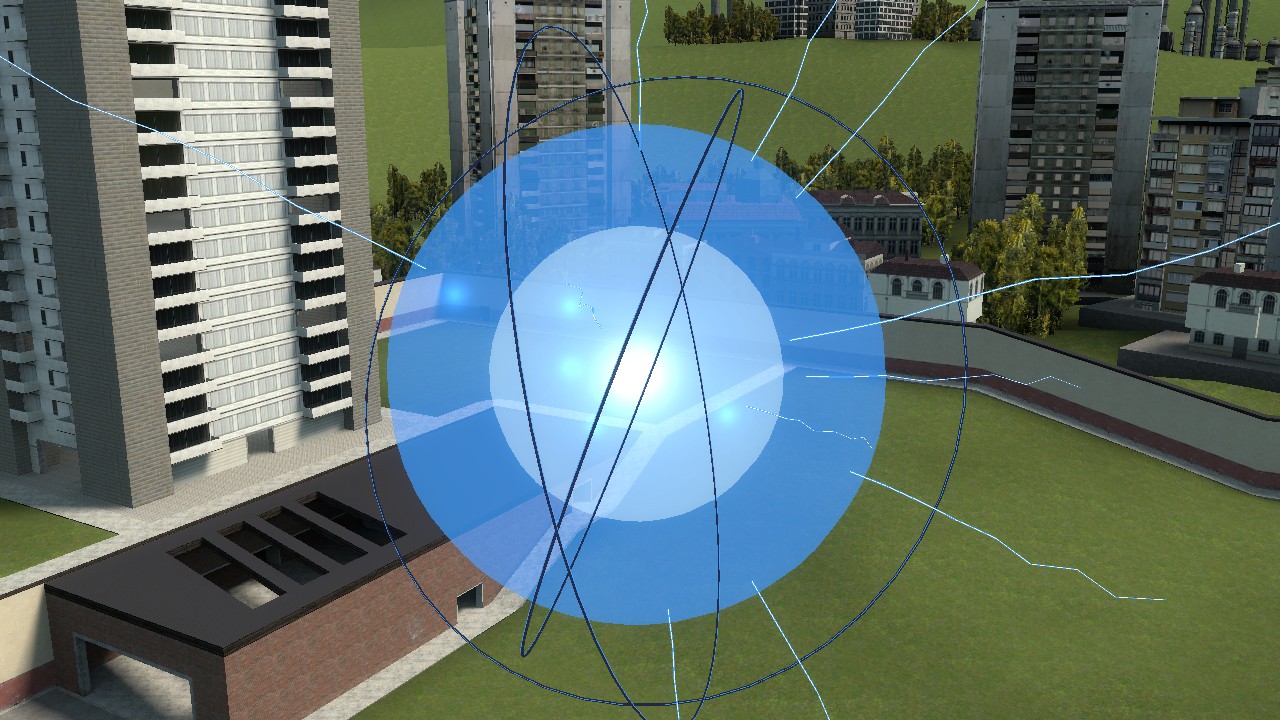
- Omega Sphere (entity, admin spawn only) — a huge blue sphere with dark rings and lightning arcs. Throw or walk anything into it: the sphere turns green, flashes, pulls everything to its center and erases it (about 4.5 seconds of animation). It then turns blue again and recharges for 10 seconds. A freshly spawned sphere charges for 3 seconds.
- Omega Tablet (admin spawn only) — turns the Omega Device on and off and sets single-object exceptions: an exempted object is ignored by the sphere. Exceptions are highlighted with a green outline, and the tablet window has a list with remove buttons.
Key features
- Erase forever — all copies of the model or class are removed, and spawning is blocked from both the spawn menu and the console. The block list is saved between server restarts. You can turn this mode off so that only a single object is erased.
- Player removal — pick what happens to an erased player: becomes a spectator (persists after rejoining), kick, or ban for a set number of minutes (0 = permanent).
- Host undo — a window listing everything erased: restore the selected entry or everything at once. It lifts the spawn block, returns the player to the game, removes the ban, and brings back objects erased during the current session.
- Object limit — caps how many objects can be erased at once (default 20). The sphere pulls in no more than the limit per cycle.
- Exceptions — single objects the sphere never touches. Exceptions on map objects are remembered after the map restarts.
- Master switch — while off, the sphere is dim and pulls nothing in.
- Safety — the host can't be erased, system map entities are protected, and the sphere leaves doors, walls, spectators and held weapons alone.
- Settings — sphere radius, animation length, cooldown, player action, tablet access, effects and chat announcements. Everything can be changed in-game.
- Two languages — English and Russian. The language follows the game language or can be set manually, and every player sees chat messages in their own language.
Where to find it
- Sphere: Q menu → Entities → Rick and Morty
- Tablet: Q menu → Weapons → Rick and Morty
- Settings: Q menu → Utilities → Rick and Morty → Omega Device
Tablet controls
- LMB — add an object to the exceptions (press again to remove it)
- RMB — turn the Omega Device on or off
- R — tablet window: on/off switch, exception list and a "Settings and undo" button (host)
Console commands and settings
omega_menu              — open the control window
omega_list              — list erased entries
omega_restore <ID|all>  — undo an erase (host only)
omega_language          — auto | ru | en

omega_enabled, omega_max_objects, omega_tablet_access, omega_block_spawn,
omega_allow_players, omega_player_action (spectator / kick / ban), omega_ban_minutes,
omega_range, omega_effects, omega_announce, omega_superadmin_host,
omega_sphere_radius, omega_sphere_anim, omega_sphere_cooldown
Good to know
- Blocking works by model (props) or by class (NPCs, weapons, entities): erase one and every identical one disappears. If there are more copies than the limit, the erase is cancelled with a message.
- The host is the listen-server owner, the singleplayer player or (by setting) the superadmin on a dedicated server. Only the host changes settings and undoes erases. Tablet access is host-only by default, but you can allow admins too.
- After a server restart, undo lifts the spawn block, but only objects erased during the current session are recreated.
- Exceptions on spawned props last as long as the prop exists.
- Bans use the standard banid/writeid commands. If you run an admin mod with its own ban list (for example ULX), remove bans through it.
- To remove the sphere itself, use undo (Z) or cleanup.
Highlights
From source dataFootprint
Rated a light load on a server.
Last update
Its author last shipped an update 9d ago.
Omega Device on Nxeon
From our catalogue- One-click install
- Supported on Nxeon Garry's Mod servers. We download it from Steam Workshop, place it, and restart the server.
- Server load
- light
- Smallest plan we suggest
- Garry's Mod — 2 GB (2 GB RAM). This follows our own load rating above, not a benchmark.
- Latest build
- 2026-10-07, released 2026-10-07
Game versions by loader
| Loader | Game versions | Newest |
|---|---|---|
| Workshop |
From 2 recorded builds of Omega Device.
Recent builds
| Build | Released | Game versions | Loaders |
|---|---|---|---|
| 2026-10-07 | 2026-10-07 | n/a | Workshop |
| 2026-10-06 | 2026-10-06 | n/a | Workshop |
Run Omega Device on a Garry's Mod server
Pick a server or deploy a new one above; it is installed in one click.
What kind of mod it is
From the catalogVehicles & ships
Cars, boats, aircraft, ships and other things to drive or fly.
Compatibility
- Game
- Garry's Mod
Verified at the source
- ✓Steam WorkshopOfficial listing, checked 2026-10-07Open ↗
- ✓AuthorМалая Дугиновщина, as published on Steam Workshop
- ✓LicenseNot published by the sourceFree














