
About Project Bodycam Base 1.3
From Steam WorkshopProject Bodycam Project Bodycam is a camera and movement system overhaul for Garry’s Mod that replaces the stock Source first‑person perspective with a hybrid, third‑person body‑attached camera.…
Project Bodycam
Project Bodycam is a camera and movement system overhaul for Garry’s Mod that replaces the stock Source first‑person perspective with a hybrid, third‑person body‑attached camera. Instead of a floating eye at the player origin, the view is driven from a world‑space camera that is physically attached to your character’s body (head and weapon bones), so it actually exists in the scene and inherits your stance and motion. Camera behaviour is governed by inertia, acceleration, and stabilisation logic to keep it readable and responsive, so even though it’s technically a third‑person, body‑mounted rig, it still feels like a tight, controllable first‑person view. On top of this, Project Bodycam adds a configurable movement model—covering acceleration, overhang, direction changes, crouch and stair handling—to match the camera’s physical feel and produce a cohesive, weighty experience.
[hr][/hr]
Beta Notice
This addon is currently in beta (v1.2). It's a personal project I've been working on when I have time, which unfortunately isn't as often as I'd like. Some features may not work perfectly, and there are still known bugs I'm working through.
If you run into issues, feel free to leave a comment. I'll do my best to address them when I can. Thanks for your patience.
[hr][/hr]
What This Addon Does
The addon changes the camera view to follow your player model's head bone and also is influenced by other factors like inertia, hand movement, and movement direction (and a bit of magic ;) ), giving a more grounded perspective. The camera moves dynamically with the player body rather than being a fixed floating viewpoint.
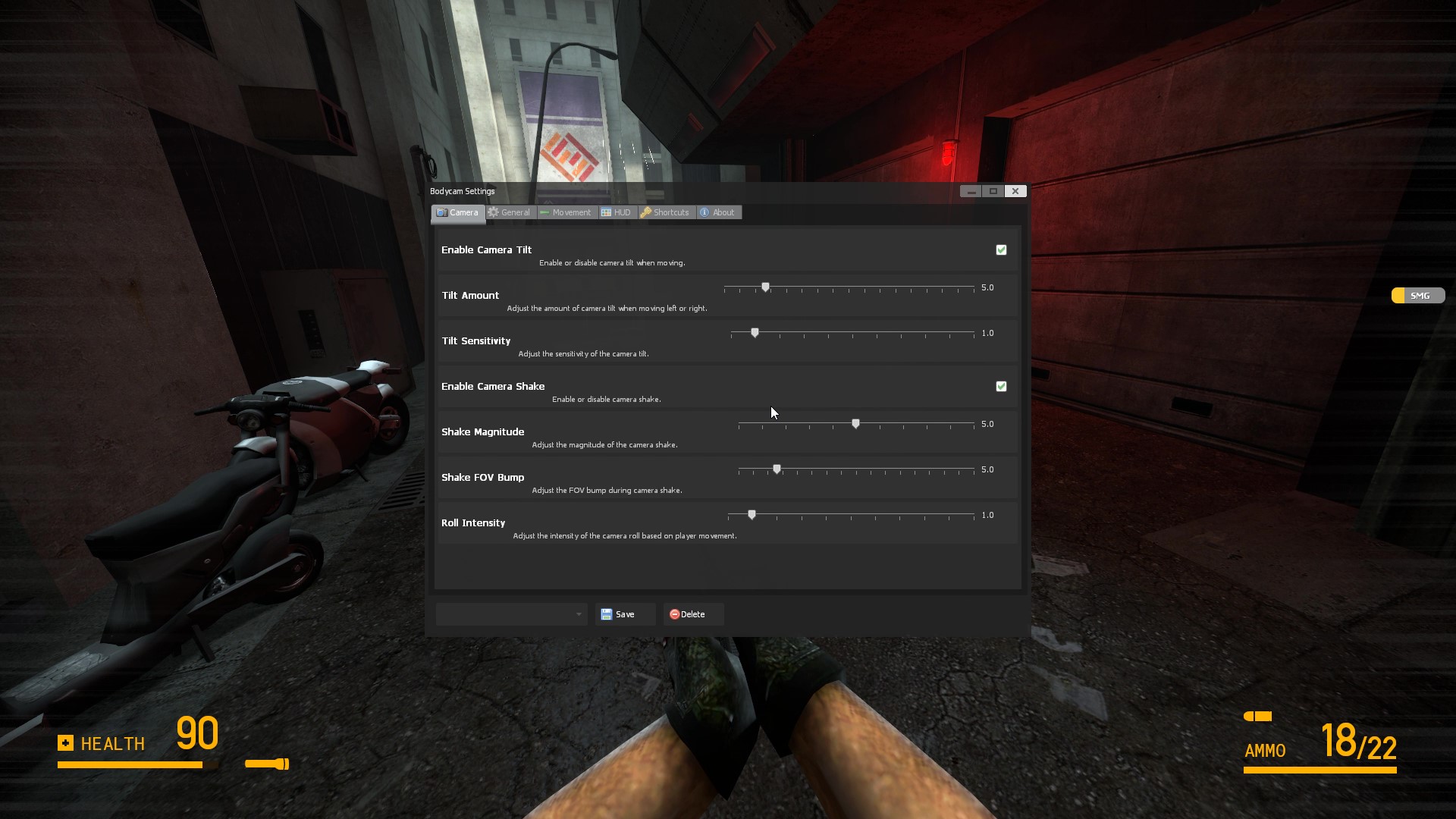
It includes a settings UI (press H or type !bodycam) where you can adjust most aspects of the camera behavior to your preference. In v1.2 this UI has been fully rewritten with a cleaner custom layout and less clutter.
Customization
The addon is highly customizable. Through the UI or console commands you can adjust:
- Camera position offsets and field of view
- Movement smoothness and camera shake intensity
- Roll effects when strafing
- Crosshair style and colors
- HUD appearance
- Movement physics (walk/run speeds, acceleration, overhang/momentum)
- and many more ;)
Multiplayer Features
On servers, players can:
- Save their own camera presets locally
- Share presets with other players on the server
- Download and apply presets others have shared
Some settings (like movement speeds) require server admin permissions to change.
Preset System
The addon comes with a few built-in presets (Default, Cinematic, Tactical) as starting points. You can create and save your own configurations through the Presets tab in the menu.
In v1.2, the default presets have been improved to better match the original showcase video, as requested by the community.
Preset Compatibility (v1.2 & v1.3)
The new inertia-based movement system in 1.2 adds acceleration, overhang, and smoother direction changes based on the original alpha behavior. I’ve tried to keep backward compatibility with older preset settings, but this may not fully work now and might break in future versions.
For best results with old presets:
- Import your existing presets into v1.3
- Adjust the new movement-related settings (acceleration, overhang, etc.) to your liking
- Save them again as new presets
- Test them in-game to make sure everything feels right
[hr][/hr]
What’s New in v1.3
- Added new "First-Person Blend" view method: keeps the real first-person view and viewmodel while blending in the bodycam's dynamic camera motion (turn lag, weapon sway, roll, ADS zoom)
- First-Person Blend always returns to the aim center (screen center = crosshair); dynamics are transient and never permanently re-aim the camera
- While aiming down sights in First-Person Blend / Hybrid mode, the view locks to the true aim direction so iron sights always line up with where shots actually go, and the crosshair is hidden
- Fixed first-person view swaying like a walking animation while standing still (playermodel animation leaked through weapon-follow; sway is now transient and fades out when idle)
- Added "Hybrid ADS Mode": uses the Legacy World-View normally and switches to the First-Person Blend view only while aiming down sights
- Added Easy Mode to the menu (default): a single quick-settings page with only the most important toggles; switch to Advanced Mode at the top of the sidebar for all tabs and settings
- Fixed menu search bar only filtering the active tab; it now searches all settings across every tab and labels results with their category
- and more see changelog
[hr][/hr]
Console Commands
General
bodycam_enable              - Toggle on/off (1/0)
bodycam_toggle_ui           - Open settings menu
bodycam_open_menu_key       - Menu key (KEY code)
Camera
bodycam_offset_updown       - Vertical offset (-20 to 20)
bodycam_offset_leftright    - Horizontal offset (-20 to 20)
bodycam_offset_forwardback  - Forward offset (-20 to 20)
bodycam_default_fov         - Field of view (50-120)
bodycam_smoothness          - Movement smoothness (0.0-1.0)
bodycam_hide_head           - Hide player head (1/0)
Effects
bodycam_enable_roll         - Roll on strafe (1/0)
bodycam_roll_intensity      - Roll amount (0.0-2.0)
bodycam_enable_shake        - Camera shake (1/0)
bodycam_shake_magnitude     - Shake amount (0.0-0.5)
bodycam_run_stabilization   - Stabilization (1/0)
Crosshair
bodycam_crosshair_enable    - Enable (1/0)
bodycam_crosshair_style - 0=Cross, 1=Dot, 2=FrameHighlights
From source dataFootprint
Rated a light load on a server.
Last update
Its author last shipped an update 1d ago.
Project Bodycam Base 1.3 on Nxeon
From our catalogue- One-click install
- Supported on Nxeon Garry's Mod servers. We download it from Steam Workshop, place it, and restart the server.
- Server load
- light
- Smallest plan we suggest
- Garry's Mod — 2 GB (2 GB RAM). This follows our own load rating above, not a benchmark.
- Latest build
- 2026-11-03, released 2026-11-03
Game versions by loader
| Loader | Game versions | Newest |
|---|---|---|
| Workshop |
From 2 recorded builds of Project Bodycam Base 1.3.
Recent builds
| Build | Released | Game versions | Loaders |
|---|---|---|---|
| 2026-11-03 | 2026-11-03 | n/a | Workshop |
| 2026-11-02 | 2026-11-02 | n/a | Workshop |
Run Project Bodycam Base 1.3 on a Garry's Mod server
Pick a server or deploy a new one above; it is installed in one click.
What kind of mod it is
From the catalogGameplay & overhauls
New mechanics, content and overhauls that change how the game plays.
Compatibility
- Game
- Garry's Mod
Verified at the source
- ✓Steam WorkshopOfficial listing, checked 2026-11-03Open ↗
- ✓AuthorCh4os, as published on Steam Workshop
- ✓LicenseNot published by the sourceFree