About Quest System
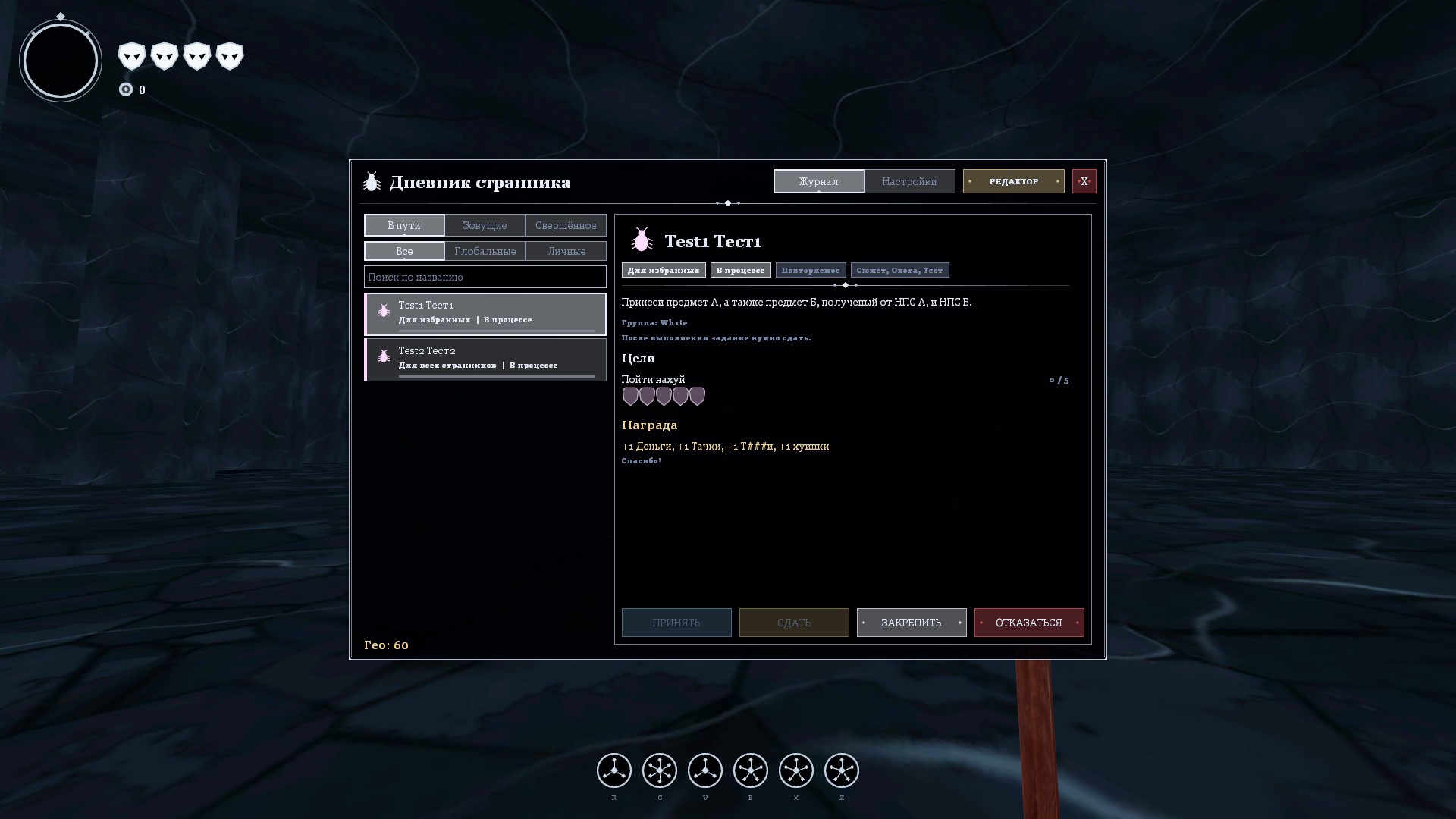
From Steam WorkshopQuest System Two types of quests: - Global — visible to and completed by all players. - Local — assigned to a single player or a small group (up to 16 people). FEATURES - Player journal: list,…
Quest System
Two types of quests: - Global — visible to and completed by all players. - Local — assigned to a single player or a small group (up to 16 people).
FEATURES - Player journal: list, description, objectives, rewards, pinning quests in the on-screen tracker. - Admin editor: create, copy, delete, enable/disable, manage players (assign, complete, reset, change progress and points). - Objectives: kill (NPCs/players), reach a point, survive N seconds, say something in chat, and custom objectives via event keys. Admins see any objective's progress in real time on the "Players" tab (progress bar, -1 / +1 / +10, "DONE"). - Quest settings: shared progress, repeat and cooldown, time limit, manual turn-in, forced pinning, objective order, quest abandonment, chains (requires another quest), auto-assign. - Rewards: points, health, armor, weapons, message, and custom rewards (key, name, amount, up to 8 per quest). - Theme presets: "Classic" and "Beetle"; custom presets can be saved in the journal settings.
COMMANDS - !quests, qsys_menu — journal - !questadmin, qsys_admin — editor (admins) - qsys_hud — show/hide the tracker - qsys_event <player> <key> [n] — credit a "manual" objective to a player (admins, console, maps) - qsys_list — list quests in the console
The journal hotkey can be chosen in the settings (qsys_key).
VARIABLES - qsys_access — 1: editor for admins, 0: superadmins only. - qsys_maxpins — how many quests a player can pin. - qsys_default_theme — default preset for new players.
DATA Quests and progress are stored in garrysmod/data/quest_system/*.json.
Highlights
From source dataFootprint
Rated a light load on a server.
Last update
Its author last shipped an update 11d ago.
Quest System on Nxeon
From our catalogue- One-click install
- Supported on Nxeon Garry's Mod servers. We download it from Steam Workshop, place it, and restart the server.
- Server load
- light
- Smallest plan we suggest
- Garry's Mod — 2 GB (2 GB RAM). This follows our own load rating above, not a benchmark.
- Latest build
- 2026-10-24, released 2026-10-24
Game versions by loader
| Loader | Game versions | Newest |
|---|---|---|
| Workshop |
From 1 recorded build of Quest System.
Run Quest System on a Garry's Mod server
Pick a server or deploy a new one above; it is installed in one click.
What kind of mod it is
From the catalogGameplay & overhauls
New mechanics, content and overhauls that change how the game plays.
Compatibility
- Game
- Garry's Mod
Verified at the source
- ✓Steam WorkshopOfficial listing, checked 2026-10-24Open ↗
- ✓AuthorWh1te, as published on Steam Workshop
- ✓LicenseNot published by the sourceFree