







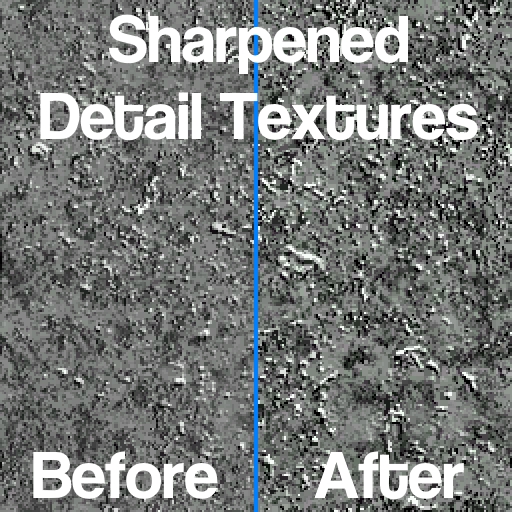
About Sharpened Detail Textures
From Steam WorkshopReplaces the default Half-Life 2 detail textures with sharper versions with no performance impact. I personally don't really like it. I think the contrast of the default detail textures is fine. The…
Replaces the default Half-Life 2 detail textures with sharper versions with no performance impact.
I personally don't really like it. I think the contrast of the default detail textures is fine.
The map in the pictures is gm_functional_flatgrass_sfoh.
FAQ
Q: What are detail textures?
A: Detail textures are textures that blend in with a base texture to add fake detail to it. It uses less video memory than simply using a higher resolution texture. See VDC: $detail for more information.
Q: Will this affect my FPS?
A: Not at all. All it does is replace the detail textures with sharper versions. Their resolutions were not changed.
Q: Can I toggle it?
A: Due to engine limitations, there's no real seamless way to add a toggle. The best and only way to do it in-game is to enable/disable this addon in the addons menu and then type mat_reloadtextures or mat_reloadallmaterials into the console. You can also manually reload the changed textures individually using mat_reloadtexture.
Q: Can I adjust the amount of sharpening?
A: Since these are textures, no. The sharpening is baked in.
Q: Can you make 4K detail textures/upscale all textures/etc?
A: I had ideas of doing HD detail textures, detail texture extensions, and my own upscaled texture pack. Something like that would only happen if I'm up to it. If you want 4K detail textures, check out this addon.
Tags: [spoiler]detail texture materials/detail enhanced high pass highpass sharpen sharpened retexture material sharp detail textures enhanced detail textures sharper detail textures[/spoiler]
Highlights
From source dataFootprint
Rated a light load on a server.
Last update
Its author last shipped an update 4 yr ago.
Sharpened Detail Textures on Nxeon
From our catalogue- One-click install
- Supported on Nxeon Garry's Mod servers. We download it from Steam Workshop, place it, and restart the server.
- Server load
- light
- Smallest plan we suggest
- Garry's Mod — 2 GB (2 GB RAM). This follows our own load rating above, not a benchmark.
- Latest build
- 2023-01-15, released 2023-01-15
Game versions by loader
| Loader | Game versions | Newest |
|---|---|---|
| Workshop |
From 1 recorded build of Sharpened Detail Textures.
Run Sharpened Detail Textures on a Garry's Mod server
Pick a server or deploy a new one above; it is installed in one click.
What kind of mod it is
From the catalogCosmetics, visuals & audio
Skins, textures, shaders, models and sound — how the game looks and sounds.
Compatibility
- Game
- Garry's Mod
Verified at the source
- ✓Steam WorkshopOfficial listing, checked 2026-10-10Open ↗
- ✓Authorsomefoolouthere (she/her), as published on Steam Workshop
- ✓LicenseNot published by the sourceFree














