About VJ HUD
From Steam WorkshopAn extension for VJ Base, it enables the HUD features. Source - GitHub Change Logs - Releases VJ Base (Required) - [url=http://steamcommunity.com/sharedfiles/filedetails/?id=131759821]Workshop Page…
An extension for VJ Base, it enables the HUD features. Source - GitHub Change Logs - Releases VJ Base (Required) - Workshop Page
ABOUT
This addon was originally made in 2013, but it was never released. Over the years I worked on it randomly, but at this point due to all the people requesting to upload the addon, I have decided to release the addon publicly. I will continue adding onto it or improve some of its old code with each update. If you have any suggestions, let me know!
FEATURES
Check VJ Base's workshop page for full feature list!
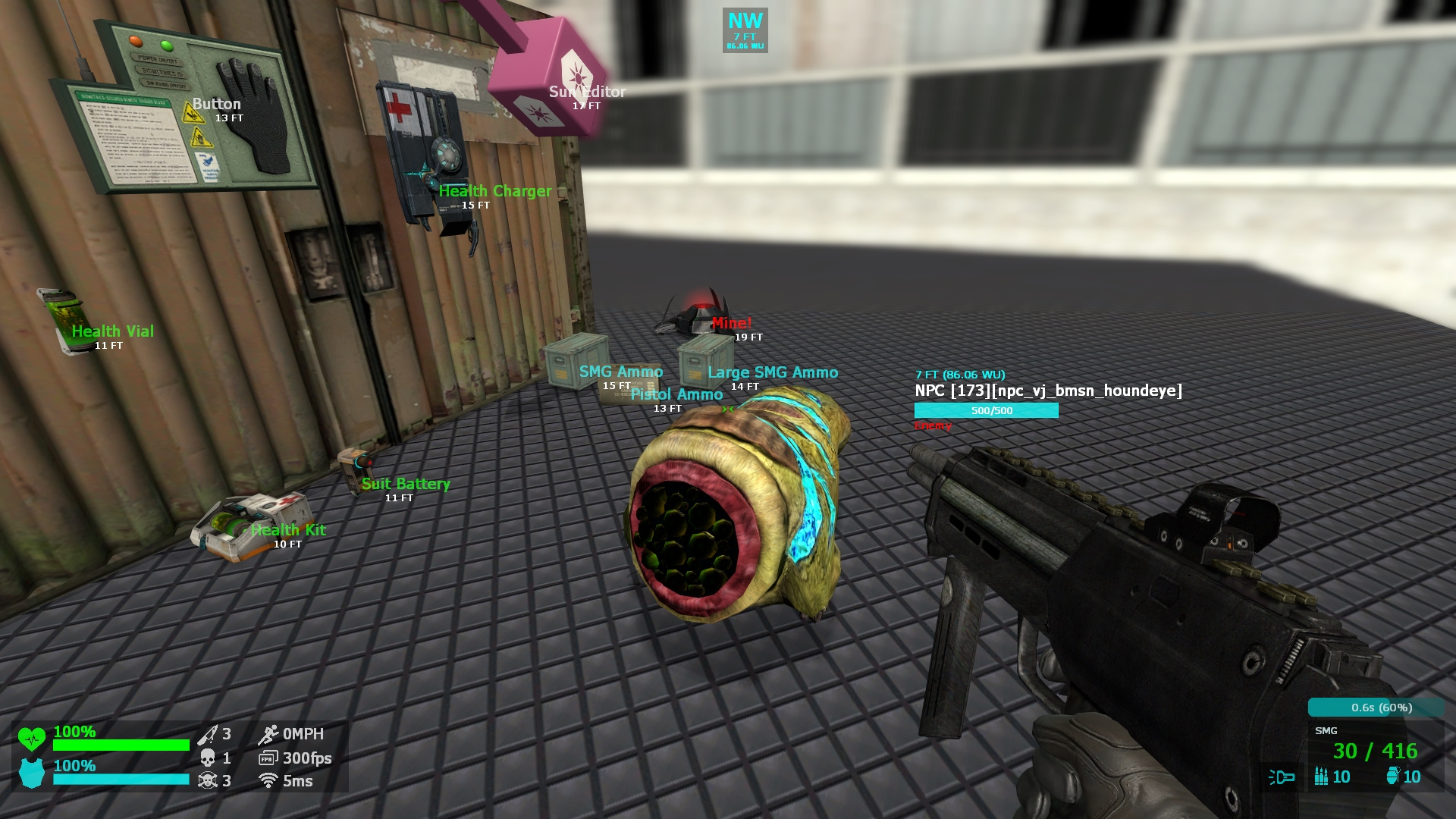
- Comes with a extensive menu that enables the user to customize everything in the HUD!
- Health & Suit:
- [list]
- Both have a bar with a percentage
- Beating heart icon that beats faster depending on how low the user's health is
- Warning notifications depending on the user's health
- Indicator showing that the user is dead
- Indicator showing that god mode is enabled
- The health bar slowly transitions from green to red
[*] Information about the user:
- Number of Kills
- Number of Deaths
- Kill / Death Ratio
- Speed
- Frames per Second (FPS)
- Ping (Dynamically become more red the higher it is)
- Speed of the Vehicle (If the user is in one)
[*] Ammo Counter:
- Number of rounds in current magazine
- Number of rounds in reserve
- Number of secondary rounds
- Number of grenades
- Name of the current weapon
- Flashlight indicator (Read more about it below under HEV power)
- The counter slowly transitions from green to red (Depending on how many rounds the current magazine takes)
- Reloading bar:
- [list]
- Amount of time left until finished (seconds)
- Percentage with a bar
- Works with many major weapon addons, including CW 2.0
[/list] [*] Compass:
- Displays which direction the user is looking at (Ex: North, West, North-West)
- Distance from the user to the position that the user is looking at (Both real measurement & world units)
[*] Trace Information (Current entity that the user is looking at):
- Distance from the user to the entity, including real measurement & world units
- Type of entity with its index and class
- Health bar with a number displaying the entity's max health and the current health
- [list]
- Works with anything with health: NPCs, Players, Bots, Props, Custom Entities etc.
[*] Custom information for NPCs:
- Disposition towards the user
- Indicator showing whether it's a boss NPC
- Will show display different icons if the NPC is: Guarding a location, is a medic, or being controlled by a player
- Will display an icon and the name of the player the NPC is following
[/list] [*] Proximity Scanner:
- Scans for items around the player and displays a warning or message depending on the item
- Items are colored depending on what they are:
- [list]
- Neutral items such as buttons or editors are marked white
- Health and suit related items are marked green
- Ammo and weapon related items are marked blue
- Dangerous items such as grenades and mines are marked red with a flashing text
[*] All items have a small text at the bottom showing a real measurement from the user to the item [/list] [*] Crosshair:
- A simple crosshair that comes with many different options!
- The color and the opacity can be configured through the menu
- Comes with 9 different materials that the user can pick from in the menu
[*] HEV suit auxiliary power support:
- Small bar appears under the health bar, which will display the auxiliary power if it's not full (Its color changes depending on the power level)
- Turned off flashlight indicator, which will display only if the auxiliary power is below 50%
- Flashlight indicator will display different colors depending on the current auxiliary power
[*] All real measurements (speed or distance) can be displayed in imperial or metric [*] All the bars, numbers, and percentages have a smooth transition [*] Many elements in the HUD are accompanied by an icon rather than a text [/list]


Highlights
From source dataFootprint
Rated a light load on a server.
Last update
Its author last shipped an update 18 mo ago.
VJ HUD on Nxeon
From our catalogue- One-click install
- Supported on Nxeon Garry's Mod servers. We download it from Steam Workshop, place it, and restart the server.
- Server load
- light
- Smallest plan we suggest
- Garry's Mod — 2 GB (2 GB RAM). This follows our own load rating above, not a benchmark.
- Latest build
- 2025-04-19, released 2025-04-19
Game versions by loader
| Loader | Game versions | Newest |
|---|---|---|
| Workshop |
From 1 recorded build of VJ HUD.
Dependencies
- Required: VJ Base
Declared by the newest build that lists any. Required ones are installed with it on one-click installs.
Run VJ HUD on a Garry's Mod server
Pick a server or deploy a new one above; it is installed in one click.
What kind of mod it is
From the catalogQuality of life & UI
Small conveniences, tweaks and interface improvements players notice straight away.
Compatibility
- Game
- Garry's Mod
Verified at the source
- ✓Steam WorkshopOfficial listing, checked 2026-10-10Open ↗
- ✓AuthorDrVrej, as published on Steam Workshop
- ✓LicenseNot published by the sourceFree