






About Wound Blur
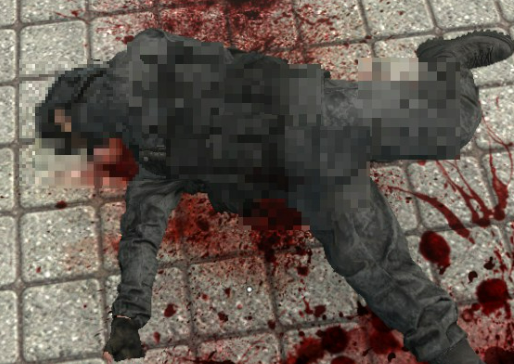
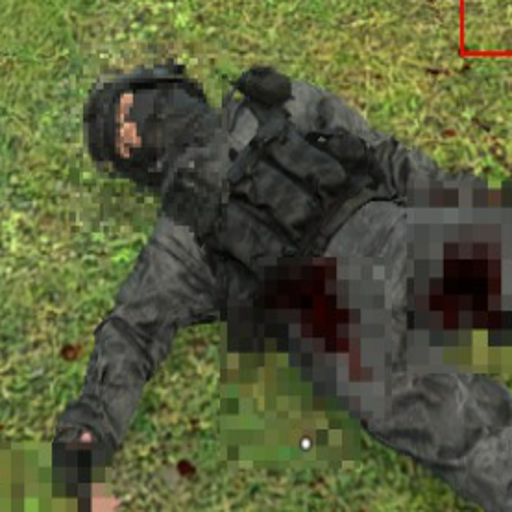
From Steam WorkshopCensors the exact spot where a character gets hit. Shoot an NPC in the stomach and a mosaic appears on the stomach. Shoot them in the leg and it appears on the leg. Great for clean recordings and…
Censors the exact spot where a character gets hit. Shoot an NPC in the stomach and a mosaic appears on the stomach. Shoot them in the leg and it appears on the leg. Great for clean recordings and screenshots.
Features
- Mosaic appears at the exact hit position, not on the whole body
- Sticks to the bone, so it moves with the body when the character walks, falls or ragdolls
- Carries over to the corpse when the target dies
- Works on NPCs, players, nextbots and ragdolls (each can be switched off)
- Pellets and bursts in one spot are merged into a single mark
- Mosaic or solid color fill, adjustable cell count and size
- Hides behind walls, distance limit and per-frame limit for good performance
- Optional auto-fade of the marks, or keep them forever
Controls
F7 toggles the mod on/off. The bind is set automatically on launch. Everything else is done through console commands. Type woundblur_help to see them all.
Main commands
woundblur_grid 40        Mosaic cells (4-64). Higher = smaller pixels
woundblur_size 6         Width of the mark (world units)
woundblur_mode 1         0 = mosaic, 1 = solid color fill
woundblur_skiphead 1     Do not mark the head/neck
woundblur_lifetime 30    Marks fade after 30 seconds (0 = never)
woundblur_clear          Remove all marks
woundblur_preset low     Performance preset (low / high / default)
woundblur_debug 1        Red outlines for tuning
woundblur_togglekey F8 Change the toggle keyHighlights
From source dataFootprint
Rated a light load on a server.
Last update
Its author last shipped an update today.
Wound Blur on Nxeon
From our catalogue- One-click install
- Supported on Nxeon Garry's Mod servers. We download it from Steam Workshop, place it, and restart the server.
- Server load
- light
- Smallest plan we suggest
- Garry's Mod — 2 GB (2 GB RAM). This follows our own load rating above, not a benchmark.
- Latest build
- 2026-10-15, released 2026-10-15
Game versions by loader
| Loader | Game versions | Newest |
|---|---|---|
| Workshop |
From 1 recorded build of Wound Blur.
Run Wound Blur on a Garry's Mod server
Pick a server or deploy a new one above; it is installed in one click.
What kind of mod it is
From the catalogCreatures & NPCs
Adds or changes creatures, NPCs and how they behave.
Compatibility
- Game
- Garry's Mod
Verified at the source
- ✓Steam WorkshopOfficial listing, checked 2026-10-16Open ↗
- ✓Authorllprostoll, as published on Steam Workshop
- ✓LicenseNot published by the sourceFree














