About Z-City Wepdev/Degub Tools
From Steam WorkshopZ-City WepDev/Debug Tools WARNING: This is a weapon development/debug tool , not gameplay content. Regular players don't need it, and it should NOT be installed on servers. Some commands require…
Z-City WepDev/Debug Tools
WARNING: This is a weapon development/debug tool, not gameplay content. Regular players don't need it, and it should NOT be installed on servers. Some commands require sv_cheats 1 and Super Admin permissions. If you add it to your server, you'll just end up wasting RAM for no reason.
Note for English-speaking users: The addon itself doesn't have an English localization yet, so most of the UI, HUD elements, and console messages are currently in Russian.
What is it?
A collection of debugging tools for when you're tired of alt-tabbing every five minutes just to find a muzzle offset or figure out what a model bone is actually called.
Instead of guessing or asking a psychic:
- Lists every attachment bone of the current model directly in chat/console—no decompiler required.
- Lists every $sequence and automatically checks whether the names match your AnimList.
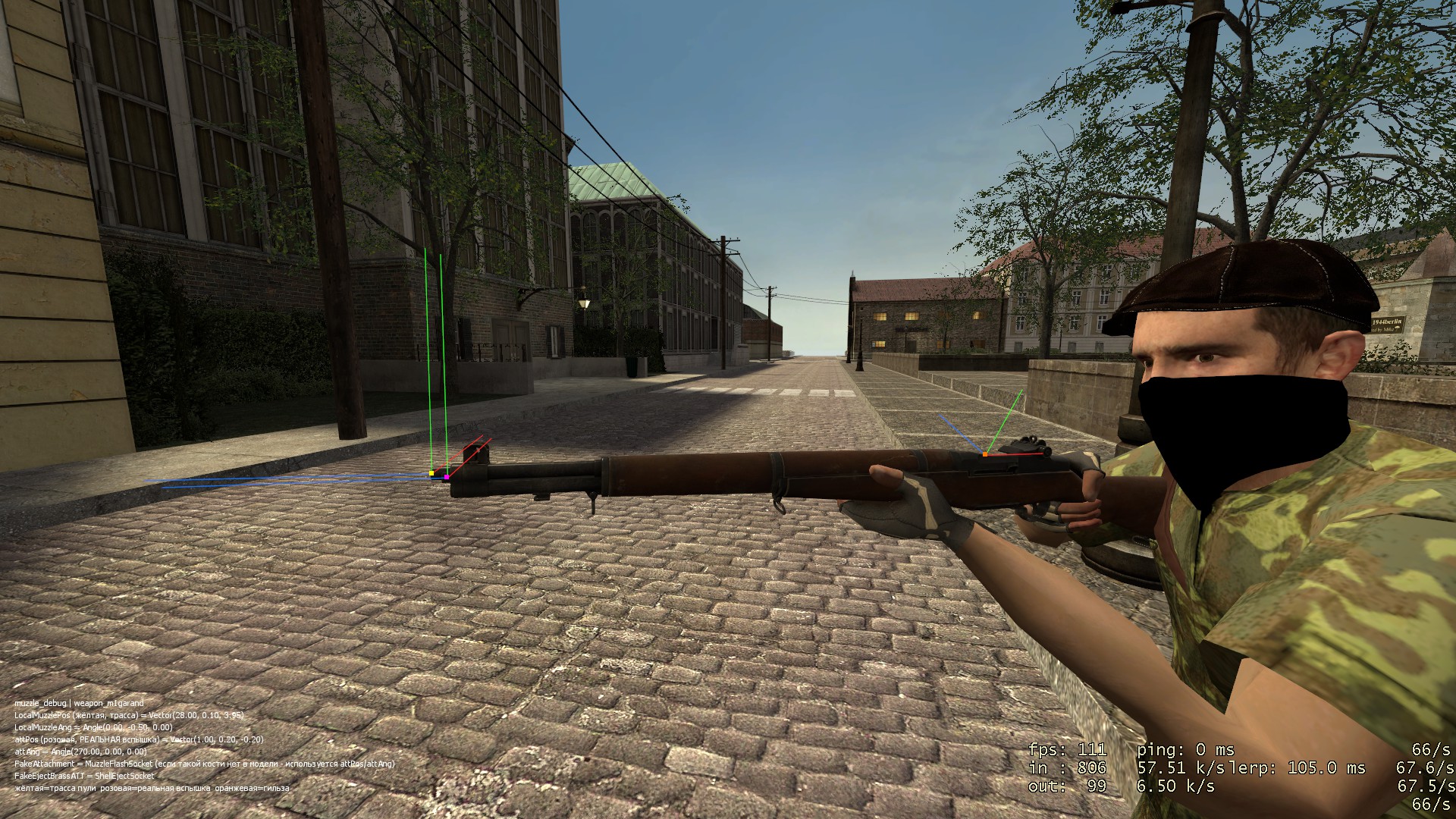
- A 3D gizmo shows the actual bullet origin, muzzle flash position, and shell ejection point right in the world—three separate calculations, three different colors.
- A standalone preview window lets you play any sequence from any model without creating a weapon.
- Includes an RPM ↔ Primary.Wait converter.
- And yes, there's time slowdown for frame-by-frame animation debugging.
Main Features:
- Attachment dump with automatic validation against FakeAttachment, FakeEjectBrassATT, and FakeMagDropBone. (Honestly, more than half the bugs while making the weapon pack came from typos in bone names.)
- $Sequence dump with automatic AnimList validation.
- 3D muzzle gizmo — yellow = actual bullet trace (GetTrace), pink = muzzle flash (GetMuzzleAtt), orange = shell ejection. These are separate calculations, even if you'd expect them to be the same.
- Live muzzle calibration directly in-game. Adjust LocalMuzzlePos/Ang and attPos/Ang with console commands, see the result instantly, then print ready-to-paste Lua code with a single command.
- Model preview stand — load any model independently of a weapon and play any animation by name or index.
- Fire rate converter — RPM ↔ Primary.Wait in both directions, with instant application to your current weapon for quick testing.
- Live reload debugger — displays both the engine-calculated reload duration (including the organism's StaminaReloadMul) and the actual reload progress in real time.
- host_timescale-based slow motion—engine-level slowdown without animation/server desync.
Commands:
- wepdev_dump_attachments — dump all attachment bones and validate FakeAttachment/FakeEjectBrassATT/FakeMagDropBone
- wepdev_dump_sequences — dump every model $sequence and validate AnimList
- wepdev_info 1 — live SWEP HUD (caliber, RPM, ReloadTime, etc.)
- wepdev_reload_debug 1 — real-time reload debugging HUD
- muzzle_debug 1 — 3D gizmo for bullet trace, muzzle flash, and shell ejection
- muzzle_nudge_pos/ang x y z, muzzle_nudge_attpos/attang x y z — live muzzle calibration
- muzzle_print — print ready-to-paste SWEP.LocalMuzzlePos/attPos values
- wepdev_preview_model <path> — load any model, wepdev_play_anim <name/index> — play a sequence, wepdev_preview_remove — remove preview
- wepdev_firerate <rpm>, wepdev_firerate_sec <rps>, wepdev_firerate_from_wait <wait> — fire rate converter
- wepdev_slowmo <multiplier> — host_timescale slow motion (use 1 to restore normal speed)
Highlights
From source dataFootprint
Rated a light load on a server.
Last update
Its author last shipped an update today.
Z-City Wepdev/Degub Tools on Nxeon
From our catalogue- One-click install
- Supported on Nxeon Garry's Mod servers. We download it from Steam Workshop, place it, and restart the server.
- Server load
- light
- Smallest plan we suggest
- Garry's Mod — 2 GB (2 GB RAM). This follows our own load rating above, not a benchmark.
- Latest build
- 2026-10-15, released 2026-10-15
Game versions by loader
| Loader | Game versions | Newest |
|---|---|---|
| Workshop |
From 1 recorded build of Z-City Wepdev/Degub Tools.
Run Z-City Wepdev/Degub Tools on a Garry's Mod server
Pick a server or deploy a new one above; it is installed in one click.
What kind of mod it is
From the catalogQuality of life & UI
Small conveniences, tweaks and interface improvements players notice straight away.
Compatibility
- Game
- Garry's Mod
Verified at the source
- ✓Steam WorkshopOfficial listing, checked 2026-10-16Open ↗
- ✓AuthorVanchous, as published on Steam Workshop
- ✓LicenseNot published by the sourceFree