






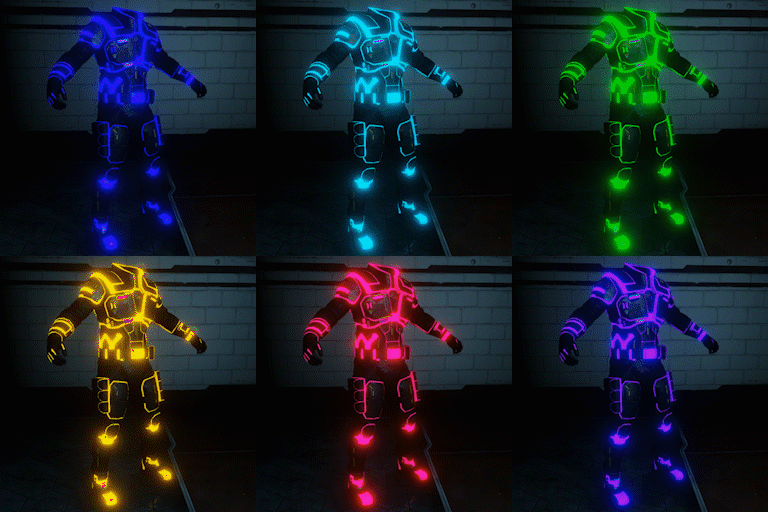
About Horzine RGB Glowing Security Suits
From Steam WorkshopTHE PREVIEW IMAGE SHOWN IN HERE IS IN 4x SPEED. THE REAL CYCLE SPEED IS SLOWER. Yes, this mod also contains modded First Person arms. NOT Online Compatible You are required to have the Horzine…
[h1]THE PREVIEW IMAGE SHOWN IN HERE IS IN 4x SPEED. THE REAL CYCLE SPEED IS SLOWER.[/h1] Yes, this mod also contains modded First Person arms.
NOT Online Compatible
You are required to have the Horzine Security Suits in color for this mod to work. Makes the colored trimmings on the Horzine Security Suit glow in an RGB cycle.
You may have to run the game at least once after subscribing for the file to show up in your documents folder...
Important Note
This mod uses the infamous LocalShaderCache-PC-D3D-SM5.upk file that may be present in other mods. In which case they will not be compatible and one of the mods will lose their textures. This is a problem with the Killing Floor 2 SDK and Workshop Uploading Tool not compiling the shaders into their respective files. I can't do anything about it. Go yell at Tripwire.
To install locate...
...\Documents\My Games\KillingFloor2\KFGame\Cache\1424874734\0\
[h1]Drag the Published folder to...[/h1] (In the event it's named Unpublished, rename to Published) ...\Documents\My Games\KillingFloor2\KFGame\
No Textures?
You have another mod that contains a LocalShaderCache-PC-D3D-SM5.upk. You must remove that mod, unsubscribe from it, and delete it's relative folder from your download cache which is located at ...\Documents\My Games\KillingFloor2\KFGame\Cache
Highlights
From source dataFootprint
A 61 MB download, rated a light load on a server.
Last update
Its author last shipped an update 8 yr ago.
Horzine RGB Glowing Security Suits on Nxeon
From our catalogue- One-click install
- Supported on Nxeon Killing Floor 2 servers. We download it from Steam Workshop, place it, and restart the server.
- Server load
- light
- Smallest plan we suggest
- Killing Floor 2 — 2 GB (2 GB RAM). This follows our own load rating above, not a benchmark.
- Latest build
- 2018-09-10, released 2018-09-10, 61 MB
Game versions by loader
| Loader | Game versions | Newest |
|---|---|---|
| Workshop |
From 1 recorded build of Horzine RGB Glowing Security Suits.
Run Horzine RGB Glowing Security Suits on a Killing Floor 2 server
Pick a server or deploy a new one above; it is installed in one click.
What kind of mod it is
From the catalogWeapons, items & crafting
New weapons, gear, items and the recipes to make them.
Compatibility
- Game
- Killing Floor 2
- File size
- 61 MB
Verified at the source
- ✓Steam WorkshopOfficial listing, checked 2026-10-10Open ↗
- ✓AuthorShikuTeshi, as published on Steam Workshop
- ✓LicenseNot published by the sourceFree















