






About KF2VR
From Steam Workshophttps://raw.githubusercontent.com/optimumbox/Killing-Floor-2-VR/vr-dlss-fixes/docs/workshop/setup-guide.png How to install for VR (one time, about 2 minutes) IMPORTANT: After subscribing, Steam may…
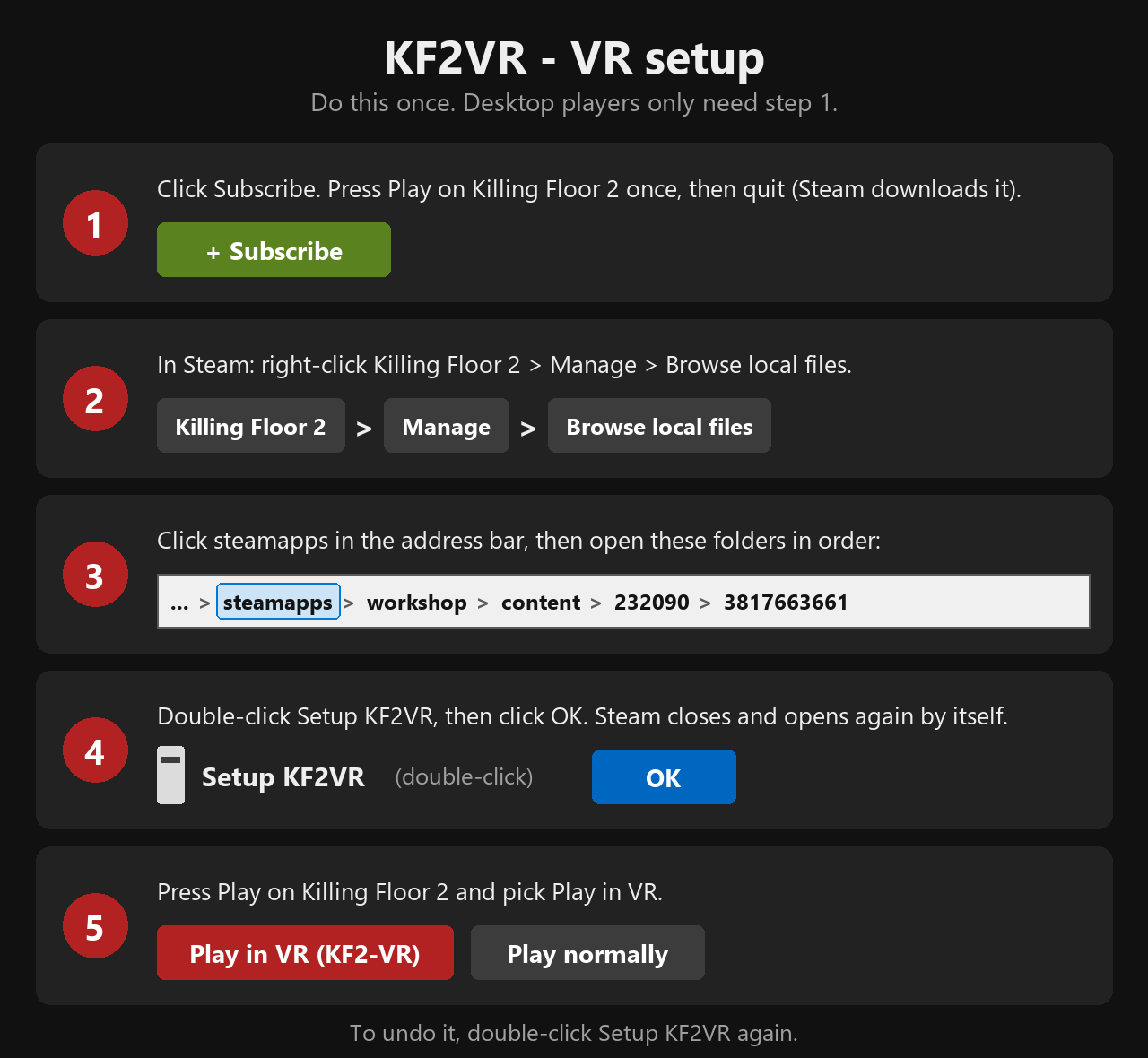 [h1]How to install for VR (one time, about 2 minutes)[/h1][quote]IMPORTANT: After subscribing, Steam may not download KF2VR until you start the game. Press Play on Killing Floor 2 once, wait for the main menu, then quit. If the 3817663661 folder below is missing or empty, do that again and wait a minute.[/quote][olist][*]Click Subscribe. Then press Play on Killing Floor 2 once, wait for the main menu, and quit the game.[*]In your Steam Library, right-click Killing Floor 2 > Manage > Browse local files. A folder called killingfloor2 opens.[*]In that window's address bar, click steamapps. Then open these folders, one after another: workshop > content > 232090 > 3817663661.[*]Double-click Setup KF2VR in that folder. Click OK: Steam closes and opens again by itself.[*]Press Play on Killing Floor 2 and choose Play in VR or Play normally.[/olist]To remove it, double-click Setup KF2VR again. Your normal Killing Floor 2 is never changed: Play normally starts the plain game.[h2]Prefer not to run the setup file? Do it by hand instead[/h2]It does exactly the same thing.[olist][*]Do steps 1 to 3 above.[*]Right-click the file Play.cmd (it may show just as Play) and choose Copy as path. On Windows 10, hold Shift while right-clicking to see that option.[*]In Steam, right-click Killing Floor 2 > Properties. On the General page, click in the Launch Options box and press Ctrl+V to paste.[*]After what you pasted, type one space, then type: %command%[*]Close the Properties window and press Play on Killing Floor 2.[/olist]Check the box: it starts with a quote mark and your drive letter, ends with Play.cmd and a quote mark, then a space and %command%. Copy as path adds the quote marks for you. To remove it later, empty the Launch Options box.[h1]No VR headset? Play on your normal screen with VR friends[/h1]You do NOT need a headset to join friends who play in VR. Pick ONE of these two ways:[h2]Way 1: Server browser (easiest)[/h2][olist][*]Subscribe to this item (you don't need the one-time install above for this way).[*]Press Play on Killing Floor 2. If a window asks how you want to play, click Play normally.[*]In the game's main menu, open the Server Browser.[*]Search for your friend's server by its name (ask your friend what they called it), click it, and join.[*]Type the server password your friend gives you.[/olist][h2]Way 2: Join code[/h2][olist][*]Do the one-time VR install at the top of this page (it is needed for the launcher).[*]Press Play on Killing Floor 2 and click Play in VR (KF2-VR). Don't worry: this opens the KF2-VR launcher, which also works without a headset.[*]In the launcher, choose Desktop - no headset.[*]Click Join a friend. Ask your friend for their join code (a long line starting with KF2VR1:), copy it, click Paste code, then click Join.[/olist]The game, your friend's server and your KF2-VR files must all be the same version. If joining fails, check that Steam has finished updating the Workshop items, then try again.[h1]About[/h1]The unofficial Killing Floor 2 VR mod by Kvasir94 and optimumbox for PC VR headsets (Windows, Steam copy of Killing Floor 2). Updates arrive through Steam automatically. VR sessions run with VAC off: never use the VR mod on VAC-secured servers. Fan-made, not affiliated with Tripwire Interactive. Source and releases: https://github.com/optimumbox/Killing-Floor-2-VR
Highlights
From source dataFootprint
Rated a light load on a server.
Last update
Its author last shipped an update 3d ago.
KF2VR on Nxeon
From our catalogue- One-click install
- Supported on Nxeon Killing Floor 2 servers. We download it from Steam Workshop, place it, and restart the server.
- Server load
- light
- Smallest plan we suggest
- Killing Floor 2 — 2 GB (2 GB RAM). This follows our own load rating above, not a benchmark.
- Latest build
- 2026-10-12, released 2026-10-12
Game versions by loader
| Loader | Game versions | Newest |
|---|---|---|
| Workshop |
From 1 recorded build of KF2VR.
Run KF2VR on a Killing Floor 2 server
Pick a server or deploy a new one above; it is installed in one click.
What kind of mod it is
From the catalogWorkshop
Its source category doesn’t say more about what it does, so NxLabs lists it under Other.
Compatibility
- Game
- Killing Floor 2
Verified at the source
- ✓Steam WorkshopOfficial listing, checked 2026-10-16Open ↗
- ✓AuthorOptimumbox, as published on Steam Workshop
- ✓LicenseNot published by the sourceFree















