
About Server Extension
From Steam Workshophttps://raw.githubusercontent.com/GenZmeY/KF2-Server-Extension/master/PublicationContent/mutbanner.png…







📋 Description:
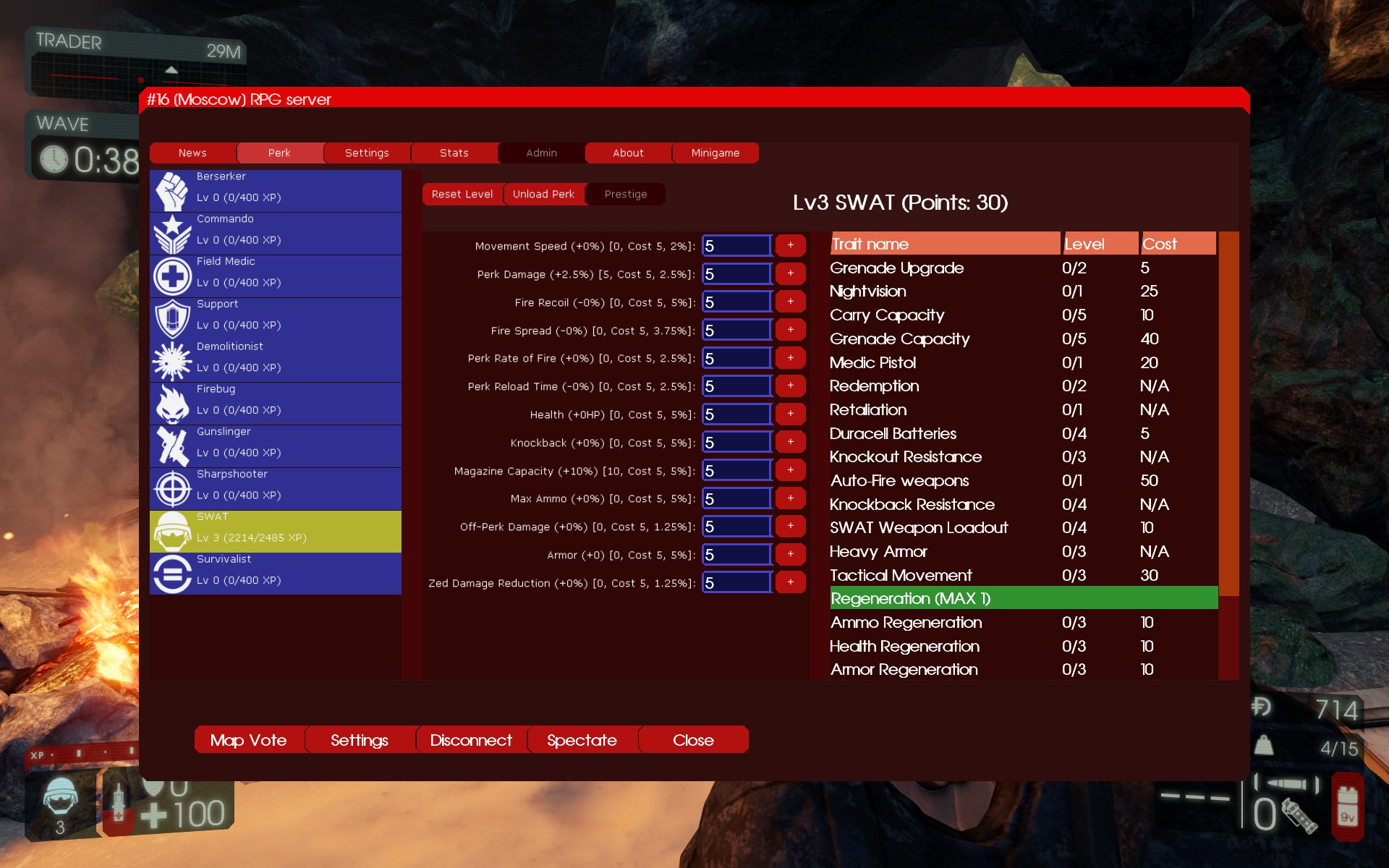
This mod replaces current perk system in Killing Floor 2 with a serverside perk progression with RPG elements, which let you buy individual stats and traits.
This is a further development of the ServerExt mutator from Marco and Forrest Mark X.
🎮 Usage (single player)
[olist] [*]Subscribe to this mutator. [*]Create a file (*): [code]C:\Users\<username>\Documents\My Games\KillingFloor2\KFGame\Config\KFServerExtMut.ini[/code] with content:
[ServerExtMut.ServerExtMut]
SettingsInit=0
[*]Create a file (*): [code]C:\Users\<username>\Documents\My Games\KillingFloor2\KFGame\Config\KFxMapVote.ini[/code] with content:
[ServerExtMut.xVotingHandler]
ConfigVersion=0
[*]Create a file (*): [code]C:\Users\<username>\Documents\My Games\KillingFloor2\KFGame\Config\KFServerExt.ini[/code] with content: KFServerExt.ini (default) [*]Launch KF2. [*]Open console (~) and start any map with the mutator (this will generate the contents of the configs):
open KF-BioticsLab?Mutator=ServerExtMut.ServerExtMut[/code]
[*]Close the game and configure the mutator (see [b]⚙️ Setup[/b] link below).
[*]Launch KF2 again, open the console, and start the game:
[code]KF-BioticsLab?Game=KFGameContent.KFGameInfo_Survival?Difficulty=3?GameLength=2?Mutator=ServerExtMut.ServerExtMut
(replace the map and set/add parameters you need). [/olist]
🖥️ Usage (server)
Note: If this is unclear, first read: Dedicated Server Guide (KF2 wiki) [olist] [*]Open PCServer-KFEngine.ini / LinuxServer-KFEngine.ini. [*]Find [IpDrv.TcpNetDriver] section and ensure line exists (add if missing):
DownloadManagers=OnlineSubsystemSteamworks.SteamWorkshopDownload[/code]
(If there are several [b]DownloadManagers[/b] then the line above should be the first)
[*]Add the following string to the [b][OnlineSubsystemSteamworks.KFWorkshopSteamworks][/b] section (create one if it doesn't exist):
[code]ServerSubscribedWorkshopItems=2085786712
[*]Start server and wait for mutator download. [*]When the download is complete, stop the server. [*]Create a file (*): [code]<kf2-server>\KFGame\Config\KFServerExtMut.ini[/code] with content:
[ServerExtMut.ServerExtMut]
SettingsInit=0
[*]Create a file (*): [code]<kf2-server>\KFGame\Config\KFxMapVote.ini[/code] with content:
[ServerExtMut.xVotingHandler]
ConfigVersion=0
[*]Create a file (*): [code]<kf2-server>\KFGame\Config\KFServerExt.ini[/code] with content: KFServerExt.ini (default) [*]Add mutator to server start parameters: [code]?Mutator=ServerExtMut.ServerExtMut[/code] and start the server (this will generate the contents of the configs). [*]Stop the server and configure the mutator (see ⚙️ Setup link below). [*]Start the server. [/olist]
🐞 (*) Buggy config initialization
This mutator (like many others) relies on UnrealScript's default values (0 for int type) to detect first-time use and generate a config. However, the game contains a bug that initializes unset values to random data, which can lead to incorrect settings or missing configs.
As a workaround, I recommend explicitly setting version variables in the configs during the first initialization.
Unfortunately, I can't fix this issue because it's a game engine problem (not the mutator's fault).
📚 More info
- [h1]⚙️ Setup[/h1]
- [h1]🌟 Examples[/h1]
- [h1]🌍 Localization[/h1]
🤐 If not working or you have no text
Older versions of ServerExt have the same file names - this can cause conflicts if you subscribe to them. Therefore: [olist] [*]Check your subscriptions. If you are subscribed to other versions of the mutator, cancel them. [*]Clear the cache, it's here: Client:
C:\Users\<username>\Documents\My Games\KillingFloor2\KFGame\Cache\[/code]
[b]Server:[/b]
[code]<KF2_DIR>/Binaries/Win64/steamapps/workshop/content/232090/
<KF2_DIR>/KFGame/Cache/
[*]Delete all ServerExt localization files. It's here (client only):
C:\Users\<username>\Documents\My Games\KillingFloor2\KFGame\Localization\[/code]
Check all folders and delete all ServerExt.* files you find.
[*]Try starting the game/server again.
[/olist]

[h1]🌍 Credits[/h1]
[b]Developers:[/b]
[list]Highlights
From source dataFootprint
A 9 MB download, rated a light load on a server.
Last update
Its author last shipped an update 2 yr ago.
Server Extension on Nxeon
From our catalogue- One-click install
- Supported on Nxeon Killing Floor 2 servers. We download it from Steam Workshop, place it, and restart the server.
- Server load
- light
- Smallest plan we suggest
- Killing Floor 2 — 2 GB (2 GB RAM). This follows our own load rating above, not a benchmark.
- Latest build
- 2024-09-14, released 2024-09-14, 9 MB
Game versions by loader
| Loader | Game versions | Newest |
|---|---|---|
| Workshop |
From 1 recorded build of Server Extension.
Run Server Extension on a Killing Floor 2 server
Pick a server or deploy a new one above; it is installed in one click.
What kind of mod it is
From the catalogBalance
Its source category doesn’t say more about what it does, so NxLabs lists it under Other.
Compatibility
- Game
- Killing Floor 2
- File size
- 9 MB
Verified at the source
- ✓Steam WorkshopOfficial listing, checked 2026-10-10Open ↗
- ✓AuthorGenZmeY, as published on Steam Workshop
- ✓LicenseNot published by the sourceFree