






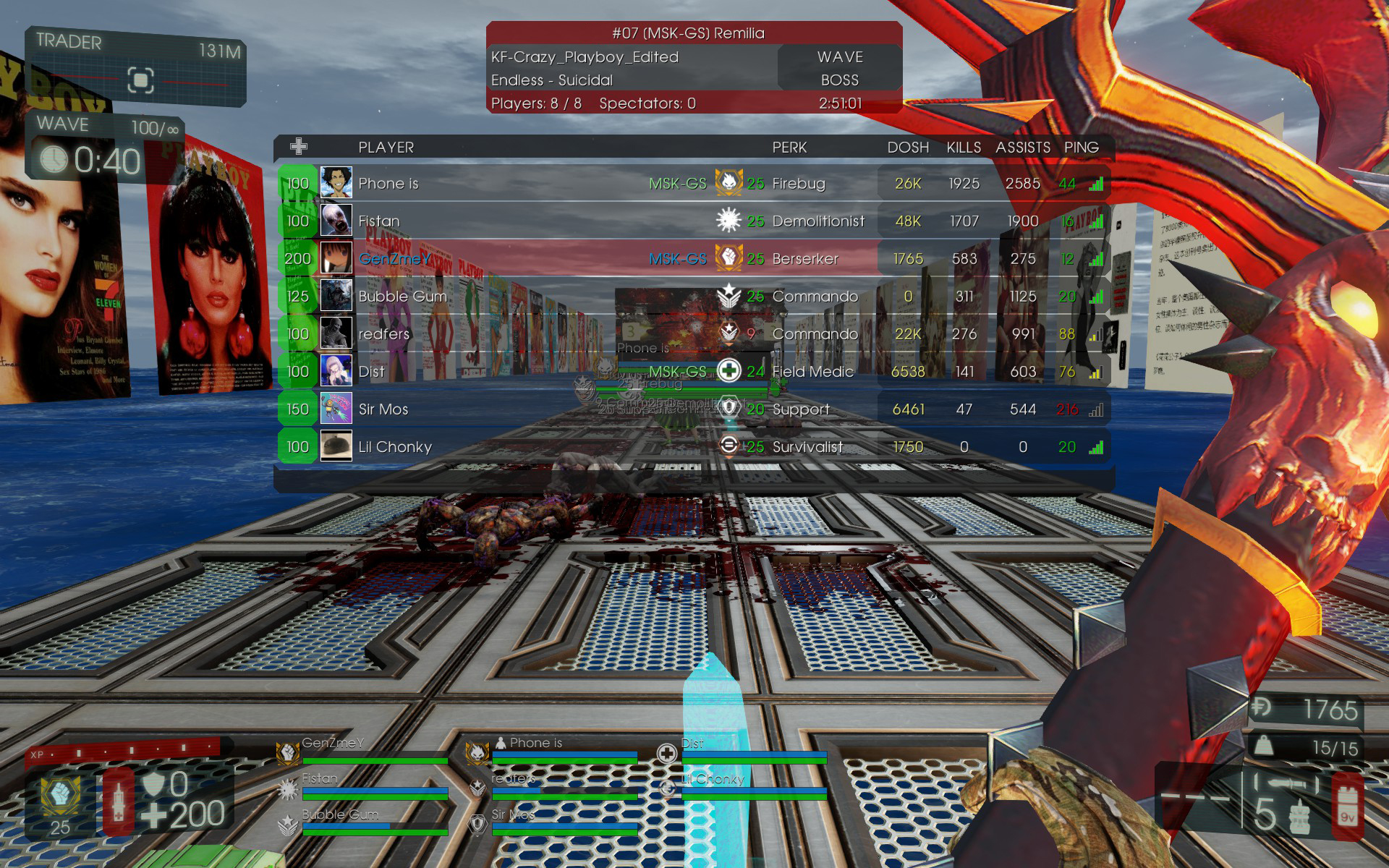

About Yet Another Scoreboard
From Steam Workshophttps://img.shields.io/static/v1?logo=GitHub&labelColor=gray&color=blue&logoColor=white&label=&message=Open Source https://img.shields.io/github/license/GenZmeY/KF2-YetAnotherScoreboard…






📋 Description
Yet another scoreboard... Based on ClassicHUD and heavily modified.
❌ Whitelisted?
No. This mod is not whitelisted and will de-rank your server. Any XP earned will not be saved.
But I hope that it will be whitelisted - I submitted whitelist request here: https://forums.tripwireinteractive.com/index.php?threads/whitelisting-mods-and-mutators.120340/page-3#post-2353668
🎮 Usage (single player)
[olist] [*]Subscribe to this mutator. [*]Create a file (*): [code]C:\Users\<username>\Documents\My Games\KillingFloor2\KFGame\Config\KFYAS.ini[/code] with content:
[YAS.YAS]
Version=0
[*]Launch KF2. [*]Open console (~) and start any map with the mutator (this will generate the default KFYAS.ini content):
open KF-BioticsLab?Mutator=YAS.Mut[/code]
[*]Close the game and configure the mutator (see [b]⚙️ Setup (KFYAS.ini)[/b] below).
[*]Launch KF2 again, open the console, and start the game:
[code]open KF-BioticsLab?Game=KFGameContent.KFGameInfo_Survival?Difficulty=3?GameLength=2?Mutator=YAS.Mut
(replace the map and set/add parameters you need). [/olist]
🖥️ Usage (server)
Note: If this is unclear, first read: Dedicated Server Guide (KF2 wiki) [olist] [*]Open PCServer-KFEngine.ini / LinuxServer-KFEngine.ini. [*]Find [IpDrv.TcpNetDriver] section and ensure line exists (add if missing):
DownloadManagers=OnlineSubsystemSteamworks.SteamWorkshopDownload[/code]
(If there are several [b]DownloadManagers[/b] then the line above should be the first)
[*]Add the following string to the [b][OnlineSubsystemSteamworks.KFWorkshopSteamworks][/b] section (create one if it doesn't exist):
[code]ServerSubscribedWorkshopItems=2521826524
[*]Start server and wait for mutator download. [*]When the download is complete, stop the server. [*]Create a file (*): [code]<kf2-server>\KFGame\Config\KFYAS.ini[/code] with content:
[YAS.YAS]
Version=0
[*]Add mutator to server start parameters: [code]?Mutator=YAS.Mut[/code] and start the server (this will generate the default KFYAS.ini content). [*]Stop the server and configure the mutator (see ⚙️ Setup (KFYAS.ini) below). [*]Start the server. [/olist]
🐞 (*) Buggy config initialization
This mutator (like many others) relies on UnrealScript's default values (0 for int type) to detect first-time use and generate a config. However, the game contains a bug that initializes unset values to random data, which can lead to incorrect settings or missing configs.
As a workaround, I recommend explicitly setting Version=0 in the config during the first initialization.
Unfortunately, I can't fix this issue because it's a game engine problem (not the mutator's fault).
⚙️ Setup (KFYAS.ini)
[YAS.MessageOfTheDay] Customize messages at the bottom of the panel.
- [YAS.Ranks]
- Display settings for different player ranks.
- Edit Player and Admin lines to set how this is displayed:
- [list][*]RankName - Rank name. Leave blank if you don't want this to be shown.[*]RankColor - Rank color.[*]PlayerColor - Player name color of the player with this rank.[/list]
- Use Rank array to set your own ranks:
- [list][*]RankName - Same as above.[*]RankColor - Same as above.[*]PlayerColor - Same as above.[*]RankID - Used to establish a relation between a player and his rank.[*]OverrideAdmin - If True then this rank will be displayed even if the player is an admin.[/list]
- [YAS.RankRelations]
- Use Relation array to establish a relation between a player and their rank:
- [list][*]RankID - RankID from the [YAS.Ranks] section.[*]ObjectID - ID for which this rank will be applied. This can be a player's SteamID64, UniqueID, or a steam group's SteamID64 (then the rank will be applied to all members of that group).[/list]
- Ranks priority
- [list][*]Personal ranks are higher in priority than group ranks, so if a player belongs to both the group rank and the personal rank, then the personal rank will be used.[*]The higher the position in [YAS.RankRelations] the higher the rank priority. That is, if a player belongs to two group relations at once, the one that is higher in the list will be used.[/list]
- Rank example
- When your config is generated for the first time there will be an example rank - 'Man of Culture'. It has green color and relation with ObjectID 103582791429670253 (which is the SteamID64 of this group). Thus, if you leave this setting, when someone from this group enters the game, he will have a green rank 'Man of Culture'.
- You can use this as a template for creating your own ranks, or remove it if you don't need it.
Highlights
From source dataFootprint
A 564 KB download, rated a light load on a server.
Last update
Its author last shipped an update 2 yr ago.
Yet Another Scoreboard on Nxeon
From our catalogue- One-click install
- Supported on Nxeon Killing Floor 2 servers. We download it from Steam Workshop, place it, and restart the server.
- Server load
- light
- Smallest plan we suggest
- Killing Floor 2 — 2 GB (2 GB RAM). This follows our own load rating above, not a benchmark.
- Latest build
- 2024-04-28, released 2024-04-28, 564 KB
Game versions by loader
| Loader | Game versions | Newest |
|---|---|---|
| Workshop |
From 1 recorded build of Yet Another Scoreboard.
Run Yet Another Scoreboard on a Killing Floor 2 server
Pick a server or deploy a new one above; it is installed in one click.
What kind of mod it is
From the catalogWorkshop
Its source category doesn’t say more about what it does, so NxLabs lists it under Other.
Compatibility
- Game
- Killing Floor 2
- File size
- 564 KB
Verified at the source
- ✓Steam WorkshopOfficial listing, checked 2026-10-10Open ↗
- ✓AuthorGenZmeY, as published on Steam Workshop
- ✓LicenseNot published by the sourceFree















