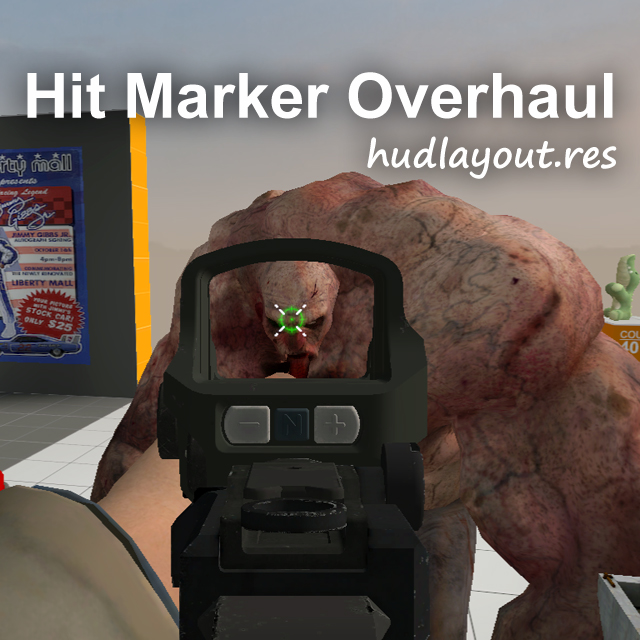
About Hit Marker Overhaul [VScript]
From Steam WorkshopFinally, no more env_screenoverlay entity!👏👏👏 Compared to the [url=https://steamcommunity.com/sharedfiles/filedetails/?id=3612420662]old version , the images are no longer affected by color…
Finally, no more env_screenoverlay entity!👏👏👏
Compared to the old version, the images are no longer affected by color correction, and their size has also been greatly reduced.
Settings and information in "left4dead2\ems\lxc\hitmarker\"
Notes:
[olist] [*]If the sound is abnormal after change, type snd_restart in the console to resolve the issue.
[*]Add the following command to "Left 4 Dead 2/left4dead2/cfg/autoexec.cfg", you can ignore this if you don't need it. If you don't know how to do, please read this guide: Setting up an AutoExec by мяFunreal
When you want to check the markers, then setting hit_marker_debug to <1|2|3|4> to view each hit image.
setinfo hit_marker_debug 0;[/code]

After setting [b]hit_marker_cfg[/b], you can use custom settings when playing on supported servers. The host always load the settings from settings.txt file, you can add the [b]-prefer[/b] option to ignore this rule.
In singleplayer game, using chat command "[i]!hit get[/i]" to retrieve the current settings. The server will automatically read this variable, you can also manually update the settings using the chat command "[i]!hit set[/i]".
This is an example of the default settings:
[code]setinfo hit_marker_cfg 0;
hit_marker_cfg !sets[1,0,0,0,0,0,0,0,0,0,1,1]!dur[1,1,1,1]!cd[0,0,0.3,0.5]!ci[3,3,3,3]!si[3,3,3,3]!surv[0,0,0,0]!snd["hitmarker/hit.mp3","hitmarker/hit_head.mp3","hitmarker/kill.mp3","hitmarker/headshot.mp3"];
[*]Now using hudlayout.res Conflict Resolver Base instead of itempickup.res. I don't delete itempickup.res at this stage, otherwise it would break a lot of things. [spoiler]Since this version use the itempickup.res to load images, it may conflict with other UI mods. Interneted has already explained this in Custom Crosshair Support, so I won't go into details again. >> Check existing patches <<[/spoiler] Please refer to the new solution for hudlayout.res conflicts.
[*]If you has missing texture, download fix texture missing and extract the "hitmarker" folder to the "Left 4 Dead 2\left4dead2\materials\" directory. Also, you can move the content pack to "addons" directory to fix it.
[*]Based on personal testing, it works in singleplayer and dedicated server, and multiplayer games(thanks tomaz for the testing). Only this mod needs to be installed on the dedicated server, for a local host server, all required items must be installed.
[*]Data is passed through name2, which is one of the only two console variables that can be modified from the server. This variable is only used in split-screen mode, so it should be fine, right?[spoiler]at least let me use setinfo![/spoiler] [/olist]
If you're curious about how the images work, take a look here.
Highlights
From source dataFootprint
Rated a light load on a server.
Last update
Its author last shipped an update 5d ago.
Hit Marker Overhaul [VScript] on Nxeon
From our catalogue- One-click install
- Supported on Nxeon Left 4 Dead 2 servers. We download it from Steam Workshop, place it, and restart the server.
- Server load
- light
- Latest build
- 2026-10-30, released 2026-10-30
Game versions by loader
| Loader | Game versions | Newest |
|---|---|---|
| Workshop |
From 2 recorded builds of Hit Marker Overhaul [VScript].
Recent builds
| Build | Released | Game versions | Loaders |
|---|---|---|---|
| 2026-10-30 | 2026-10-30 | n/a | Workshop |
| 2026-05-24 | 2026-05-24 | n/a | Workshop |
Dependencies
- Required: Hit Marker Overhaul Image Support
- Required: Hit Marker Overhaul Content Pack
- Required: Hit Marker Overhaul Content Pack Dynamic
- Required: hudlayout.res Conflict Resolver Base
Declared by the newest build that lists any. Required ones are installed with it on one-click installs.
What kind of mod it is
From the catalogGameplay & overhauls
New mechanics, content and overhauls that change how the game plays.
Compatibility
- Game
- Left 4 Dead 2
Verified at the source
- ✓Steam WorkshopOfficial listing, checked 2026-11-02Open ↗
- ✓Author4512369781, as published on Steam Workshop
- ✓LicenseNot published by the sourceFree