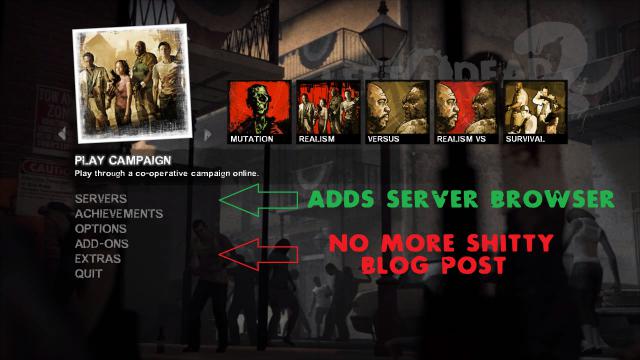
About Menu UI Fixes and Improvements
From Steam WorkshopA vanilla-style menu improvement mod. This addon is essentially a "best-of" the most useful menu fixes and features that I've either made myself or adopted from other mods that retain the original…
A vanilla-style menu improvement mod. This addon is essentially a "best-of" the most useful menu fixes and features that I've either made myself or adopted from other mods that retain the original look of the game's UI. It dates back to before the TLS update so some of the changes became obsolete or redundant. When I've borrowed things from other modders, I have provided credits below. Almost all borrowed work has been edited by me, at least in some capacity. There are too many changes to make a completely comprehensive list but I will mention the following additions:
Main features:
- All Games Search (button just to the left of Play Campaign).
- Server Browser.
- Reformatted add-on browser, campaign browser, mutations browser, friends/Steam server browser, and achievement list to better utilize screen space.
- Realism and Survival single-player option
- Splitscreen support
- Video Options menu now defaults to the expanded "Advanced Settings"
- Removed Blog Post
- Hefty in-game menu supplement and Extras menu on the main menu; "Set Lerp to 0" executes the following commands:[/list]
- [code]cl_cmdrate 100;rate 100000;cl_cmdrate 101;cl_updaterate 101;cl_interp 0;cl_interp_ratio -1[/code]
- Credits:
- Server Browser mod by RebrΔlex
- Bigger Addon Browser by Olik and Olde
- Splitscreen Support v1 by Urik
- Splitscreen Support v2 by Gianx64
- Rebuildaudiocache and Reloadfont functionality in Extras by Urik
- In-Game Menu Supplement by Urik
- Download Campaign HUD Fix by George
- Scripted Mode HUD Fix by George
- Removed Blog Post by Olde
- Added Developer Console to Extras by Olde
- Alternate Campaign List by Olde
- Alternate Mutation Menu by Urik and Olde
- Reformatted Achievement List by Olde
- Reformatted Friends and Steam Server List by Olde
- Auto-Expanded Video Options Menu by Urik
- Search All Games Button by Urik (I transformed it from a menu sub-option to a button)
- Set Lerp to 0 Extras entry by Unknown
- Classic Exit Screen by Unknown and Olde
- FOV Sliders by Vɪʀᴜѕ™ and Olde
- For alternate versions, see this collection.
- SPLITSCREEN HELP (locally hosting):
- 1) Connect two controllers to the computer. Set up keybindings manually or find a preset in a guide.
- 2) Make sure the developer console is enabled.
- 3) Enter "sv_lan 1" into the dev console before playing (or put this line into your autoexec.cfg file). Because of a bug with the TLS update, splitscreen will give an error message that reads "STEAM validation rejected" if you don't have sv_lan 1.
Highlights
From source dataFootprint
Rated a light load on a server.
Last update
Its author last shipped an update 3 mo ago.
Menu UI Fixes and Improvements on Nxeon
From our catalogue- One-click install
- Supported on Nxeon Left 4 Dead 2 servers. We download it from Steam Workshop, place it, and restart the server.
- Server load
- light
- Latest build
- 2026-08-05, released 2026-08-05
Game versions by loader
| Loader | Game versions | Newest |
|---|---|---|
| Workshop |
From 1 recorded build of Menu UI Fixes and Improvements.
What kind of mod it is
From the catalogQuality of life & UI
Small conveniences, tweaks and interface improvements players notice straight away.
Compatibility
- Game
- Left 4 Dead 2
Verified at the source
- ✓Steam WorkshopOfficial listing, checked 2026-11-01Open ↗
- ✓AuthorOlde, as published on Steam Workshop
- ✓LicenseNot published by the sourceFree