
About Select Your Skins (SYS)
From Steam Workshophttps://i.imgur.com/FkJjEPy.png Select Your Skins (SYS) is a randomization and skin selection engine for L4D2. This powerful script works online for all compatible mods, that you can find in a…
 Select Your Skins (SYS) is a randomization and skin selection engine for L4D2. This powerful script works online for all compatible mods, that you can find in a collection here.
❕ Even if it is not obligatory, it is highly recommended to subscribe to the HUD Mod to actually see what you are doing with the SYS Options, at least in the beginning. A version compatible with the Global Radar can also be found here.[/quote] [quote]❗️ This mod is not compatible (for the key binds) with Vocalizer mods, although, it is compatible with ion's vocalizer.
This mod adds the following features for users and modders: - Better and more powerful randomization (RNG) for the modders to use - Reroll RNG Key: when you press it, you can randomize again everything compatible - Select your skins: select and lock your skins, forever (30 slots for 30 different skins to lock) - RNG/SYS Switcher: switch between all random and your select skins by pressing one key
If you are a user, you can read the user manual, as well as other installation methods here:
 However, if you do not want to spend time reading the manual, here's a tl;dr.
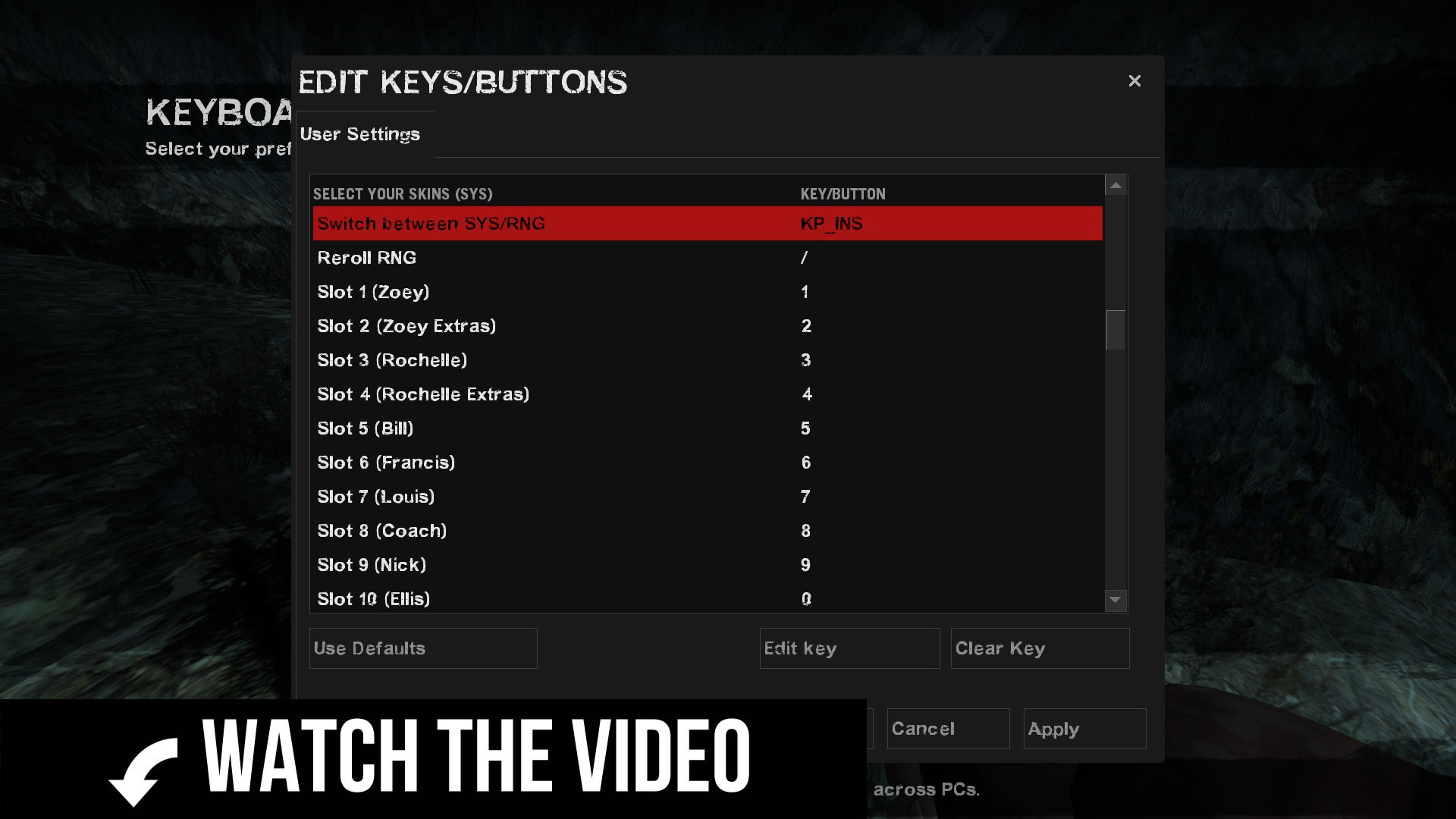
◼️ INSTALLATION ➊ Subscribe to this mod (and if possible the HUD Mod) ➋ Subscribe to at least one compatible mod ➌ Start L4D2 and let the Workshop mods load ➍ Go to Options➝Keyboard/Mouse➝Edit Keys/Buttons ➎ You will see new controls (Select Your Skins SYS) down the list ➏ Assign Switch Between SYS/RNG and Reroll RNG to your desired keys ◻️ HOW TO USE ➀ Press on the Reroll RNG key to randomize everything again (RNG Mode) ➁ In Edit Keys/Buttons, assign a Slot key (1 to 30) to the slot of a mod you use ➂ Switch to SYS Mode with the Switch Between SYS/RNG key ➃ Press on the Slot key you just assigned to select the skin you want ➄ To lock the skin, assign the Slot Max Priority key in Edit Keys/Buttons ➅ Press the Slot Max Priority key to lock/unlock the skin even in RNG Mode
If you are a Modder, you might be interested in adding the Randomization (RNG) and Select Your Skins (SYS) features in your mod. You might be one copy and paste away from it, so feel free to read this Guide about SYS implementation.

[table] [tr][th] [/th][/tr] [tr][th]Coding : Ellie[/th][/tr] [tr][th]Beta Testing : Camshi & 0000 SICK[/th][/tr] [/table]
Highlights
From source dataFootprint
Rated a light load on a server.
Last update
Its author last shipped an update 6 yr ago.
Select Your Skins (SYS) on Nxeon
From our catalogue- One-click install
- Supported on Nxeon Left 4 Dead 2 servers. We download it from Steam Workshop, place it, and restart the server.
- Server load
- light
- Latest build
- 2020-12-19, released 2020-12-19
Game versions by loader
| Loader | Game versions | Newest |
|---|---|---|
| Workshop |
From 1 recorded build of Select Your Skins (SYS).
Dependencies
- Required: Select Your Skins HUD
Declared by the newest build that lists any. Required ones are installed with it on one-click installs.
What kind of mod it is
From the catalogQuality of life & UI
Small conveniences, tweaks and interface improvements players notice straight away.
Compatibility
- Game
- Left 4 Dead 2
Verified at the source
- ✓Steam WorkshopOfficial listing, checked 2026-11-01Open ↗
- ✓AuthorEileen, as published on Steam Workshop
- ✓LicenseNot published by the sourceFree