About SFKTeam's custom menu (splitscreen!)
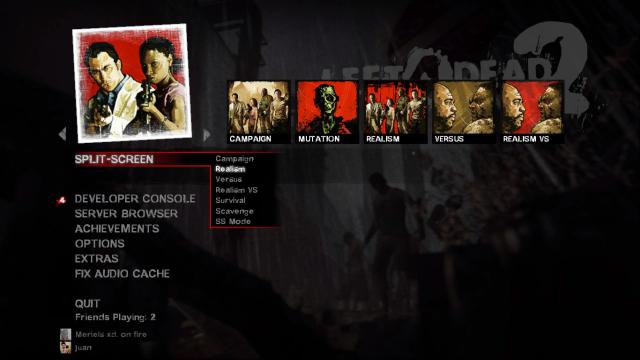
From Steam WorkshopThis is a custom menu made by SFKTeam, originally published on gamebanana and last updated on 23/08/2012. I'm sharing this because it's very useful for when you want to play splitscreen and don't…
This is a custom menu made by SFKTeam, originally published on gamebanana and last updated on 23/08/2012.
I'm sharing this because it's very useful for when you want to play [h1]splitscreen[/h1] and don't want to go through all the hassle involved. Plus, having to set up the controls is hard enough.
If there's a problem with this submission, let me know. I do not take credit for this at all, I'm just putting it out here.
If you had an issue and were able to solve it without any of the solutions in this post, please let us know how in the comments, add me, or post it in the discussions.
▌▌▌▌▌▌▌▌▌▌▌▌▌▌▌▌▌▌▌▌▌▌▌▌▌▌▌▌▌▌▌▌▌▌▌▌▌▌▌▌▌▌▌▌▌▌▌▌▌▌▌▌▌▌▌▌▌▌▌▌▌▌▌
[h1]TROUBLESHOOTING: Read everything before trying anything! ONE FIX AT A TIME.[/h1]
- Enable the developer console.
- If you don't have an English keyboard layout, find out how to create a bind to bring up the console. Otherwise, just "enable the developer console" in the options, then hit the tilde key.
- SS mode is used to establish the screen separation. Vertical is recommended.
- Regarding controller and keyboard issues:
- [olist]
- Enable Gamepads (Thanks to stampac2)
- Go to Options -> Keyboard/mouse -> Gamepad -> Enable/Disable
- This option will rewrite some binds, so be careful with it. I am including it at the beginning and the end. If you've tried everything, change it, and try again.
- Reconnect controller in loading screen in order to transfer it to the second player slot when using two xbox 360 controllers. Alternatively, use this program .
- To enable the controller to look up/down, either
- A.
- Enable and open the console, write
- [code]cmd2 +jlook[/code]
- Hit Enter
- B.
- You need to go in to the 360controller.cfg, which is located in "Steam\steamapps\common\left 4 dead 2\left4dead2\cfg".
- Then ctrl+f to the heading that says:
- controller2 bindings
- And add the following line beneath it:
- [code]cmd2 +jlook[/code]
- Check this link that will teach you how to use BOTH Keyboard/Mouse and Xbox 360 Controllers in SPLITSCREEN mode. (thanks to taithope for providing link)
- Dual xbox 360 controller setup guide.
- Disable Gamepads
- Go to Options -> Keyboard/mouse -> Gamepad -> Enable/Disable
- This option will rewrite some binds, so be careful with it. I am including it at the beginning and the end. If you've tried everything, change it, and try again.
- [/olist]
- To play addon maps:
- - Load your desired map via console [code]ss_map <map name>[/code]
- - For survival, just type [code]ss_map <map name> survival[/code]
- "campaign" is also an option. Whether there are other game modes which can be accessed this way is beyond me, would appreciate the info.
- - Once loaded, type [code]connect_splitscreen localhost 2[/code]
- "It may start with only player 1 alive. Just die, and when you restart it'll be all good." (thanks to McAssman, Starwars2711 and liamlantz)
- - To get the name of custom maps for the ss_map command, load the custom map in single player mode, open the console, then look for where it says :
- [code]Left 4 Dead 2
- Map: <mapname here>
- Players: 1 (0 bots) / 4 humans
- Build:
- Server Number: [/code]
- - Video showing how to get map names the hard way.
- To change the second player's name, go to your "Steam\SteamApps\common\Left 4 Dead 2\left4dead2\cfg\config.cfg" and edit name2 entry (thanks to Vicousvern). Alternatively, write [code]name2 <desired name>[/code] in console.
- Write [code]sb_takecontrol <name>[/code] to change player one's character. To change player two's, write [code]cmd2 sb_takecontrol <name>[/code]
- *untested*
- Tool for playing splitscreen on separate displays
available here (IMPORTANT: Make sure you back-up everything before attempting this one)Link down. If anyone has an archived copy, please send it this way. - When editing .txt files, it is sometimes useful to set them to "read only" after you've made your changes, since the game can alter them to its liking. This is necessary to change player two's name permanently. Be careful with this option and don't forget when you're using it, as it may cause unexpected results and it may prevent you from changing options from the menu. Learn how to use an autoexec.txt if you want more flexibility.
- A video detailing steps to follow + useful links.
- A video in portuguese detailing all steps and showing JoyID usage.
desc. updated jan 26 2020. Thanks to everyone in the comments and discussion for providing the info for this section. ▌▌▌▌▌▌▌▌▌▌▌▌▌▌▌▌▌▌▌▌▌▌▌▌▌▌▌▌▌▌▌▌▌▌▌▌▌▌▌▌▌▌▌▌▌▌▌▌▌▌▌▌▌▌▌▌▌▌▌▌▌▌▌
Original author's post:
Please Try NOT to use any other mainmenu or ingame menu addon with this addon. It may cause problems
Here is the new Mainmenu we created for Left 4 Dead 2. We wanted to simplify split-screen so more people could play and also add a Developer Console button to the Mainmenu.
Changelog: 23/08/2012 Added Easy Mode. 24/07/2012 Updated with Valves new menu. 11/06/2012 Added All Gamemodes Cleaned Obselete Code Corrected Any Errors 31/05/12 Moved All Gamemodes into 1 Flyout - Thanks to Rayman
Highlights
From source dataFootprint
Rated a light load on a server.
Last update
Its author last shipped an update 12 yr ago.
SFKTeam's custom menu (splitscreen!) on Nxeon
From our catalogue- One-click install
- Supported on Nxeon Left 4 Dead 2 servers. We download it from Steam Workshop, place it, and restart the server.
- Server load
- light
- Latest build
- 2014-06-30, released 2014-06-30
Game versions by loader
| Loader | Game versions | Newest |
|---|---|---|
| Workshop |
From 1 recorded build of SFKTeam's custom menu (splitscreen!).
What kind of mod it is
From the catalogQuality of life & UI
Small conveniences, tweaks and interface improvements players notice straight away.
Compatibility
- Game
- Left 4 Dead 2
Verified at the source
- ✓Steam WorkshopOfficial listing, checked 2026-11-01Open ↗
- ✓Author^6amorbts, as published on Steam Workshop
- ✓LicenseNot published by the sourceFree