About VOX - Complete Vocalizer
From Steam Workshop⸻ Installation To install, bind the radial menus in Options ➤ Keyboard/Mouse ➤ Edit Keys/Buttons . If the VOX vocalizer section is missing from your options, disable conflicting addons first. You can…
⸻ Installation
- To install, bind the radial menus in Options ➤ Keyboard/Mouse ➤ Edit Keys/Buttons.
- If the VOX vocalizer section is missing from your options, disable conflicting addons first. You can re-enable conflicting addons after binding the radial menus.
⸻ Features
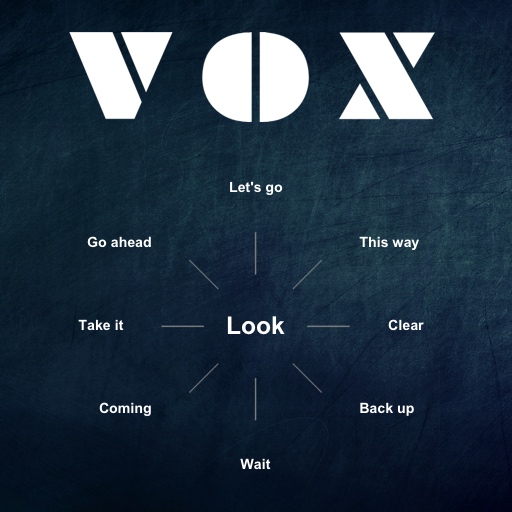
- [h3]Up to 16 menus for each character[/h3]
- Select your character in the "Characters" menu to load relevant voicelines.
- [h3]Over 6000 recordings[/h3]
- Voicelines should work in all situations without being impeded by location or event.
- [h3]Randomized menus[/h3]
- Similar voicelines are grouped together and randomized. For example when selecting "Hunter", your character will alternate between calling out "Hunter!" or whispering "There's a hunter around".
- [h3]Ergonomic menus[/h3]
- Character specific menus can be flipped to show more voicelines, saving keyboard space.
- [h3]Character-switcher[/h3]
- While AFK, select a character in the "Characters" menu to take control. You can only switch to a character that is not controlled by another player.
- [h3]UI improvements[/h3]
- Character selection highlighting, feedback sounds, etc.
⸻ FAQ
- Do other people hear this?
- Yes, everyone on the server will hear your character, even if they haven't subscribed.
- Does this vocalizer work on all servers?
- Yes, it works on all servers that allow addons. Addons are disabled in versus unless the server explicitly allows them.
- Why are some voicelines silent?
- Because you haven't selected your character in the "Characters" menu.
- Why are there more menus for some characters?
- The L4D2 characters have more voicelines in game, so they have more menus.
- Where are the voicelines from the original built-in vocalizer?
- Some voicelines are merged with others when they are similar, including:
- - "Go ahead" and "I'm with you"
- - "Taunt" and "Hurrah"
- - "Swear" and "Argh"
- - "Hurry" and "Run"
- I want to save my keybindings in an autoexec.cfg file
- Paste the following:
- [quote]
- bind z +g1
- bind x +g2
- bind c +g3
- bind v +g4
- bind b +g5
- bind n +g6
- bind 1 +s1
- bind 2 +s2
- bind 3 +s3
- bind 4 +s4
- bind 5 +s5
- bind g +x1
- alias -g1 -mouse_menu
- alias -g2 -mouse_menu
- alias -g3 -mouse_menu
- alias -g4 -mouse_menu
- alias -g5 -mouse_menu
- alias -g6 -mouse_menu
- alias -s1 -mouse_menu
- alias -s2 -mouse_menu
- alias -s3 -mouse_menu
- alias -s4 -mouse_menu
- alias -s5 -mouse_menu
- alias -x1 -mouse_menu
- alias +g1 +mouse_menu x0
- alias +g2 +mouse_menu x0
- alias +g3 +mouse_menu x0
- alias +g4 +mouse_menu x0
- alias +g5 +mouse_menu x0
- alias +g6 +mouse_menu x0
- alias +s1 +mouse_menu x0
- alias +s2 +mouse_menu x0
- alias +s3 +mouse_menu x0
- alias +s4 +mouse_menu x0
- alias +s5 +mouse_menu x0
- alias +x1 +mouse_menu x1
- [/quote]
- Into:
- Program Files (x86)\Steam\steamapps\common\Left 4 Dead 2\left4dead2\cfg\autoexec.cfg
- It doesn't work for me
- This has been tested extensively on both Windows and macOS, so the issue is most likely with your setup. Have you selected your character in the "Characters" menu?
- For a clean installation:
- 1. Unsubscribe.
- 2. Quit L4D2 and Steam.
- 3. Remove the VOX vpk (410726312.vpk) from your workshop folder:
- Program Files (x86)\Steam\steamapps\common\Left 4 Dead 2\left4dead2\addons\workshop\
- 4. Make sure you don't have any other leftover vocalizer in your addons folder:
- Program Files (x86)\Steam\steamapps\common\Left 4 Dead 2\left4dead2\addons\
- 5. Follow the installation instructions again. You can also configure your keybindings in your autoexec.cfg file as mentioned above.
- Can I use this with your third person addon?
- Yes, follow the installation instructions. The addons will be detected as conflicting as they both add entries to your game's Keys/Buttons options, but they work perfectly together once your key bindings are saved for each one of them.
Highlights
From source dataFootprint
Rated a light load on a server.
Last update
Its author last shipped an update 6 yr ago.
VOX - Complete Vocalizer on Nxeon
From our catalogue- One-click install
- Supported on Nxeon Left 4 Dead 2 servers. We download it from Steam Workshop, place it, and restart the server.
- Server load
- light
- Latest build
- 2020-12-06, released 2020-12-06
Game versions by loader
| Loader | Game versions | Newest |
|---|---|---|
| Workshop |
From 1 recorded build of VOX - Complete Vocalizer.
What kind of mod it is
From the catalogListed on Steam Workshop as “QoL”
Quality of life & UI
Small conveniences, tweaks and interface improvements players notice straight away.
Compatibility
- Game
- Left 4 Dead 2
Verified at the source
- ✓Steam WorkshopOfficial listing, checked 2026-11-01Open ↗
- ✓Authorc2, as published on Steam Workshop
- ✓LicenseNot published by the sourceFree