








About Advanced Inventory
From ModrinthUpgradable Inventory, Bigger Stacks, All Things Stackable, and More!
Ever gotten annoyed with how pathetically small the Minecraft inventory is, and how stupid stacks of just 64 is, and gotten tired of your inventory filling up SO fast you can't even play the game in larger modpacks?
Then this is the mod for you!
For Minecraft Forge 1.20.1
The mod code was done for me by Zanckor through Arcane Studios as a commission, so while I am not a coder, this was fully funded by me and the concept created by me.
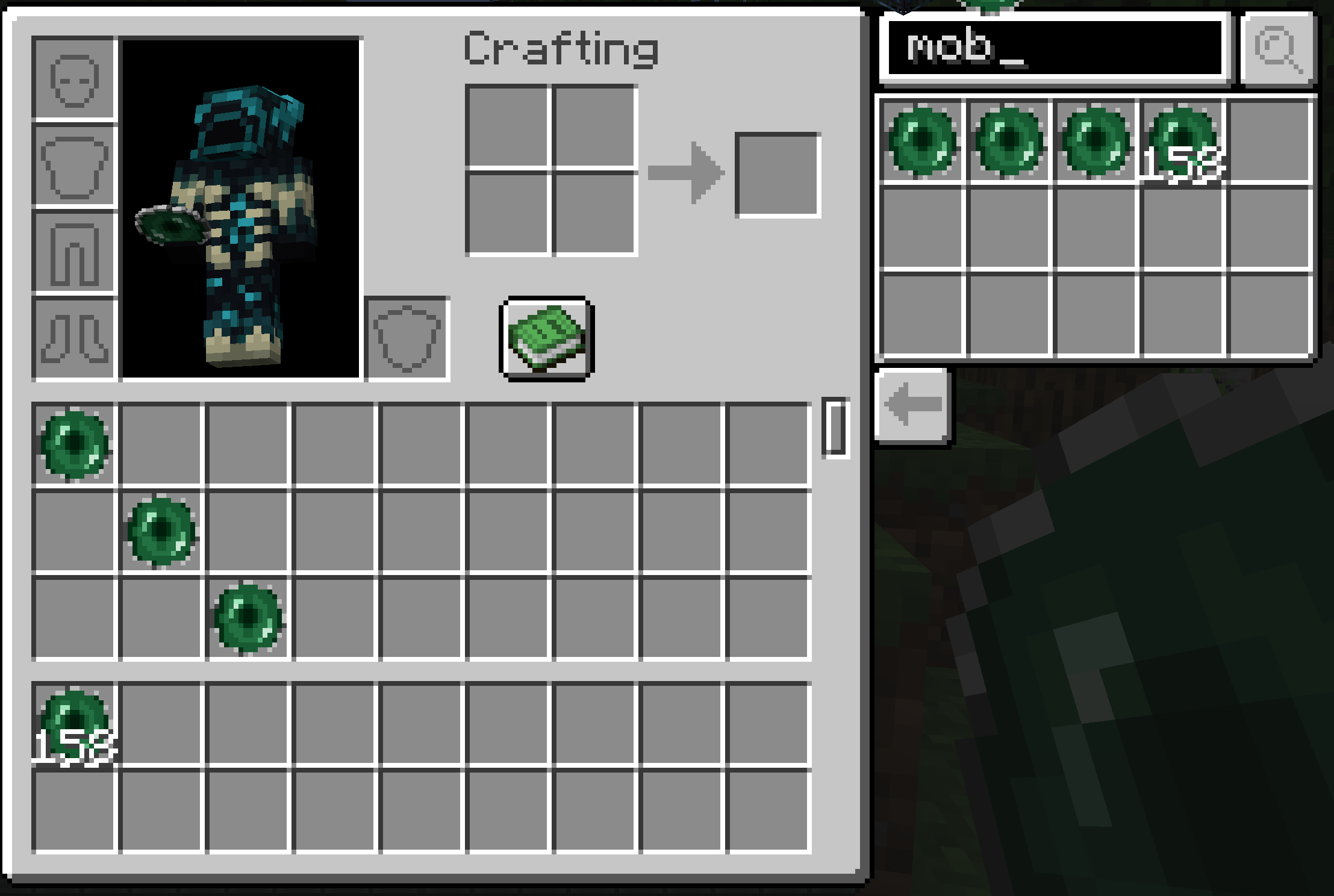
The above screenshot shows a few things.
1 - Stacks are larger than 64! By default, the mod is set to a stack size of 50,000 items. Note that the stacks of 64 do not automatically turn into a single stack, and you have to combine them by moving them or using an inventory sorter. This is a known bug, and may be fixed if we can figure out a waye. Also note stacks bigger than 64 are bugged in Creative mode, and may disappear or not work so in creative just pick a single block instead of the whole stack. This, however, isn't a problem since, in creative, you only need one of a block to place it anyway.
To increase or decrease this possible this stack size, close your world, open your save file, go to ServerConfig and find the field that says limitStackSize and set it to whatever you want, and save. You can then re open your world, and that'll be whatever you want it to be.
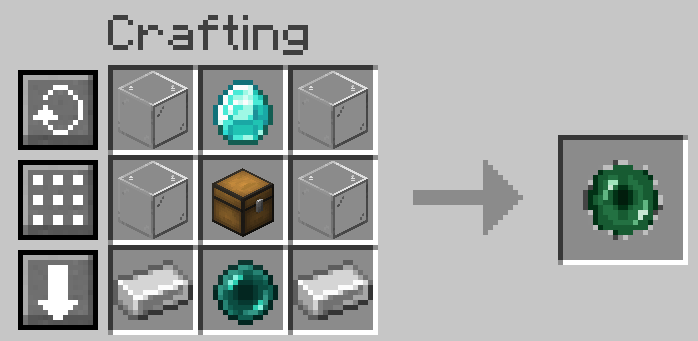
2 - A new item! The Capture Mob. It's designed to look like an ender pearl surrounded by iron. Left click the mob to capture it, right click to spawn it back in. This works on any entity so you can even use this device on a boat or a mine cart if you want! Note that the crafting recipe is not coded in yet, and I may add a texture change when it has a mob in it to make it more clear that there is.
3 - Search Field With a big inventory, finding items may be hard! So, you can type in the thing you want, and as you scroll it will appear in that side thing for you to grab and put in your hot bar!
4 - Secondary Hot Bar While this does not show when you are in an item with an inventory like a chest, this is where you can put items you do not want to lose track of! They will not be effected by scrolling, and are right there for ease of grabbing. This can also be used as some extra inventory slots, but is insanely useful for sorting your big inventory or when you are building or if there are tools you use frequently but not enough that you don't mind them not clogging your inventory. No items go into this second hot bar automatically.
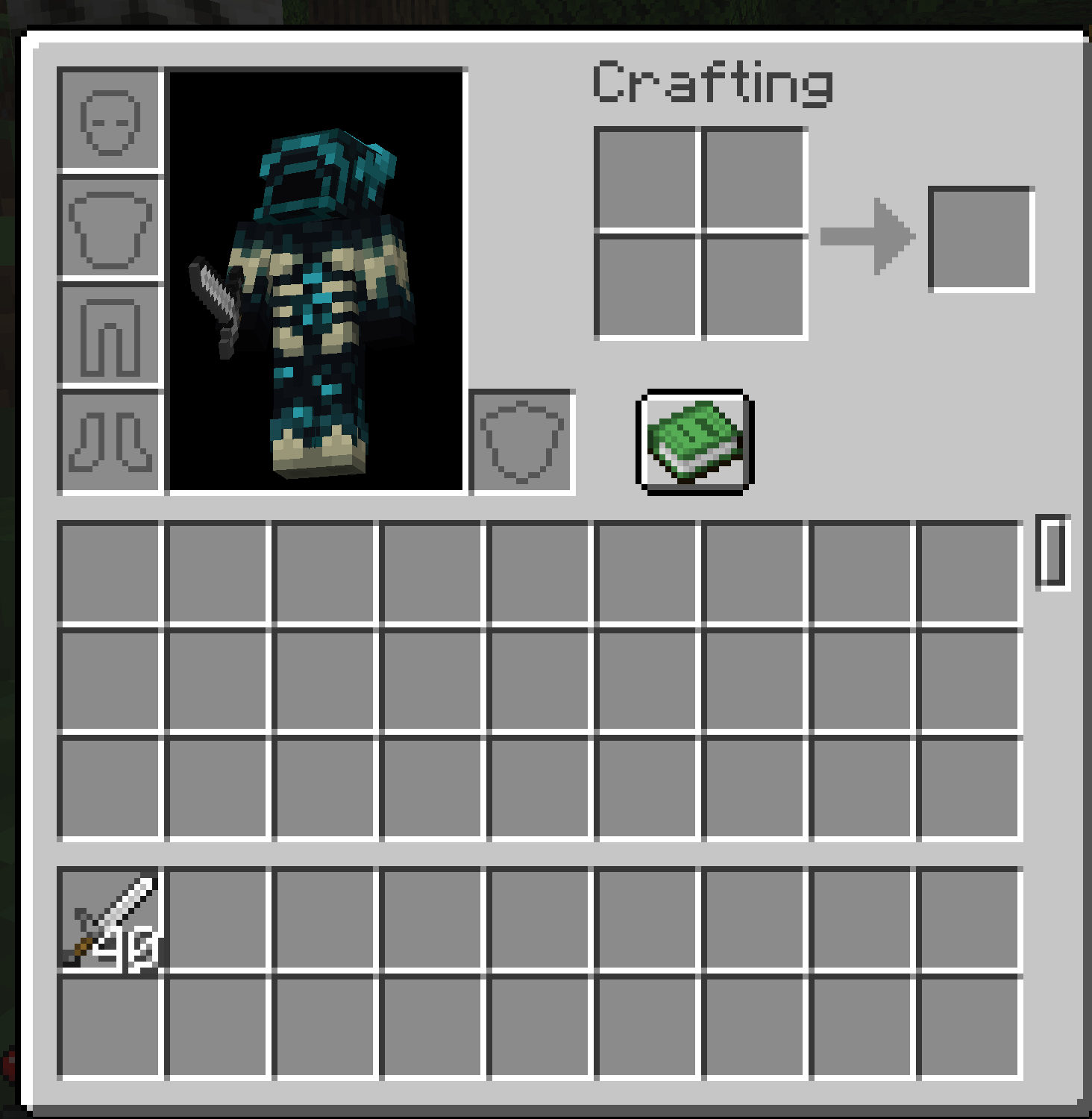
This next screenshot displays something extremely useful this mod does with tools and weapons! Weapons of the same type will now stack! But that isn't the best thing. When one tool in your stack breaks, the stack goes down by one! So if you have a stack of 40 swords, like shown above, and you break one against a zombie's skull, you now have a stack of 39 swords, and can keep hacking away at those pesky zombies to your heart's content! This works for all tools! Armor can stack like this as well, however, it does not stack in the armor slot, but you can still have a few sets of armor stacked for replacing when armor breaks in your inventory without using up too much space!
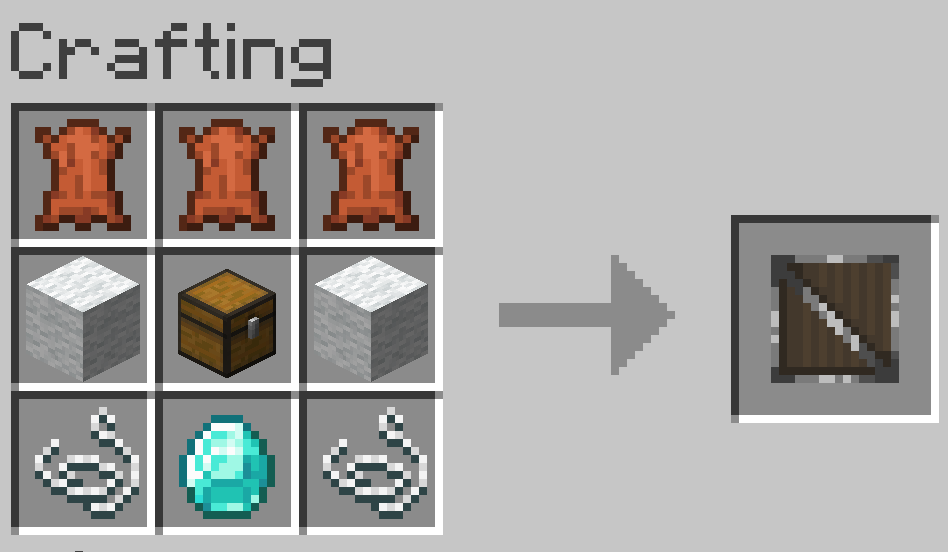
And finally, there is an item you can find in chests, buy from villagers, or craft yourself that allows you to add more slots to your inventory! The crafting recipe is seen below:
*Note that the crafting recipe for the Capture Mob item will be added once that is in the mod fully
Feel free to comment any bugs to me, or even suggestions for improvements!
You MAY use this in your modpacks, even if the modpack itself is not on CurseForge (This mod will be on Modrinth too)
Known Issues
-Crashes due to a mod conflict in the newest version, have not figured out which mod yet -The previous version sometimes deletes torches if you have over a stack, but the update has a conflict with a mod (Still working out which mod)
Highlights
From source dataGame versions
Supports 4 Minecraft versions, the newest being 1.20.4.
Loaders
Runs on Forge.
Footprint
Rated a light load on a server.
Advanced Inventory on Nxeon
From our catalogue- One-click install
- Supported on Nxeon Minecraft servers. We download it from Modrinth, place it, and restart the server.
- Server side
- Required on the server
- Server type needed
- Forge
- Server load
- light
- Smallest plan we suggest
- Minecraft — 2 GB (2 GB RAM). This follows our own load rating above, not a benchmark.
- Latest build
- 1.1.3, released 2024-02-11
Game versions by loader
| Loader | Game versions | Newest |
|---|---|---|
| Forge | 1.20.1 to 1.20.4 (4 versions) | 1.20.4 |
From 5 recorded builds of Advanced Inventory.
Recent builds
| Build | Released | Game versions | Loaders |
|---|---|---|---|
| 1.1.3 | 2024-02-11 | 1.20.1 to 1.20.4 (4 versions) | Forge |
| 1.1.2 | 2024-02-01 | 1.20.1 to 1.20.4 (4 versions) | Forge |
| 1.1.2 | 2024-02-01 | 1.20.1 to 1.20.4 (4 versions) | Forge |
| 1.1.1 | 2024-01-24 | 1.20.1 to 1.20.4 (4 versions) | Forge |
| 1.1.0 | 2024-01-17 | 1.20.1 to 1.20.4 (4 versions) | Forge |
Run Advanced Inventory on a Minecraft server
Pick a server or deploy a new one above; it is installed in one click.
What kind of mod it is
From the catalogQuality of life & UI
Small conveniences, tweaks and interface improvements players notice straight away.
Runs on your server
From source side supportModrinth lists Advanced Inventory as required on the server. Check its Modrinth page to see whether players need it too.
Compatibility
- Game
- Minecraft
- Loaders
- Forge
- Runs on
- Serverrequired on the server
- Game versions
- 1.20.4 and 3 earlier
Verified at the source
- ✓ModrinthOfficial listing, checked 2026-10-02Open ↗
- ✓Authorarthademon, as published on Modrinth
- ✓LicenseMITFree









