







About BlatBlock
From ModrinthNew generation of OneBlock maps and modpacks


🌍 Overview
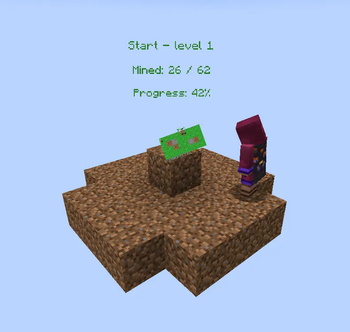
BlatBlock introduces a revolutionary skyblock-style gameplay experience to Minecraft! This mod adds a unique world type, powerful tools, and magical accessories to transform your gameplay.
⭐ Key Features
- 🏗️ BlatBlock World Type - Start in a void world with a magical generator
- 🏗️ Auto Generators
- ⚒️ Multitools - All-in-one tools combining pickaxe, axe, shovel, hoe, and sword functionality
- 💍 Magical Rings - Special accessories that enhance generator functionality
- 📊 Progressive Layers - Unlock new blocks and entities as you advance
- 🎯 JEI Integration - Full layer and information integration
- 🎯 KubeJS Integration - Full layer control
🏗️ The Generator System

A new world with the BlatBlock world type:
- You spawn at coordinates (0, 2, 0)
- The BlatBlock Generator appears at (0, 0, 0)
- The world is completely void except for your starting platform
How It Works
- The generator places blocks from your selected layer above itself
- Each layer contains different blocks and entities with varying spawn chances
- Progress through layers by collecting enough blocks to unlock the next tier

Available Content
- See which blocks and mobs are available at your current layer
- Preview Next Layers: Check what becomes available as you progress
- Layer Switching: Unlock and switch between different layers
- Progression System: Each layer requires a certain number of mined blocks to access
🚀 AutoGenerator Block

Three tiers of generators:
- Basic – iron-based, slow, simple recipe
- Improved – diamond accents, faster operation
- Perfect – netherite construction, maximum performance
- Creative
Generator Upgrades
Four upgrade types that improve generator behavior:
- Speed Upgrade – increases tick rate
- Fortune Upgrade – increases output quantity
- Tag Upgrade – controls tag filtering
- Entity Upgrade – enables mob drops
- Stack Upgrade - increases maximum stack


💍 Magical Rings

Ring Effect
- 🔮 Entity Ring Prevents mobs from spawning from the generator
- 💧 Liquid Ring Blocks liquid generation from the generator
- 📦 Drop Ring Items drop directly into your inventory
- 🏷️ Tag Ring Removes source tags from generated items Rings can be combined for maximum efficiency!
⚒️ Multitool System

Functionality
- ⛏️ Pickaxe: Mine stone, ores, and hard materials
- 🪓 Axe: Chop wood, strip logs, scrape copper, remove wax
- 🔨 Shovel: Dig dirt, sand, gravel, create paths, extinguish campfires
- 🌾 Hoe: Till farmland, create dirt paths
- ⚔️ Sword: Combat capabilities
Available Tiers
- Wooden Multitool - Basic starter tool
- Stone Multitool - Standard efficiency
- Iron Multitool - Enhanced durability
- Golden Multitool - Fast but fragile
- Diamond Multitool - High-tier performance
- Netherite Multitool - Ultimate efficiency and durability
🔧 Creating Custom Layers
BlatBlock uses JSON configuration files for complete customization:
Example Layer Configuration
{
    "title": "blatblock.layer.end",
    "title_color": "#dce775",
    "texture": "blatblock:textures/gui/end.png",
    "background": "blatblock:textures/gui/end_bg.png",
    "block_cost": 2000,
    "sort": 3,
    "block_calc": "4*level*level+40*(level+1)",
    "blocks": [
        {
            "block": "minecraft:end_stone",
            "chance": "0.9"
        },
        {
            "block": "minecraft:obsidian",
            "chance": "0.1"
        }
    ],
    "entities": [
        {
            "entity": "minecraft:endermite",
            "chance": "0.2+((level-4)/10)*0.02",
            "level": 4
        },
        {
            "entity": "minecraft:enderman",
            "chance": "0.1+((level-6)/10)*0.02",
            "level": 6
        }
    ]
}
Configuration Options 
- Advanced Features
- Dynamic Chance Calculations: Use mathematical expressions for progressive difficulty
- Level Requirements: Set minimum levels for specific content
- Custom Textures: Create themed layers with unique visual styles
- Mod Integration: Support for modded blocks and entities
🎮 Gameplay Tips
Early Game Strategy
Start Mining: Use the generator to collect basic materials Craft Tools: Create multitools for efficient resource gathering Build Platform: Expand your starting area for safety Progress Layers: Collect enough blocks to unlock new tiers
Mid Game Optimization
- Acquire Rings: Enhance generator efficiency
- Layer Management: Switch between layers for specific resources
- Automation Setup: Plan for semi-automated systems
- Resource Planning: Focus on materials needed for progression
Late Game Mastery
Highlights
From source dataGame versions
Built for Minecraft 1.20.1.
Loaders
Runs on Forge.
Footprint
Rated a light load on a server.
BlatBlock on Nxeon
From our catalogue- One-click install
- Supported on Nxeon Minecraft servers. We download it from Modrinth, place it, and restart the server.
- Server side
- Required on the server
- Server type needed
- Forge
- Server load
- light
- Smallest plan we suggest
- Minecraft — 2 GB (2 GB RAM). This follows our own load rating above, not a benchmark.
- Latest build
- 1.20.1-0.8, released 2026-05-14
Game versions by loader
| Loader | Game versions | Newest |
|---|---|---|
| Forge | 1.20.1 | 1.20.1 |
From 5 recorded builds of BlatBlock.
Recent builds
| Build | Released | Game versions | Loaders |
|---|---|---|---|
| 1.20.1-0.8 | 2026-05-14 | 1.20.1 | Forge |
| 1.20.1-0.7 | 2026-03-29 | 1.20.1 | Forge |
| 1.20.1-0.6 beta | 2025-10-09 | 1.20.1 | Forge |
| 1.20.1-0.5 beta | 2025-10-07 | 1.20.1 | Forge |
| 1.20.1-0.4 beta | 2025-10-06 | 1.20.1 | Forge |
Dependencies
- Required: modrinth project BmIdVqSs (modrinth, not in our catalogue)
- Optional: modrinth project umyGl7zF (modrinth, not in our catalogue)
- Optional: modrinth project u6dRKJwZ (modrinth, not in our catalogue)
- Optional: modrinth project vvuO3ImH (modrinth, not in our catalogue)
Declared by the newest build that lists any. Required ones are installed with it on one-click installs.
Run BlatBlock on a Minecraft server
Pick a server or deploy a new one above; it is installed in one click.
What kind of mod it is
From the catalogMaps & scenarios
Custom maps, arenas and scenarios to play on.
Runs on your server
From source side supportModrinth lists BlatBlock as required on the server. Check its Modrinth page to see whether players need it too.
Compatibility
- Game
- Minecraft
- Loaders
- Forge
- Runs on
- Serverrequired on the server
- Game versions
- 1.20.1
Verified at the source
- ✓ModrinthOfficial listing, checked 2026-10-03Open ↗
- ✓AuthorBlatFan, as published on Modrinth
- ✓LicenseMITFree









