







About Blocks Spread
From ModrinthMinecraft, But Every Block Spreads Like Sculk
Minecraft, But Every Block Spreads Like Sculk
<iframe width="560" height="315" src="https://www.youtube-nocookie.com/embed/HuXd9qLKXrw" title="YouTube video player" frameborder="0" allow="accelerometer; autoplay; clipboard-write; encrypted-media; gyroscope; picture-in-picture; web-share" allowfullscreen></iframe>
Information
A Fabric 1.21.4 mod built by Steampwred for YouTuber Frosty.
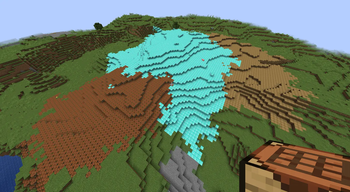
This mod makes any placed block spread and clone itself like sculk. Breaking one clone normally removes all connected copies, but sneak-breaking preserves them. If left unchecked, the spreading blocks can eventually overtake your world.
Good luck beating the game...
_Inspired by Skippy T & Element X_.
Overview
- Place a block and it starts to spread like a sculk catalyst.
- From there, it spreads outwards onto other nearby blocks.
- Break the original block and the spread withdraws, replacing itself with air.
- Crouch while breaking the original block to stop the spread, leaving all blocks affected.
- Most features can be toggled through commands.
Commands
/spread startTurn spreading on./spread stopDisables spreading and kills active colonies./spreadShows current enabled state./spread statusShows enabled state, active colonies, base speed, radius ramping, and particle state./spread clearKills active colonies without changing the toggle./spread speed <1-256>Changes the base spread speed. Default:10./spread particles on|offToggles particles./spread maxsize <1-8192>Change max size of colony
Warning
This mod will permanently alter your world, so start with a new world or a backup.
Highlights
From source dataGame versions
Supports 8 Minecraft versions, the newest being 1.21.11.
Loaders
Runs on Fabric.
Footprint
Rated a light load on a server.
Blocks Spread on Nxeon
From our catalogue- One-click install
- Supported on Nxeon Minecraft servers. We download it from Modrinth, place it, and restart the server.
- Server side
- Required on the server
- Server type needed
- Fabric
- Server load
- light
- Smallest plan we suggest
- Minecraft — 2 GB (2 GB RAM). This follows our own load rating above, not a benchmark.
- Latest build
- 1.0.0, released 2026-07-22
Game versions by loader
| Loader | Game versions | Newest |
|---|---|---|
| Fabric | 1.21.4 to 1.21.11 (8 versions) | 1.21.11 |
From 1 recorded build of Blocks Spread.
Run Blocks Spread on a Minecraft server
Pick a server or deploy a new one above; it is installed in one click.
What kind of mod it is
From the catalogBuilding & decoration
Blocks, furniture, decorations and building tools.
Runs on your server
From source side supportModrinth lists Blocks Spread as required on the server. Check its Modrinth page to see whether players need it too.
Compatibility
- Game
- Minecraft
- Loaders
- Fabric
- Runs on
- Serverrequired on the server
- Game versions
- 1.21.11 and 7 earlier
Verified at the source
- ✓ModrinthOfficial listing, checked 2026-10-02Open ↗
- ✓AuthorSTEAMPWRED, as published on Modrinth
- ✓LicenseLicenseRef-All-Rights-ReservedFree









