






About BungeeServerManager [BungeeCord] [MySQL]
From SpigotMCPlugin to manage your servers connected through BungeeCord
 Bungee Server Manager
v1.5.2
Admin tool to manage BungeeCord servers ingame without restarting it.
Features
- Uses MySQL
- You can set a tab header/footer on join (editable in the config.yml) with spaceholders
- When a player joins, he will be connected to a random lobby (you have to specify min. 1 lobby)
- You can get information about which players are on which server
- Compatible with multiple root servers (Just specify the IP of the second root)
- Easy to use
- Staff with the permission servermanager.receiveinfo will get information when someone changes something
- Auto-Updater keeps the plugin up to date
- Forced Host Servers
- Configurable messages (Coming soon!)
Legend: Command - Description - Permission
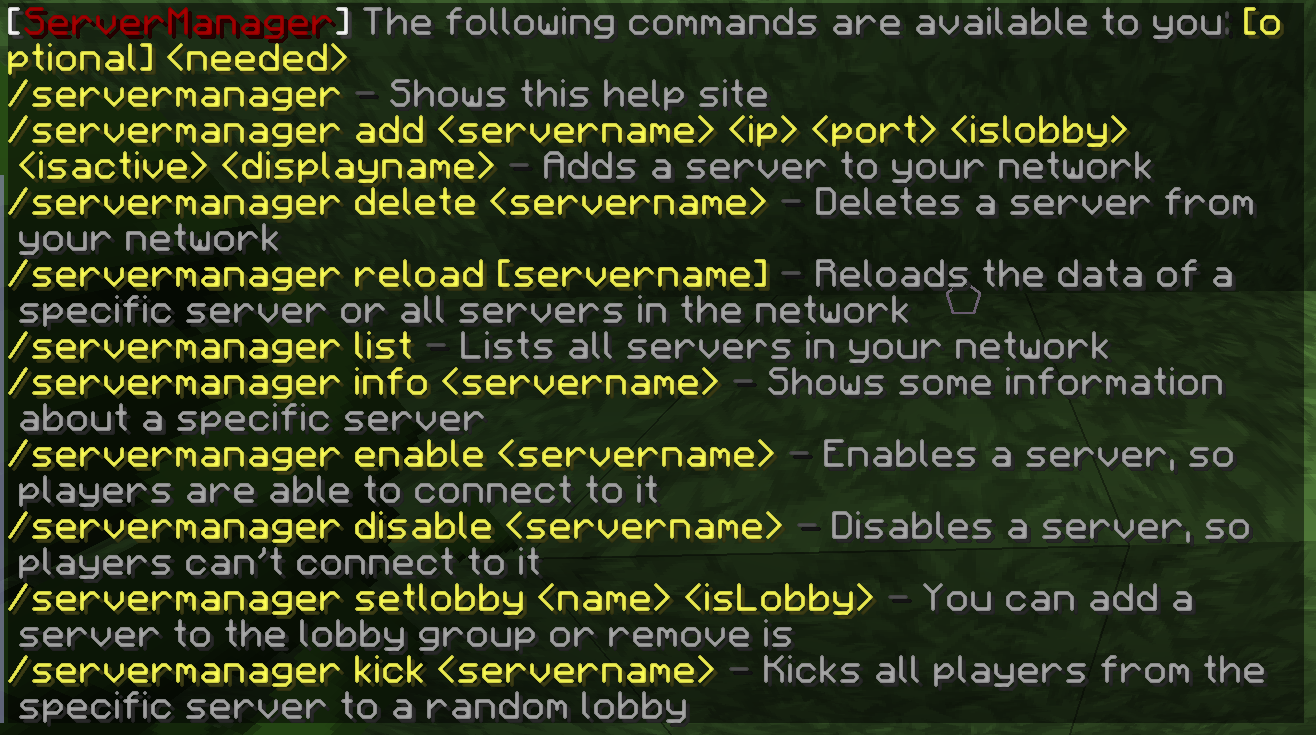
- /servermanager - Shows the help site - servermanager.help
- /servermanager add <servername> <ip> <port> <islobby> <isactive> <isrestricted> <displayname> - Adds a server to the network - servermanager.servers.add
- /servermanager delete <servername> - Deletes a server from the network - servermanager.servers.delete
- /servermanager reload [servername] - Reloads the information of a server - servermanager.servers.reload
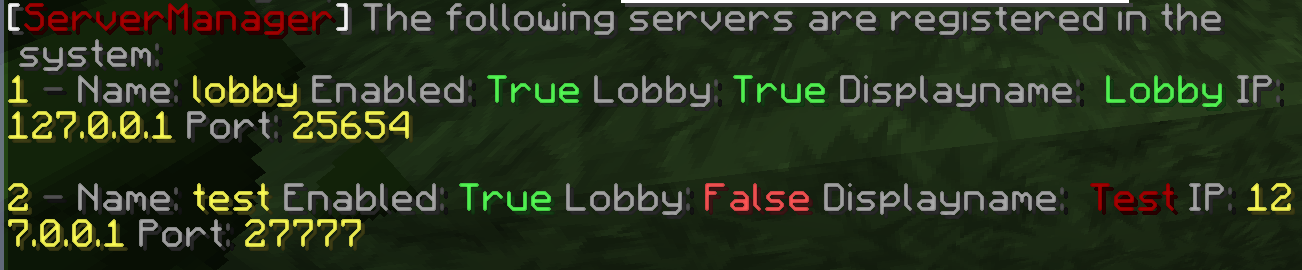
- /servermanager list - Gives you a list of all servers - servermanager.servers.list
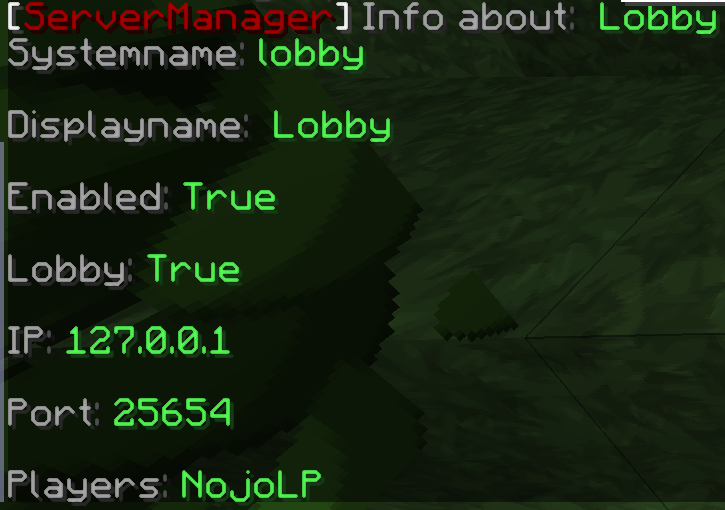
- /servermanager info <servername> - Gives you some additional information about a server - servermanager.servers.info
- /servermanager enable <servername> - Enables a server and registers it in BungeeCord - servermanager.servers.enable
- /servermanager disable <servername> - Disables a server and unregisters it from BungeeCord - servermanager.servers.disable
- /servermanager setlobby <servername> <true/false> - Specifies a server as a lobby - servermanager.servers.setlobby
- /servermanager setrestricted <servername> <true/false> - Restricts a server so players can only join if they have the permission servermanager.server.<servername> - servermanager.servers.setrestricted (servermanager.ignorerestriction to join every server)
- /servermanager kick <servername> - Kicks all players from that server to a random lobby - servermanager.servers.kick (servermanager.ignorekick for bypass)
- /hub, /lobby - Sends you to a random server that is signes as a lobby
- /whereami - Gives you information about your current server
- /goto <playername> - Sends you to a players server - servermanager.goto
- /notify - You can disable the notifications
Legend: Command - Description - Permission
- /smc - Opens the GUI - smc.use
#BungeeServerManager Configuration
ConfigVersion: 3
#Type here your MySQL Settings
MySQL:
Host: Hostname
Port: 3306 #Leave it, if you don't have anything else configured
User: Username
Database: Database
Password: Password
#Settings for the Header in the Tablist
Header:
SetHeader: false
HeaderText: '&7Hello &4%player% &7you''re playing on server &a%server%'
#Settings for the Footer in the Tablist
Footer:
SetFooter: false
FooterText: '&7Hello &4%player% &7you''re playing on server &a%server%'
#Here you can change the appearance if the client pings the server in the multiplayer screen
ServerPing:
SetMOTD: false
OneMorePlayer: false
MOTDText: 'Some text here'
#Here are some general plugin settings
General:
HubCommands: hub;lobby
Highlights
From source dataGame versions
Supports 2 Minecraft versions, the newest being 1.19.
Loaders
Runs on Spigot and Paper.
Footprint
Rated a light load on a server.
BungeeServerManager [BungeeCord] [MySQL] on Nxeon
From our catalogue- One-click install
- Supported on Nxeon Minecraft servers, for Paper servers. We download it from SpigotMC, place it, and restart the server.
- Server side
- Required on the server
- Server type needed
- Spigot, Paper
- Server load
- light
- Smallest plan we suggest
- Minecraft — 2 GB (2 GB RAM). This follows our own load rating above, not a benchmark.
- Latest build
- 1.5.2, released 2022-12-11
Game versions by loader
| Loader | Game versions | Newest |
|---|---|---|
| Paper | 1.18 to 1.19 (2 versions) | 1.19 |
| Spigot | 1.18 to 1.19 (2 versions) | 1.19 |
From 10 recorded builds of BungeeServerManager [BungeeCord] [MySQL].
Recent builds
| Build | Released | Game versions | Loaders |
|---|---|---|---|
| 1.5.2 | 2022-12-11 | 1.18 to 1.19 (2 versions) | Spigot, Paper |
| 1.5.1 | 2022-04-12 | n/a | Spigot, Paper |
| 1.5.0 | 2022-01-09 | n/a | Spigot, Paper |
| 1.4.8 | 2021-12-22 | n/a | Spigot, Paper |
| 1.4.7 | 2021-06-21 | n/a | Spigot, Paper |
| 1.4.6 | 2020-10-30 | n/a | Spigot, Paper |
Run BungeeServerManager [BungeeCord] [MySQL] on a Minecraft server
Pick a server or deploy a new one above; it is installed in one click.
What kind of mod it is
From the catalogAdmin & protection
Permissions, moderation, anti-cheat and land protection for the people running the server.
Runs on your server
From source side supportSpigotMC lists BungeeServerManager [BungeeCord] [MySQL] as required on the server. Check its SpigotMC page to see whether players need it too.
Compatibility
- Game
- Minecraft
- Loaders
- SpigotPaper
- Runs on
- Serverrequired on the server
- Game versions
- 1.19 and 1 earlier
- Requires
- One-click install needs a Paper server.
Verified at the source
- ✓SpigotMCOfficial listing, checked 2026-10-02Open ↗
- ✓AuthorNojoLP, as published on SpigotMC
- ✓LicenseNot published by the sourceFree
More like BungeeServerManager [BungeeCord] [MySQL]
Other Minecraft mods, same category first, ranked by real downloads.

Fabric API
Libraries & compatibility · Modrinth
Lightweight and modular API providing common hooks and intercompatibility measures utilized by mods using the Fabric toolchain.


Cloth Config API
Libraries & compatibility · Modrinth
Configuration Library for Minecraft Mods

FerriteCore
Performance · Modrinth
Memory usage optimizations

Lithium
Performance · Modrinth
No-compromises game logic optimization mod, useful for both single-player games and multi-player servers.


YetAnotherConfigLib (YACL)
Libraries & compatibility · Modrinth
A builder-based configuration library for Minecraft!

Fabric Language Kotlin
Gameplay & overhauls · Modrinth
This is a mod that enables usage of the Kotlin programming language for Fabric mods.

Architectury API
Libraries & compatibility · Modrinth
An intermediary api aimed to ease developing multiplatform mods.


VeinMiner
Building & decoration · Modrinth
Mine the whole vein on mining a single ore/block. Make the tedious mining experience to something satisfying and fun! FTB Ultimine alternative
BungeeServerManager [BungeeCord] [MySQL], answered
Generated from the mod’s own source data.
Do my players need to install BungeeServerManager [BungeeCord] [MySQL]?
SpigotMC lists BungeeServerManager [BungeeCord] [MySQL] as required on the server. Check its SpigotMC page to see whether players need it too.
Which loaders does it support?
Spigot and Paper.
Is it free?
Yes. BungeeServerManager [BungeeCord] [MySQL] is free to download from SpigotMC.
How do I add it to my Nxeon server?
Use “Add to a server” on this page, or open NxLabs from your dashboard. We install it, restart your server and switch it on.

Run BungeeServerManager [BungeeCord] [MySQL] on a Minecraft server.
Deploy in about a minute from $4.99 a month, then add BungeeServerManager [BungeeCord] [MySQL] in one click.