







About CB: Compressed Blocks
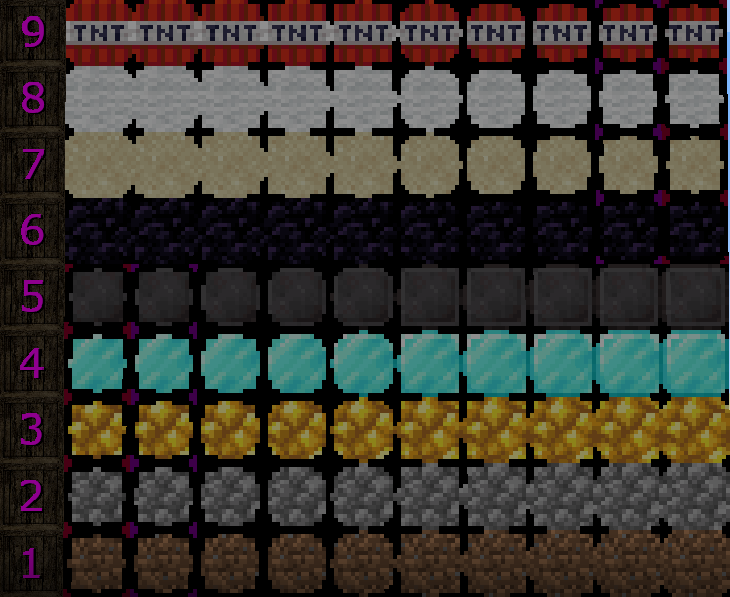
From ModrinthA Block and Item Compression mod for Minecraft. Compress your Blocks and Items to make more free space (up to 3.486.784.101 Blocks / Items in just one single Block!)
CB: Compressed Blocks


CB: Compressed Blocks adds multi-level compression for blocks and items, letting you store large quantities in a fraction of the space. Compressed blocks remain placeable, while compressed items can be stored in crates for compact inventory storage.
Features
- Block Compression --- Compress blocks into compact, placeable variants.
- Item Compression --- Store compressed items in crates to reduce inventory usage.
- Multiple Compression Levels --- Compress existing compressed variants to reach higher levels.
- Two Compression Recipes --- Standard 3×3 compression and 2×2 compression for blocks and items that already have a 3×3 crafting recipe.
- Decompression --- Recover the original blocks and items by reversing the compression process.
- Extensible Compression System --- Add support for additional blocks and items through custom entry definitions and resource-pack assets.
A single maximum-level compressed variant can represent up to 3,486,784,401 original blocks or items.
Supported Minecraft Versions
For the latest supported versions and compatibility details, see the GitHub README.
Support is version-specific. Backports and updates are request-based and are not automatically provided for every release. To request support for a particular Minecraft version, open an issue on GitHub and specify the required Minecraft version and mod loader.
Configuration and Custom Entries
CB's compression system can be extended beyond its built-in catalogs. Users and modpack developers can add custom blocks and items or override existing entries by using the same ID.
- New ID: Adds a new compression entry.
- Existing ID: Replaces the corresponding built-in definition.
Custom entries require the appropriate entry definitions and resource-pack assets. This allows blocks and items from other mods to be supported without requiring dedicated integration into CB.
Loader-Specific Configuration
Configuration behavior depends on the mod loader.
Forge (3.1.0 or later)
Forge uses the JSONC catalogs directly to define compression entries and their settings. It does not use a separate loader configuration file for these settings.
The catalogs are located in config/compressedblocks/:
blocks.jsonc--- Default block compression entries.crates.jsonc--- Default item crate entries.custom_blocks.jsonc--- Optional custom block entries.custom_crates.jsonc--- Optional custom crate entries.
The default catalogs are copied from the mod's bundled resources when the corresponding configuration files do not exist. Changes to these files control the entry definitions and settings used by the mod.
NeoForge and Fabric (3.1.0 or later)
NeoForge and Fabric use loader configuration files for configurable compression settings.
The JSONC catalogs provide the initial default values. Once saved loader configuration values exist, those values take precedence over the JSONC defaults.
Changing a JSONC default does not automatically overwrite an existing value in the loader configuration.
Custom entries are defined separately through the JSONC custom-entry files.
For configuration options, custom-entry definitions, required resources, and examples, see the CB Wiki.
Installation
- Download the release matching your Minecraft version and mod loader.
- Install the appropriate Fabric, Forge, or NeoForge loader.
- Install the required dependencies:
- Fabric:
- Fabric API (Modrinth)
- Forge Config API Port (Modrinth)
- Mod Menu (Modrinth) --- Optional
- NeoForge:
- Forge Config API Port (Modrinth)
- Forge:
- Check the dependency information for your specific release.
- Place the downloaded JAR and required dependencies in your Minecraft
modsfolder and launch the game.
Check the dependency information for your specific release, as requirements may vary by Minecraft version and mod loader.
Links
Highlights
From source dataGame versions
Supports 34 Minecraft versions, the newest being 26.3.
Loaders
Runs on Fabric, Forge and NeoForge.
Footprint
Rated a light load on a server.
CB: Compressed Blocks on Nxeon
From our catalogue- One-click install
- Supported on Nxeon Minecraft servers. We download it from Modrinth, place it, and restart the server.
- Server side
- Required on the server
- Server type needed
- Fabric, Forge, NeoForge
- Server load
- light
- Smallest plan we suggest
- Minecraft — 2 GB (2 GB RAM). This follows our own load rating above, not a benchmark.
- Latest build
- 3.1.0-26.3, released 2026-10-15
Game versions by loader
| Loader | Game versions | Newest |
|---|---|---|
| Fabric | 1.20 to 26.3 (18 versions) | 26.3 |
| NeoForge | 1.21 to 26.3 (15 versions) | 26.3 |
| Forge | 1.20.1 to 26.3 (11 versions) | 26.3 |
From 19 recorded builds of CB: Compressed Blocks.
Recent builds
| Build | Released | Game versions | Loaders |
|---|---|---|---|
| 3.1.0-26.3 | 2026-10-15 | 26.1 to 26.3 (5 versions) | Fabric |
| 3.1.0-26.3 | 2026-10-15 | 26.1 to 26.3 (5 versions) | NeoForge |
| 3.1.0-26.3 | 2026-10-15 | 26.1 to 26.3 (5 versions) | Forge |
| 3.1.0-1.21.11 | 2026-10-14 | 1.21.11 | Fabric |
| 3.1.0-1.21.11 | 2026-10-14 | 1.21.11 | NeoForge |
| 3.1.0-1.21.11 | 2026-10-14 | 1.21.11 | Forge |
Dependencies
- Required: modrinth project P7dR8mSH (modrinth, not in our catalogue)
- Required: modrinth project ohNO6lps (modrinth, not in our catalogue)
- Optional: modrinth project mOgUt4GM (modrinth, not in our catalogue)
Declared by the newest build that lists any. Required ones are installed with it on one-click installs.
Run CB: Compressed Blocks on a Minecraft server
Pick a server or deploy a new one above; it is installed in one click.
What kind of mod it is
From the catalogBuilding & decoration
Blocks, furniture, decorations and building tools.
Runs on your server
From source side supportModrinth lists CB: Compressed Blocks as required on the server. Check its Modrinth page to see whether players need it too.
Compatibility
- Game
- Minecraft
- Loaders
- FabricForgeNeoForge
- Runs on
- Serverrequired on the server
- Game versions
- 26.3 and 33 earlier
Verified at the source
- ✓ModrinthOfficial listing, checked 2026-10-15Open ↗
- ✓AuthorSashiro, as published on Modrinth
- ✓LicenseMITFree









