







About ChatControl
From ModrinthThe ultimate chat filtering and formatting plugin. Program your own rules!
Testimonials/Vouches: 


ChatControl is chat management and formatting plugin for Bukkit, Spigot and Paper that significantly reduces the amount of spam, ads, swearing and bots on your server!
It received over 600,000+ downloads since 2013 and was since modernized to work on the latest Minecraft version.
Issue Tracker | Wiki
Create custom rules and handlers for complete control over your chat. ChatControl also comes with many other, often unique features, see the list below!
Unofficial review video by Koz4Christ
Note: In commands, there is no such argument as "username".

Features
Rules and Handlers
- Rules can be used for:
- Effective curse/swear word filtering. By default, over 48 curse words are blocked!
- Powerful IP / URL advertisements blocking
- Filter spam and repetitive characters
- Block unicode / non-english messages
- Typo / slang correction
- Command aliases
- Utility commands / messages
- Fun message replacements
- ...they are entirely up to you, and the possibilities are endless!
- Define your own rules that matches certain regular expressions and applies for: chat, commands, signs or packets
- Packet rules allows you to edit messages from the server itself or even other plugins (or hide them). The support replacing message per different worlds with rewritein operator
- For example, change the unknown command message to no permission message in survival, but to something else in the hardcore world
- Handlers allow you to easily manage a big set of rules without spaghetti code
- Custom syntax and parser, fixing many YAML limitations
- Inspired by popular but now outdated PwnFilter
Chat Formatting
- Format chat messages, with variables: {player_prefix} and {player_suffix}
- {world} (TIP: if you want to customize the world name, use Multiverse-Core and edit world alias in worlds.yml)
- {health
- {player} (player name)
- {town} and {nation} (if Towny plugin is enabled)
- {clan} (if SimpleClans plugin is enabled)
- {country_name} and {country_code}
- {region_name} and {isp} (player's internet provider)
- PlaceholderAPI is supported.
- Supports global chat (begin with "!") and local chat (ranged mode)
- Use _chatcontrol.chat.overrideranged_ permission to get all messages in the world
- Use _chatcontrol.chat.spy_ permission to get all messages in all worlds - spy mode
Anti Spam
- Block the same or similar messages and commands
- Strip special and duplicate characters to prevent bypasses (toggleable)
- Ignore first argument in commands to prevent too strict check
- Customizable percentage
- Set the delay between messages and commands
- Lower long unreadable message spam
- Whitelist commands from delay and similarity check
Anti Caps
- Efficient and intelligent CAPS prevention
- Customize minimum message length, caps percentage, amount of caps in the row and a whitelist of ignored words
- Ignore player names
Anti Bot
- Set the delay between logging in again
- Prevent signs with the same text (alert staff + drop the sign) (Useful against "AutoSign" cheat)
- Block chat until player moves on join (Prevent bots joining and spamming)
Chat Clear
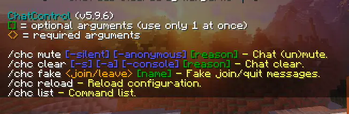
- Clear the in game chat. Support reason and arguments:
- -anonymous (-a) (to hide the cleaner's name)
- -silent (-s) (to hide entire broadcast message after clean)
- -console (to clear console)
- Do not clear chat for players with permission
Chat Mute
- Globally prevent chatting and executing certain commands under the mute.
- Also hide join/quit/kick and death messages
- Supports reason and arguments
- -anonymous (-a) (to hide the cleaner's name)
- -silent (-s) (to hide entire message after clean)
- -console (to clear console)
Messages' Customization & Broadcaster
- Customize or hide join/quit and kick messages. Support variables:{player}, {player_suffix} and {player_prefix} (see more variables above in Chat formatter)
- Send fake join or leave messages (/chc fake)
- Broadcast messages in the specified interval
- 3 modes - by order, random and random with cache that prevents messages to repeat until all were broadcasted
- Set a prefix and a suffix
- Supports variables %player and %world
- Different messages per world
- World messages inherit global messages by default, this can be disabled by inserting - excludeGlobal on the first line.
Packet Features
- Disable tab complete if no argument is given, leaking server info.
- Notice: If using spigot, it is recommended to disable this feature and to configure it in spigot.yml!
- Change other plugins' or even server messages (see rules/packet.txt file)
Console Features
- Remove unwanted messages from the console
Sound Notify
- Get notified when somebody mentions you in the chat or if you receive '/tell', '/r' (or any specified message)
- Customizable sound, volume and pitch.
- Respects the difference in sound names between MC 1.9 and older
- Can specify a prefix that is necessary to get notified (e.g @kangarko)
- Only notify afk players (toggleable, requires Essentials)
Grammar
- Capitalise sentences automatically
- Insert a dot at the end
- Respects domains and IP addresses
- Define minimum message length for capitalization and punctuation
Chat Conversation Saver
- Save entire chat conversation to file. Unlike console output, this will save only player messages and specified commands
- Ignore certain players
Localization
- Current available locations:
Highlights
From source dataGame versions
Supports 75 Minecraft versions, the newest being 1.20.1.
Loaders
Runs on Bukkit.
Footprint
Rated a light load on a server.
ChatControl on Nxeon
From our catalogue- One-click install
- Supported on Nxeon Minecraft servers. We download it from Modrinth, place it, and restart the server.
- Server side
- Required on the server
- Server type needed
- Bukkit
- Server load
- light
- Smallest plan we suggest
- Minecraft — 2 GB (2 GB RAM). This follows our own load rating above, not a benchmark.
- Latest build
- 5.9.6, released 2023-07-05
Game versions by loader
| Loader | Game versions | Newest |
|---|---|---|
| Bukkit | 1.2.5 to 1.20.1 (75 versions) | 1.20.1 |
From 1 recorded build of ChatControl.
Run ChatControl on a Minecraft server
Pick a server or deploy a new one above; it is installed in one click.
What kind of mod it is
From the catalogTechnology & automation
Machines, power, logistics and automation.
Runs on your server
From source side supportModrinth lists ChatControl as required on the server. Check its Modrinth page to see whether players need it too.
Compatibility
- Game
- Minecraft
- Loaders
- Bukkit
- Runs on
- Serverrequired on the server
- Game versions
- 1.20.1 and 74 earlier
Verified at the source
- ✓ModrinthOfficial listing, checked 2026-10-03Open ↗
- ✓Authorkangarko, as published on Modrinth
- ✓LicenseLicenseRef-ChatControl-fair-use-licenseFree









