








About Classic Minecraft Icon
From ModrinthBring back the classic crafting table window icon of Minecraft
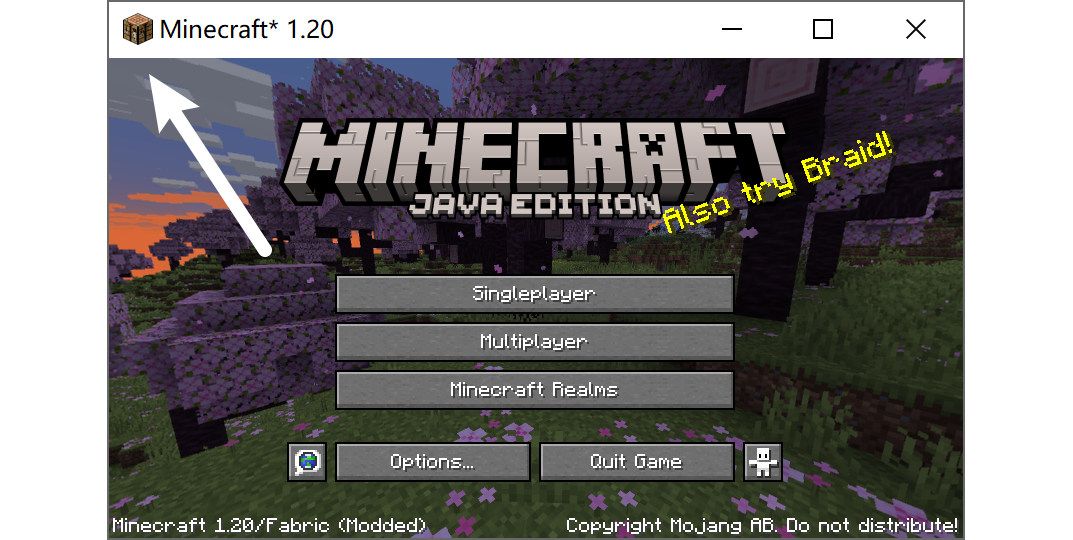
The icon for the Minecraft game window was changed from a crafting table to a grass / dirt block during the 1.20 release. This change affects all Minecraft versions, not just 1.20, which breaks how Minecraft should feel like
Here's a simple client-side mod to revert that change. Yes, the classic Minecraft icon is back!
This mod is client-side only and requires no extra dependency. It supports all Minecraft versions since 1.14 (fabric) or since 1.15 (forge)
| Icon File | Source | |--------------------|----------------------------------------------------------------------------------------------------------------------------------------| | icon_16x16.png | Asset bdf48ef6b5d0d23bbb02e17d04865216179f510a | | icon_32x32.png | Asset 92750c5f93c312ba9ab413d546f32190c56d6f1f | | icon_48x48.png | Extracted from minecraft.icns | | icon_128x128.png | Scaled from icon_256x256.png | | icon_256x256.png | Extracted from minecraft.icns | | minecraft.icns | Asset 991b421dfd401f115241601b2b373140a8d78572 |
Highlights
From source dataGame versions
Supports 48 Minecraft versions, the newest being 26.3.
Loaders
Runs on Fabric, Forge and NeoForge.
Footprint
Rated a light load on a server.
Classic Minecraft Icon on Nxeon
From our catalogue- One-click install
- Supported on Nxeon Minecraft servers. We download it from Modrinth, place it, and restart the server.
- Server side
- Client-only: it runs in players’ own games, so it can’t be installed on a server
- Server type needed
- Fabric, Forge, NeoForge
- Server load
- light
- Smallest plan we suggest
- Minecraft — 2 GB (2 GB RAM). This follows our own load rating above, not a benchmark.
- Latest build
- v1.1.10-mc1.21.11-neoforge, released 2026-09-26
Game versions by loader
| Loader | Game versions | Newest |
|---|---|---|
| NeoForge | 1.20.5 to 1.21.11 (14 versions) | 1.21.11 |
| Forge | 1.18 to 1.20.4 (10 versions) | 1.20.4 |
From 5 recorded builds of Classic Minecraft Icon.
Recent builds
| Build | Released | Game versions | Loaders |
|---|---|---|---|
| v1.1.10-mc1.21.11-neoforge | 2026-09-26 | 1.21 to 1.21.11 (12 versions) | NeoForge |
| v1.1.10-mc1.20.4-forge | 2026-09-26 | 1.20 to 1.20.4 (5 versions) | Forge |
| v1.1.10-mc1.20.6-neoforge | 2026-09-26 | 1.20.5 to 1.20.6 (2 versions) | NeoForge |
| v1.1.10-mc1.19.4-forge | 2026-09-26 | 1.19.3 to 1.19.4 (2 versions) | Forge |
| v1.1.10-mc1.18.2-forge | 2026-09-26 | 1.18 to 1.18.2 (3 versions) | Forge |
Run Classic Minecraft Icon on a Minecraft server
Pick a server or deploy a new one above; it is installed in one click.
What kind of mod it is
From the catalogWeapons, items & crafting
New weapons, gear, items and the recipes to make them.
Client-side mod
From source side supportModrinth lists Classic Minecraft Icon as not supported on servers. It runs in players’ own games, not on your server.
Compatibility
- Game
- Minecraft
- Loaders
- FabricForgeNeoForge
- Runs on
- Client only
- Game versions
- 26.3 and 47 earlier
Verified at the source
- ✓ModrinthOfficial listing, checked 2026-10-01Open ↗
- ✓Authorfallen-breath, as published on Modrinth
- ✓LicenseLGPL-3.0-onlyFree









