






About Myths and Legends [Cobblemon Sidemod]
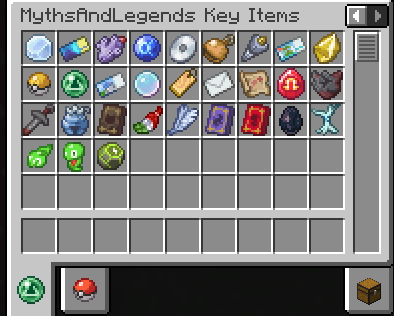
From ModrinthThe 'Cobblemon Myths and Legends Addon' for Cobblemon Mod introduces key items and new spawning conditions, intended to add encounters with Legendary and Mythical Pokémon, along with pre-made spawns for select key items.
The _Cobblemon Myths and Legends Sidemod_ for Cobblemon Mod introduces a dynamic new feature where key items directly influence spawning conditions. These items, when held by a player, fulfill specific conditions, causing certain Pokémon to spawn exclusively around that player (every condition specific to the Pokémon must be fulfilled in order for it to spawn). This mechanic also applies to multiple players independently, each holding the necessary items.
Key items can be found in selected loot chests by default, with their rarity and specific loot tables configurable in the settings. This allows for a tailored gameplay experience, where players can adjust how and where these items appear in the game world.
Important Notice
Reminder: For versions higher than 1.3, to use the mechanics added by the mod, you MUST use the Myths and Legends datapack or create one yourself. Download the official Myths and Legends datapack from:
- CurseForge
- Modrinth (Note: Link is still under review)
A public repository is also available for anyone who wants to tinker with the datapack and "compile" their own version: GitHub Repository.
Wiki and Additional Resources
- Added a wiki page containing all information on the currently implemented spawns from the datapack: Wiki
Creating Custom Spawns
Interested in crafting your own unique Pokémon spawn conditions? Follow this detailed guide to learn how you can add custom spawns to your game: Creating Custom Spawns Tutorial. This guide provides step-by-step instructions, making it easy for you to bring your creative ideas to life in the Cobblemon world.
Additional Conditions
The mod introduces the following additional conditions:
Key Item Conditions
key_item: Checks for a specific key item in the player's inventory.- Example usage:
"key_item": "tidal_bell".
Custom Item Conditions
custom_key_items: Checks for a specific amount of a custom key item in the player's inventory and consumes it if allowed.
- Example usage:
      "custom_key_items": [
    {
      "id": "minecraft:diamond",
      "count": 2,
      "consume": false
    },
    {
      "id": "minecraft:emerald",
      "count": 1,
      "consume": true
    },
    {
      "id": "cobblemon:master_ball",
      "count": 1,
      "consume": false
    }
]custom_secondary_item: Checks for a specific amount of a custom secondary item in the player's inventory and consumes it if allowed.
- Example usage:
    "custom_secondary_item": {
      "id": "minecraft:emerald",
      "count": 10,
      "consume": true
}- The
consumeflag works regardless of the config settings, ensuring the item is consumed upon condition check iftrue.
Item Conditions
thunder_stone_requirement: Checks for the required amount ofthunder_stonein the player's inventory. Example usage:"thunder_stone_requirement": "3".
water_stone_requirement: Checks for the required amount ofwater_stonein the player's inventory. Example usage:"water_stone_requirement": "2".
ice_stone_requirement: Checks for the required amount ofice_stonein the player's inventory. Example usage:"ice_stone_requirement": "4".
fire_stone_requirement: Checks for the required amount offire_stonein the player's inventory. Example usage:"fire_stone_requirement": "5".
dragon_scale_requirement: Checks for the required amount ofdragon_scalein the player's inventory. Example usage:"dragon_scale_requirement": "2".
electirizer_requirement: Checks for the required amount ofelectirizerin the player's inventory. Example usage:"electirizer_requirement": "1".
magmarizer_requirement: Checks for the required amount ofmagmarizerin the player's inventory. Example usage:"magmarizer_requirement": "1".
metal_coat_requirement: Checks for the required amount ofmetal_coatin the player's inventory. Example usage:"metal_coat_requirement": "3".
protector_requirement: Checks for the required amount ofprotectorin the player's inventory. Example usage:"protector_requirement": "2".
leaf_stone_requirement: Checks for the required amount ofleaf_stonein the player's inventory. Example usage:"leaf_stone_requirement": "4".
moon_stone_requirement: Checks for the required amount ofmoon_stonein the player's inventory. Example usage:"moon_stone_requirement": "3".
sun_stone_requirement: Checks for the required amount ofsun_stonein the player's inventory. Example usage:"sun_stone_requirement": "2".
shiny_stone_requirement: Checks for the required amount ofshiny_stonein the player's inventory. Example usage:"shiny_stone_requirement": "2".
dusk_stone_requirement: Checks for the required amount ofdusk_stonein the player's inventory. Example usage:"dusk_stone_requirement": "1".
dawn_stone_requirement: Checks for the required amount ofdawn_stonein the player's inventory. Example usage:"dawn_stone_requirement": "1".
never_melt_ice_requirement: Checks for the required amount ofnever_melt_icein the player's inventory. Example usage:"never_melt_ice_requirement": "3".
Pokémon Team Conditions
Highlights
From source dataGame versions
Supports 2 Minecraft versions, the newest being 1.21.1.
Loaders
Runs on Fabric, Forge and NeoForge.
Footprint
Rated a light load on a server.
Myths and Legends [Cobblemon Sidemod] on Nxeon
From our catalogue- One-click install
- Supported on Nxeon Minecraft servers. We download it from Modrinth, place it, and restart the server.
- Server side
- Required on the server
- Server type needed
- Fabric, Forge, NeoForge
- Server load
- light
- Smallest plan we suggest
- Minecraft — 2 GB (2 GB RAM). This follows our own load rating above, not a benchmark.
- Latest build
- 1.9.0, released 2025-11-24
Game versions by loader
| Loader | Game versions | Newest |
|---|---|---|
| Fabric | 1.21.1 | 1.21.1 |
| NeoForge | 1.21.1 | 1.21.1 |
From 5 recorded builds of Myths and Legends [Cobblemon Sidemod].
Recent builds
| Build | Released | Game versions | Loaders |
|---|---|---|---|
| 1.9.0 | 2025-11-24 | 1.21.1 | NeoForge |
| 1.9.0 | 2025-11-24 | 1.21.1 | Fabric |
| 1.8.3 | 2025-11-24 | 1.21.1 | NeoForge |
| 1.8.3 | 2025-11-24 | 1.21.1 | Fabric |
| 1.8.2 | 2025-11-17 | 1.21.1 | NeoForge |
Run Myths and Legends [Cobblemon Sidemod] on a Minecraft server
Pick a server or deploy a new one above; it is installed in one click.
What kind of mod it is
From the catalogWeapons, items & crafting
New weapons, gear, items and the recipes to make them.
Runs on your server
From source side supportModrinth lists Myths and Legends [Cobblemon Sidemod] as required on the server. Check its Modrinth page to see whether players need it too.
Compatibility
- Game
- Minecraft
- Loaders
- FabricForgeNeoForge
- Runs on
- Serverrequired on the server
- Game versions
- 1.21.1 and 1 earlier
Verified at the source
- ✓ModrinthOfficial listing, checked 2026-10-01Open ↗
- ✓AuthorD0ctorLeon, as published on Modrinth
- ✓LicenseLicenseRef-Custom-License---No-Monetized-UseFree









