






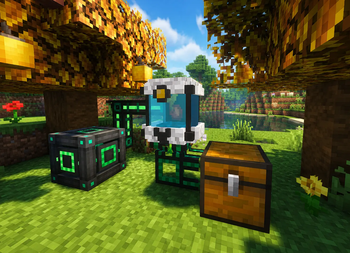

About Cobblemon Processing Chamber
From ModrinthA Cobblemon addon that adds energy-powered machines to process apricorn seeds, berries, and mint seeds into their mature forms.

Processing Chamber
Processing Chamber is a Cobblemon addon that adds FE-powered machines for automating the production of Apricorns, Berries, and Mint Leaves.
Build compact processing setups, power your machines with FE, install upgrade cards, and automate resource production using hoppers, item pipes, and energy networks.
✨ Features
- FE-powered processing machines
- Apricorn Seed automation
- Berry multiplication
- Mint Leaf production
- Upgrade cards with unique effects
- Advanced machine tier
- Custom GUI
- Energy and progress display
- Hopper and pipe automation support
- Configurable machine values
- English and Brazilian Portuguese translations
🔧 Blocks
| Block | Description | | ------------------------------- | -------------------------------------------------------------------------------------------------------------------------------------------------------- | | Resource Processor | Basic machine for processing Cobblemon resources. Stores 5,000 FE, consumes 15 FE/t, and accepts 1 upgrade card. | | Advanced Resource Processor | Advanced machine with higher energy capacity, faster processing, and up to 3 different upgrade cards. Stores 10,000 FE and consumes 45 FE/t. |
🧩 Items
| Item | Description | | ------------------------- | ------------------------------------------------------------------------------------------------------------------------- | | Processor Upgrade Kit | Upgrades a Resource Processor into an Advanced Resource Processor while preserving energy, progress, items, and upgrades. | | Overclock Card | Reduces processing time, but increases FE usage. | | Optimized Card | Reduces FE consumption without changing processing time. | | Fortune Card | Adds a chance to generate bonus output, but increases FE usage. |
⚙️ How It Works
- Place a Resource Processor or Advanced Resource Processor in the world.
- Supply FE energy through the back face of the machine.
- Insert a valid Cobblemon item into the input slot.
- The machine processes automatically while it has energy and output space.
- Generated items are stored in the 9 output slots.
- Outputs can be collected manually or extracted through automation.
The input item is not consumed every cycle.
It stays inside the machine and continues producing resources until:
- The output slots are full
- The machine runs out of energy
- The player removes the input item
If the machine runs out of energy, the processing progress is paused instead of being reset.
⬆️ Processor Upgrade Kit
The Processor Upgrade Kit instantly converts a Resource Processor into an Advanced Resource Processor.
The upgrade preserves:
- Stored energy
- Processing progress
- Input item
- Output items
- Upgrade cards
🃏 Upgrade Cards
Upgrade cards can only be inserted into upgrade slots.
Upgrade Rules
- Resource Processor accepts 1 upgrade card
- Advanced Resource Processor accepts up to 3 different upgrade cards
- Duplicate upgrade cards are not allowed in the same machine
- Each upgrade slot holds only 1 card
Overclock Card
Increases machine speed.
Effects:
- Reduces processing time by 20%
- Increases FE consumption by 40%
Optimized Card
Improves energy efficiency.
Effects:
- Reduces FE consumption by 30%
- Does not change processing time
Fortune Card
Adds a chance to generate bonus output.
Effects:
- +15% bonus output chance in the Resource Processor
- +25% bonus output chance in the Advanced Resource Processor
- Increases FE consumption by 20%
📋 Supported Processing
Apricorn Seeds → Apricorns
| Input | Output | | -------------------- | --------------- | | Black Apricorn Seed | Black Apricorn | | Blue Apricorn Seed | Blue Apricorn | | Green Apricorn Seed | Green Apricorn | | Pink Apricorn Seed | Pink Apricorn | | Red Apricorn Seed | Red Apricorn | | White Apricorn Seed | White Apricorn | | Yellow Apricorn Seed | Yellow Apricorn |
Berries → Same Berry
Supported Cobblemon berries can be processed into the same berry type, making berry multiplication easy to automate.
Example:
| Input | Output | | ------------ | ------------ | | Oran Berry | Oran Berry | | Sitrus Berry | Sitrus Berry | | Pecha Berry | Pecha Berry |
Mint Seeds → Mint Leaves
| Input | Output | | ---------------- | --------------- | | Red Mint Seeds | Red Mint Leaf | | Blue Mint Seeds | Blue Mint Leaf | | Green Mint Seeds | Green Mint Leaf | | Pink Mint Seeds | Pink Mint Leaf | | White Mint Seeds | White Mint Leaf | | Cyan Mint Seeds | Cyan Mint Leaf |
⚡ Energy
Processing Chamber machines use FE energy.
Highlights
From source dataGame versions
Built for Minecraft 1.21.1.
Loaders
Runs on Fabric and NeoForge.
Footprint
Rated a light load on a server.
Cobblemon Processing Chamber on Nxeon
From our catalogue- One-click install
- Supported on Nxeon Minecraft servers. We download it from Modrinth, place it, and restart the server.
- Server side
- Required on the server
- Server type needed
- Fabric, NeoForge
- Server load
- light
- Smallest plan we suggest
- Minecraft — 2 GB (2 GB RAM). This follows our own load rating above, not a benchmark.
- Latest build
- 1.2.0, released 2026-07-12
Game versions by loader
| Loader | Game versions | Newest |
|---|---|---|
| Fabric | 1.21.1 | 1.21.1 |
| NeoForge | 1.21.1 | 1.21.1 |
From 5 recorded builds of Cobblemon Processing Chamber.
Recent builds
| Build | Released | Game versions | Loaders |
|---|---|---|---|
| 1.2.0 | 2026-07-12 | 1.21.1 | Fabric |
| 1.2.0 | 2026-07-12 | 1.21.1 | NeoForge |
| 1.1.0 | 2026-06-25 | 1.21.1 | Fabric |
| 1.1.0 | 2026-06-25 | 1.21.1 | NeoForge |
| 1.0.0 | 2026-06-23 | 1.21.1 | Fabric |
Dependencies
- Required: modrinth project MdwFAVRL (modrinth, not in our catalogue)
Declared by the newest build that lists any. Required ones are installed with it on one-click installs.
Run Cobblemon Processing Chamber on a Minecraft server
Pick a server or deploy a new one above; it is installed in one click.
What kind of mod it is
From the catalogTechnology & automation
Machines, power, logistics and automation.
Runs on your server
From source side supportModrinth lists Cobblemon Processing Chamber as required on the server. Check its Modrinth page to see whether players need it too.
Compatibility
- Game
- Minecraft
- Loaders
- FabricNeoForge
- Runs on
- Serverrequired on the server
- Game versions
- 1.21.1
Verified at the source
- ✓ModrinthOfficial listing, checked 2026-10-03Open ↗
- ✓AuthorRapidMesck, as published on Modrinth
- ✓LicenseMITFree









