







About Comforts
From ModrinthAdds sleeping bags and hammocks for, respectively, portability and turning day to night, without setting new spawns. Comes in 16 different colors!
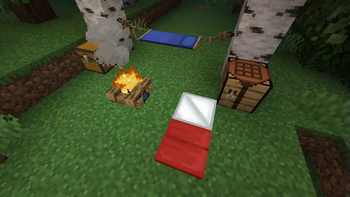
Comforts is a mod that adds sleeping bags and hammocks to Minecraft. These items can be used just like beds except they do not set a player's spawn point on use, safely preserving a player's spawn point at their home base. Just like beds, they also come in 16 different colors! The difference is that sleeping bags can be stacked and are more convenient to use on adventures and hammocks are like an inverse bed, turning day to night.
Features
Sleeping Bag
The recipe for the sleeping bag is simply three pieces of matching color wool in a straight line.
1.21 and above

1.20.6 and below

You can also dye any sleeping bag into any of the other colors!

Hammock
The recipe for the hammock cloth is simply a piece of colored wool in the center, sticks to the top and bottom, and the rest of the slots are strings.
1.21 and above

1.20.6 and below

You can also dye any hammock cloth into any of the other colors!

Please refer to this guide for instructions on how to build the hammock.
Configuration Options
- Auto-Use Sleeping Bag
- Well-Rested Mechanic
- Sleepiness Factor
- Hammocks at Night
- Sleeping Bag Break Chance
- Sleeping Bag Debuffs
- Insulated Sleeping Bags
Affiliates

Highlights
From source dataGame versions
Supports 29 Minecraft versions, the newest being 26.2.
Loaders
Runs on Fabric, Forge, NeoForge and Quilt.
Footprint
Rated a light load on a server.
Comforts on Nxeon
From our catalogue- One-click install
- Supported on Nxeon Minecraft servers. We download it from Modrinth, place it, and restart the server.
- Server side
- Required on the server
- Server type needed
- Fabric, Forge, NeoForge, Quilt
- Server load
- light
- Smallest plan we suggest
- Minecraft — 2 GB (2 GB RAM). This follows our own load rating above, not a benchmark.
- Latest build
- 16.0.0+26.2, released 2026-06-22
Game versions by loader
| Loader | Game versions | Newest |
|---|---|---|
| NeoForge | 1.21.11 to 26.2 (3 versions) | 26.2 |
| Fabric | 26.1.2 to 26.2 (2 versions) | 26.2 |
From 5 recorded builds of Comforts.
Recent builds
| Build | Released | Game versions | Loaders |
|---|---|---|---|
| 16.0.0+26.2 | 2026-06-22 | 26.2 | NeoForge |
| 16.0.0+26.2 | 2026-06-22 | 26.2 | Fabric |
| 15.0.0+26.1.2 | 2026-06-22 | 26.1.2 | NeoForge |
| 15.0.0+26.1.2 | 2026-06-22 | 26.1.2 | Fabric |
| 14.0.2+1.21.11 | 2026-03-07 | 1.21.11 | NeoForge |
Run Comforts on a Minecraft server
Pick a server or deploy a new one above; it is installed in one click.
What kind of mod it is
From the catalogGameplay & overhauls
New mechanics, content and overhauls that change how the game plays.
Runs on your server
From source side supportModrinth lists Comforts as required on the server. Check its Modrinth page to see whether players need it too.
Compatibility
- Game
- Minecraft
- Loaders
- FabricForgeNeoForgeQuilt
- Runs on
- Serverrequired on the server
- Game versions
- 26.2 and 28 earlier
Verified at the source
- ✓ModrinthOfficial listing, checked 2026-10-01Open ↗
- ✓AuthorTheIllusiveC4, as published on Modrinth
- ✓LicenseLGPL-3.0-or-laterFree









