







About Create: Additional Logistics
From ModrinthAdds a few new logistics-oriented blocks to Create, and tweaks a few behaviors.
An addition for Create 6 for Minecraft 1.20.1 and 1.21.1.
This mod aims to improve or expand several areas related to logistics with the Create mod.
Additions
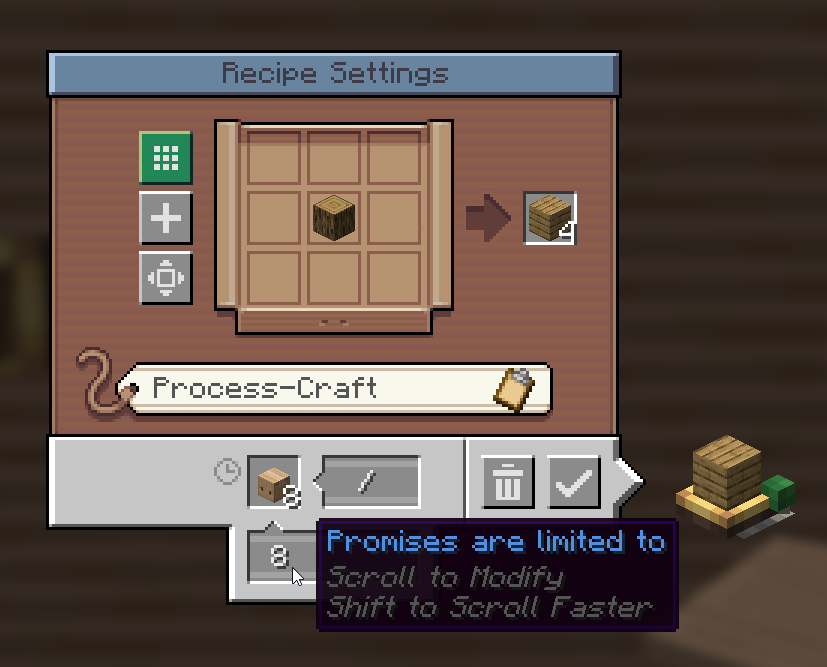
Promise Limits (Factory Gauge Improvement)
We've all been there. You set up a new factory gauge, and request 100 stacks of whatever, only to find out that your production facility can't keep up and Create tried sending 1,000 packages worth of ingredients and now everything is awful.
Promise Limits are here to help. When configuring a factory gauge, you can now set a limit for how many promises it can have open at once. This allows you to, for example, limit it to only waiting for at most a stack of something at a time.
Your factory's logistics grid will thank you.
Additional Stock (Restocker Gauge Improvement)
Restockers are pretty cool, but something I don't like about them is how they stock to a specific value and as soon as so much as a single cobblestone is missing, they'll request the exact number needed to reach that value again. This can be a bit silly and wasteful. As such, additional stock! Say, for example, you have a Restocker that's set to keep one stack of cobblestone on hand. With this, you can tell the Restocker to request 8 additional stacks of items whenever the available quantity falls under the requested level (1 stack). Then, say the number of cobblestone in storage drops to 32. Half of a stack. Instead of requesting 32 cobblestone to get back up to one stack, it'll request 544 cobblestone. That's the missing 32, and 8 more stacks. Kind of like a Threshold Switch, but for restocking. And with a somewhat clunkier UI because of how the Restocker works.
Regular Expressions (Package Address Improvement)
Globs are nice, but sometimes they just lack a little something, right? Well, go ahead and use regex if you dare. No, really. You can now. Just start your address pattern with regex: (case-insensitive) and the rest of it will be treated as a regular expression.
Cash Register (New Block, Stock Ticker-Like)
A new block that serves as an alternative to the Stock Ticker. Cash Registers are meant for use in shops specifically. They feature UIs for extracting items rather than right-clicking like the Stock Ticker. Additionally, they track all sales made through them in a Sales Ledger. Plus, they look neat!
As a little bonus, you can take the Sale Ledger out of a Cash Register and click a Stock Keeper with it to quickly select all the items you sold. Good for restocking your shop, if you're doing that manually. (This works just like a clipboard list of items for a Schematicannon.)
Package Accelerator (New Block, Packagers Go Zoom)
An auxiliary block to accompany Packagers, this block uses stress units to speed up the Packager in front of it. I use Sophisticated Storage for bulk storage of items, and as the system has grown, having a single packager has presented a bottleneck for sending items out. This is my solution, allowing packages to be sent out much quicker but at a cost.
Package Accelerators require at least 30 RPM to function.
Package Editor (New Block, Rename Packages)
A new package handling block. The Package Editor is similar to a Re-Packager, but rather than combining packages from the same order, it allows you to edit the addresses of packages using rules. Rules are input by either placing a sign next to the Package Editor, or by attaching a clipboard to the side of the Package Editor. Clipboards are recommended.
When writing rules for a Package Editor, the first line is the pattern to match and the second line is the text to replace the match with. For example, say you have packages being routed into a warehouse with the prefix Ware1- and a full package name might be Ware1-Floor2-Storage. What if you want to chop off the Ware1- once the package gets to your warehouse? That's easy, just send the packages through a Package Editor with this pattern and a blank replacement line:
Ware1-
The Package Editor will search each package name for Ware1- at the start, and if it finds it, replace it with nothing. You could also write that like this:
Ware1-{*}
$1
So what's going on there? The Package Editor treats anything inside { and } as a capture group. In other words, that text is saved and can be referenced in your replacement text by adding a $ followed one you want. You can also use regular expressions, of course, if you want to do something more advanced than globs allow for.
Finally, there are two special behaviors you can manage if you're using a clipboard:
- If you check the box next to the pattern line, the pattern will be interpreted
as case-insensitive.
- If you check the box next to the replacement line, then the Package Editor will
stop after this rule (assuming this rule matched). You could use this, for example, to make a catch-all rule that sends packages to some Lost & Found if it doesn't match any other rules.
Train Network Monitor Peripheral (New Block, CC: Tweaked Only)
You know what's cool? Trains. You know what's cooler? Having some big cool wall of data about your trains. Arrivals, departures, the status of trains. And trains are pretty important for logistics, too. The Train Network Monitor is a single block that allows you to look up live data for any station and any train on a given train network. This includes everything the normal Train Station peripheral gives you, and additional events for train arrivals and departures. You can also see how many packages are in the system, and the status of every postbox attached to the various train stations.
If you're feeling particularly adventurous, you can enable optional features for viewing more details about train inventories and for read-write access to remote trains and stations. Want to update schedules on the fly using a computer? Be my guest. However, this is disabled by default because it seems a bit too unbalanced to me.
Highlights
From source dataGame versions
Supports 2 Minecraft versions, the newest being 1.21.1.
Loaders
Runs on Forge and NeoForge.
Footprint
Rated a light load on a server.
Create: Additional Logistics on Nxeon
From our catalogue- One-click install
- Supported on Nxeon Minecraft servers. We download it from Modrinth, place it, and restart the server.
- Server side
- Required on the server
- Server type needed
- Forge, NeoForge
- Server load
- light
- Smallest plan we suggest
- Minecraft — 2 GB (2 GB RAM). This follows our own load rating above, not a benchmark.
- Latest build
- 1.4.5, released 2026-01-14
Game versions by loader
| Loader | Game versions | Newest |
|---|---|---|
| NeoForge | 1.20.1 to 1.21.1 (2 versions) | 1.21.1 |
| Forge | 1.20.1 | 1.20.1 |
From 5 recorded builds of Create: Additional Logistics.
Recent builds
| Build | Released | Game versions | Loaders |
|---|---|---|---|
| 1.4.5 | 2026-01-14 | 1.21.1 | NeoForge |
| 1.4.5 | 2026-01-14 | 1.20.1 | Forge, NeoForge |
| 1.4.4 | 2025-11-13 | 1.20.1 | Forge, NeoForge |
| 1.4.3 | 2025-11-09 | 1.21.1 | NeoForge |
| 1.4.3 | 2025-11-09 | 1.20.1 | Forge, NeoForge |
Run Create: Additional Logistics on a Minecraft server
Pick a server or deploy a new one above; it is installed in one click.
What kind of mod it is
From the catalogTechnology & automation
Machines, power, logistics and automation.
Runs on your server
From source side supportModrinth lists Create: Additional Logistics as required on the server. Check its Modrinth page to see whether players need it too.
Compatibility
- Game
- Minecraft
- Loaders
- ForgeNeoForge
- Runs on
- Serverrequired on the server
- Game versions
- 1.21.1 and 1 earlier
Verified at the source
- ✓ModrinthOfficial listing, checked 2026-10-01Open ↗
- ✓AuthorKhloeLeclair, as published on Modrinth
- ✓LicenseMITFree









