







About Create: Components and Additions
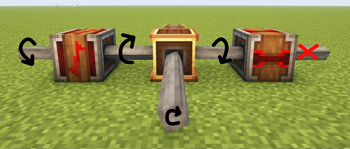
From ModrinthA small Create addon that most importantly adds the Brass Gearbox: a gearbox which the sides of which can be individually blocked.
Create: Components and Additions
_A small Create addon I'm making for my modpack, Create+._
Currently includes the following:
- Inverted Gearshift and Clutch: Right-clicking a gearshift or clutch with a redstone torch turns them into their inverted versions. (When inverted, no power means they will act like their powered, non-inverted counterparts, and when they are powered by redstone, they act like a shaft, just like their unpowered, non-inverted counterparts.)
- Brass Gearbox: has sides you can cover by right-clicking with brass casing in your hand. Covering sides prevents rotation for transferring to and from that side.
- Ponders for said blocks
- Brass Basin and Brass Chain Drive: same as originals but brass palette
Highlights
From source dataGame versions
Supports 3 Minecraft versions, the newest being 1.21.1.
Loaders
Runs on Forge and NeoForge.
Footprint
Rated a light load on a server.
Create: Components and Additions on Nxeon
From our catalogue- One-click install
- Supported on Nxeon Minecraft servers. We download it from Modrinth, place it, and restart the server.
- Server side
- Required on the server
- Server type needed
- Forge, NeoForge
- Server load
- light
- Smallest plan we suggest
- Minecraft — 2 GB (2 GB RAM). This follows our own load rating above, not a benchmark.
- Latest build
- 2.3, released 2026-06-12
Game versions by loader
| Loader | Game versions | Newest |
|---|---|---|
| Forge | 1.19.2 to 1.20.1 (2 versions) | 1.20.1 |
| NeoForge | 1.21.1 | 1.21.1 |
From 5 recorded builds of Create: Components and Additions.
Recent builds
| Build | Released | Game versions | Loaders |
|---|---|---|---|
| 2.3 | 2026-06-12 | 1.21.1 | NeoForge |
| 2.2 | 2025-09-24 | 1.20.1 | Forge |
| 2.1 | 2024-08-13 | 1.20.1 | Forge |
| 2.1 | 2024-08-13 | 1.19.2 | Forge |
| 2.0b | 2023-12-26 | 1.19.2 | Forge |
Run Create: Components and Additions on a Minecraft server
Pick a server or deploy a new one above; it is installed in one click.
What kind of mod it is
From the catalogListed on Modrinth as “Mods”
Gameplay & overhauls
New mechanics, content and overhauls that change how the game plays.
Runs on your server
From source side supportModrinth lists Create: Components and Additions as required on the server. Check its Modrinth page to see whether players need it too.
Compatibility
- Game
- Minecraft
- Loaders
- ForgeNeoForge
- Runs on
- Serverrequired on the server
- Game versions
- 1.21.1 and 2 earlier
Verified at the source
- ✓ModrinthOfficial listing, checked 2026-10-01Open ↗
- ✓AuthorSshmoob, as published on Modrinth
- ✓LicenseLGPL-3.0-or-laterFree









