






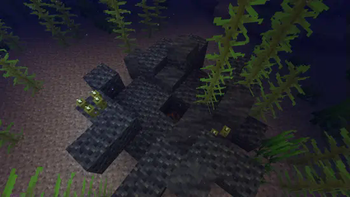

About Create: Molten Vents
From ModrinthAdds a renewable source of the orestones found in the Create mod, and by extension, many resources.
Molten Vents is a mod which adds a renewable source of the orestones found in the Create mod, and by extension the many resources that can be processed from them.
How to use:
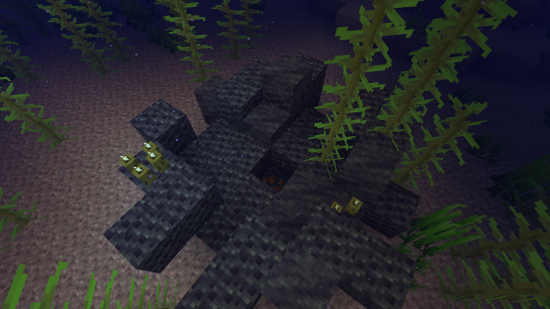
- Locate a vent; Vents are found anywhere on the surface, but are more easily found underwater. (Configurable)
- Dig out the blocks inside of the vent until you find a block that looks like the orestones the vent is made of except with magma on it, that is the dormant orestone.
- Explode the dormant orestone by any means.
- Notice that the dormant molten vent is now an active molten vent by seeing the magma in it become brighter.
- Dump lava (preferrably via an automated method) on the active molten vent and watch as the lava turns into the corresponding orestone.
- Process the orestones into resources, or use them for building.
Default Vents:
- Veridium Vent
- Asurine Vent
- Crimsite Vent
- Ochrum Vent
- Scorchia Vent
- Scoria Vent
How to add a custom molten block
Just add the name of the block to this list (a .json file that generates in the config folder)
{"values":["asurine","veridium","crimsite","ochrum","scorchia","scoria","exampleblock"]}And then depending on your modloader:
Neoforge
- Copy paste any other file in the config/molten_vents/conductive & config/molten_vents/convertible folders.
- Rename the files to the name of the custom block.
- Change values inside the files (Conductive is a list of blocks the molten vent can convert blocks through, it must contain the active molten vent at minimum. Convertible is a list of blocks the molten vent can convert into the new block. (ex. lava -> asurine))
Forge
Make a datapack that adds these two jsons: data/molten_vents/molten_vents/blocks/conductive/exampleblock.json (You can add whatever blocks you want here but definitely include these three){
"replace": false,
"values": [
"examplemodthataddsblock:exampleblock",
"molten_vents:dormant_molten_exampleblock",
"molten_vents:active_molten_exampleblock"
]
}data/molten_vents/molten_vents/blocks/convertible/exampleblock.json (The lava can be changed to any other block and other blocks can be additionally added)
{
  "replace": false,
  "values": [
    "minecraft:lava"
  ]
}
Example datapack can be found in the #datapacks channel in the discord (https://discord.gg/HHqKa8vTAN))
Then make a resourcepack that adds the name translations, blockstates, models, and textures for "molten_vents.active_molten_exampleblock" and "molten_vents.dormant_molten_exampleblock" (optional)
How to make a custom molten vent feature
Just recreate your own copy of the placed and configured feature jsons available in the base mod in the respective directories within your own datapack: data/yourdatapackname/worldgen/configured_feature/examplevent.json data/yourdatapackname/worldgen/placed_feature/examplevent.json Then add your placed feature to the forge biome modifiers: data/yourdatapackname/forge/biome_modifier/add_vents.json
Examples are here:
Discord: https://discord.gg/HHqKa8vTAN
This mod may be used in any modpack.

Highlights
From source dataGame versions
Supports 18 Minecraft versions, the newest being 1.21.8.
Loaders
Runs on Forge and NeoForge.
Footprint
Rated a light load on a server.
Create: Molten Vents on Nxeon
From our catalogue- One-click install
- Supported on Nxeon Minecraft servers. We download it from Modrinth, place it, and restart the server.
- Server side
- Required on the server
- Server type needed
- Forge, NeoForge
- Server load
- light
- Smallest plan we suggest
- Minecraft — 2 GB (2 GB RAM). This follows our own load rating above, not a benchmark.
- Latest build
- 2.1.1, released 2025-07-23
Game versions by loader
| Loader | Game versions | Newest |
|---|---|---|
| Forge | 1.20 to 1.21.4 (12 versions) | 1.21.4 |
| NeoForge | 1.21.1 to 1.21.8 (8 versions) | 1.21.8 |
From 5 recorded builds of Create: Molten Vents.
Recent builds
| Build | Released | Game versions | Loaders |
|---|---|---|---|
| 2.1.1 | 2025-07-23 | 1.21.1 to 1.21.8 (8 versions) | NeoForge |
| 2.1.0 | 2025-05-19 | 1.21.1 to 1.21.5 (5 versions) | NeoForge |
| 2.0.9 | 2025-03-14 | 1.21.1 to 1.21.4 (4 versions) | NeoForge |
| 2.0.9 | 2024-12-10 | 1.20 to 1.21.4 (12 versions) | Forge |
| 2.0.8 | 2024-07-03 | 1.20 to 1.20.1 (2 versions) | Forge |
Run Create: Molten Vents on a Minecraft server
Pick a server or deploy a new one above; it is installed in one click.
What kind of mod it is
From the catalogGameplay & overhauls
New mechanics, content and overhauls that change how the game plays.
Runs on your server
From source side supportModrinth lists Create: Molten Vents as required on the server. Check its Modrinth page to see whether players need it too.
Compatibility
- Game
- Minecraft
- Loaders
- ForgeNeoForge
- Runs on
- Serverrequired on the server
- Game versions
- 1.21.8 and 17 earlier
Verified at the source
- ✓ModrinthOfficial listing, checked 2026-10-01Open ↗
- ✓AuthorApothicon, as published on Modrinth
- ✓LicenseMITFree









