






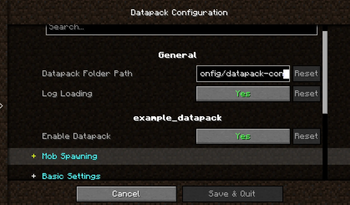

About Data Config
From ModrinthA mod that gives Minecraft datapacks a visual graphical configuration interface. Datapack authors only need to write simple JSON configurations, and players can adjust datapack parameters directly through the Cloth Config interface in-game, without manuall
Introduction
Datapack Config Mod is a utility mod for Minecraft Forge 1.20.1 that provides datapack developers with a convenient graphical configuration interface.
By integrating the Cloth Config API, the mod allows players to modify datapack parameters directly in-game without manually editing JSON files or restarting the game.
Main Features
🎨 Graphical Configuration Interface
- Uses Cloth Config to provide a user-friendly interface
- Supports 10+ configuration types: sliders, text boxes, dropdown menus, color pickers, etc.
- Changes take effect immediately — no game restart required
🌍 Full Localization Support
- Bilingual interface (Chinese and English)
- Config option names, descriptions, and tooltips can be set per language
📦 Global Datapack Loading
- Automatically loads
.zipdatapacks fromconfig/datapack-config-mod/ - Each datapack can be toggled on/off via the config interface
- Datapacks are loaded with the highest priority
🔧 Main Menu Shortcut
- A "Datapack Config" button is added to the top‑right corner of the main menu for one‑click access
Supported Configuration Types
| Type | Description | |------|-------------| | boolean | Boolean toggle | | int / slider | Integer input / slider | | double / double_slider | Floating‑point input / slider | | string | Text input | | enum / enum_selector | Dropdown menu / enum selector | | color | Color picker |
Quick Start
For Datapack Authors
Create a datapack_config.json file in the root directory of your datapack:
{
  "config": {
    "spawn_rate": {
      "type": "slider",
      "default": "50",
      "min": 0,
      "max": 100,
      "name": {
        "zh_cn": "生物生成率",
        "en_us": "Mob Spawn Rate"
      },
      "filePath": "data/mydatapack/config.json",
      "key": "spawn_rate"
    }
  }
}Highlights
From source dataGame versions
Supports 5 Minecraft versions, the newest being 1.21.11.
Loaders
Runs on Forge and NeoForge.
Footprint
Rated a light load on a server.
Data Config on Nxeon
From our catalogue- One-click install
- Supported on Nxeon Minecraft servers. We download it from Modrinth, place it, and restart the server.
- Server side
- Required on the server
- Server type needed
- Forge, NeoForge
- Server load
- light
- Smallest plan we suggest
- Minecraft — 2 GB (2 GB RAM). This follows our own load rating above, not a benchmark.
- Latest build
- 0.0.2-1.21.10-neo (beta), released 2026-07-05
Game versions by loader
| Loader | Game versions | Newest |
|---|---|---|
| Forge | 1.20.1 to 1.21.1 (3 versions) | 1.21.1 |
| NeoForge | 1.21.10 to 1.21.11 (2 versions) | 1.21.11 |
From 5 recorded builds of Data Config.
Recent builds
| Build | Released | Game versions | Loaders |
|---|---|---|---|
| 0.0.2-1.21.10-neo beta | 2026-07-05 | 1.21.10 to 1.21.11 (2 versions) | NeoForge |
| 0.0.2-1.20.1 beta | 2026-05-31 | 1.20.1 | Forge |
| 0.0.2-1.20.4 beta | 2026-05-31 | 1.20.4 | Forge |
| 0.0.2-1.21.1 beta | 2026-05-31 | 1.21.1 | Forge |
| 0.0.1-1.20.1 beta | 2026-05-18 | 1.20.1 | Forge |
Dependencies
- Required: modrinth project 9s6osm5g (modrinth, not in our catalogue)
Declared by the newest build that lists any. Required ones are installed with it on one-click installs.
Run Data Config on a Minecraft server
Pick a server or deploy a new one above; it is installed in one click.
What kind of mod it is
From the catalogQuality of life & UI
Small conveniences, tweaks and interface improvements players notice straight away.
Runs on your server
From source side supportModrinth lists Data Config as required on the server. Check its Modrinth page to see whether players need it too.
Compatibility
- Game
- Minecraft
- Loaders
- ForgeNeoForge
- Runs on
- Serverrequired on the server
- Game versions
- 1.21.11 and 4 earlier
Verified at the source
- ✓ModrinthOfficial listing, checked 2026-10-02Open ↗
- ✓Authorwonderful_Ai_Chen, as published on Modrinth
- ✓LicenseMITFree









