






About Discord Whitelister
From SpigotMCA simple spigot plugin which allows whitelisting through a discord text channel.
Discord Whitelister Bot for Spigot
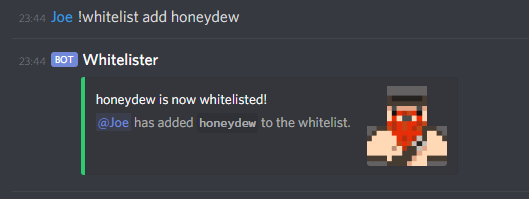
A simple spigot plugin which allows whitelisting through a discord text channel. This provides an easy way for users to whitelist without needing to be on the minecraft server.
Features
3 separate role groups
- add-remove group: allows the user to add and remove users from the whitelist an unlimited amount of times (recommended for owners and admins).
- add group: allows the user to add to the whitelist an unlimited amount of times (recommended for moderators).
- limited-add group: allows the user to whitelist a limited amount of times (recommended for users, default amount is 3).
- limited-add group can be disabled in the config (enabled by default).
- This list removes the ability for limited-add users to add back users that have been removed by the add-remove group. For example: a whitelisted user cannot add a user that has been removed by an admin or moderator.
- Can be disabled in the config (enabled by default).
As of version 1.4.9, the ! prefix for commands has been replaced with / to utilize Discord's slash commands feature.
- Use /whitelist add "minecraftUsername" in a valid channel to whitelist people on your minecraft server.
- Use /whitelist remove "minecraftUsername" in a valid channel to remove people from the whitelist on your minecraft server.
- Use /whitelist in a valid channel to get info about the bot and how to use it.
- Allows editing of server response messages (file is located at (server-root)/plugins/DiscordWhitelister/custom-messages.yml)
- This feature is disabled by default and can be enabled in the config file (use-custom-messages)
- Note: Only message variables ({Sender} for example) in the original messages will be evaluated. For example: using {MaxWhitelistAmount} in the "insufficient-permissions" string/message will not work as it was never in the original string/message
- Allows the use of ids of roles instead of names, for example: 445666895333687347 instead of Admin
- To enable this set 'use-id-for-roles' to true
- 446223693887176704
add-roles :
- 485463455940214794
limited-add-roles :
- 639221397981233162
use-id-for-roles : true
- Use the command 'dwreload' or 'discordwhitelisterreload' to reload the config and re-initialize the bot without having to restart the Minecraft server
- This feature is meant to be used when users can add themselves to the whitelist.
- If whitelisted-role-auto-add is set to true (false by default), the Discord role with the name defined by whitelisted-role ("Whitelisted" by default) will be added to that user when they successfully add (themselves) to the whitelist.
- If whitelisted-role-auto-remove is set to true (false by default), that role will be removed from that user when they successfully remove (themselves) from the whitelist.
- This requires:
- The bot to have the Manage Roles permission in Discord
- Setting up a Discord role with the same name (case sensitive) as the config
- The bots role must be higher than the whitelist role
- Only select Discord roles can whitelist through the bot
- Bot only listens for messages in select text channels
- Logs whitelist attempts from valid roles in the console
Set Up
Config file is located at: (server-root)/plugins/DiscordWhitelister/discord-whitelister.yml, this needs a valid bot token and valid channel id(s) to work. To create a Discord application and/or find your discord bot token, follow this link: https://discordapp.com/developers/applications/
!! Please enable 'SERVER MEMBERS' and 'MESSAGE_CONTENT' intent, without these the bot will not work! These options are located here: https://discord.com/developers/applications. Click the application you're using to run this bot, then the Bot button on the left, there you should see the options needed.
Highlights
From source dataGame versions
Supports 7 Minecraft versions, the newest being 1.20.
Loaders
Runs on Spigot and Paper.
Footprint
Rated a light load on a server.
Discord Whitelister on Nxeon
From our catalogue- One-click install
- Supported on Nxeon Minecraft servers, for Paper servers. We download it from SpigotMC, place it, and restart the server.
- Server side
- Required on the server
- Server type needed
- Spigot, Paper
- Server load
- light
- Smallest plan we suggest
- Minecraft — 2 GB (2 GB RAM). This follows our own load rating above, not a benchmark.
- Latest build
- 1.5.1, released 2024-01-22
Game versions by loader
| Loader | Game versions | Newest |
|---|---|---|
| Paper | 1.12 to 1.20 (7 versions) | 1.20 |
| Spigot | 1.12 to 1.20 (7 versions) | 1.20 |
From 10 recorded builds of Discord Whitelister.
Recent builds
| Build | Released | Game versions | Loaders |
|---|---|---|---|
| 1.5.1 | 2024-01-22 | 1.12 to 1.20 (7 versions) | Spigot, Paper |
| 1.4.9 | 2021-08-03 | n/a | Spigot, Paper |
| 1.4.7 | 2021-03-13 | n/a | Spigot, Paper |
| 1.4.5 | 2021-02-03 | n/a | Spigot, Paper |
| 1.4.4 | 2020-12-20 | n/a | Spigot, Paper |
| 1.4.3 | 2020-12-05 | n/a | Spigot, Paper |
Run Discord Whitelister on a Minecraft server
Pick a server or deploy a new one above; it is installed in one click.
What kind of mod it is
From the catalogAdmin & protection
Permissions, moderation, anti-cheat and land protection for the people running the server.
Runs on your server
From source side supportSpigotMC lists Discord Whitelister as required on the server. Check its SpigotMC page to see whether players need it too.
Compatibility
- Game
- Minecraft
- Loaders
- SpigotPaper
- Runs on
- Serverrequired on the server
- Game versions
- 1.20 and 6 earlier
- Requires
- One-click install needs a Paper server.
Verified at the source
- ✓SpigotMCOfficial listing, checked 2026-10-02Open ↗
- ✓AuthorJoeShimo, as published on SpigotMC
- ✓LicenseNot published by the sourceFree









