






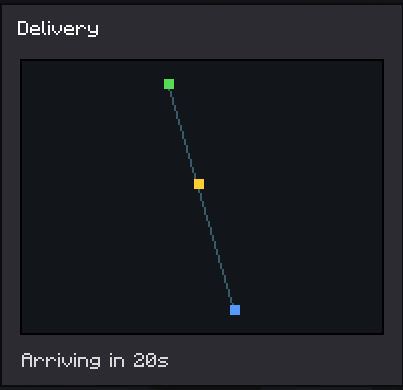

About Drone Logistics
From ModrinthAutomate item hauling with flying drones. Place terminals, link a storage and a drone, then order items from another storage; the drone flies over, grabs the cargo and delivers it with a live map and ETA.
Drone Logistics
Automated item delivery between your storages using flying delivery drones. Built for Minecraft Forge 1.20.1.
Overview
Drone Logistics turns hauling resources between bases into an automated task. Instead of running chests back and forth, you build a network of terminals, attach storages and a drone to them, and order the items you need. A drone then flies to the other storage, picks up the cargo and brings it back to you.
Core parts
- Logistics Terminal. A control block where you browse your storages, place orders and collect deliveries.
- Linking Tool. Used to select a storage area (any chests and containers inside it) and to attach the storage and the drone to a terminal.
- Delivery Drone. A flying entity that physically travels from your terminal to the target storage and back.
How to play
- Craft and place terminals where you need them.
- With the Linking Tool, middle-click two blocks to mark the storage area, then Shift plus right-click a terminal to create and attach the storage.
- Right-click a drone with the Linking Tool to select it, then right-click your terminal to attach the drone.
- Open the terminal, pick another of your storages, add the items you want to the order and press Order.
- The drone flies out, collects the cargo and brings it to your terminal buffer. You can watch the route and the arrival time on the map, and the receiving storage shows an incoming drone panel.
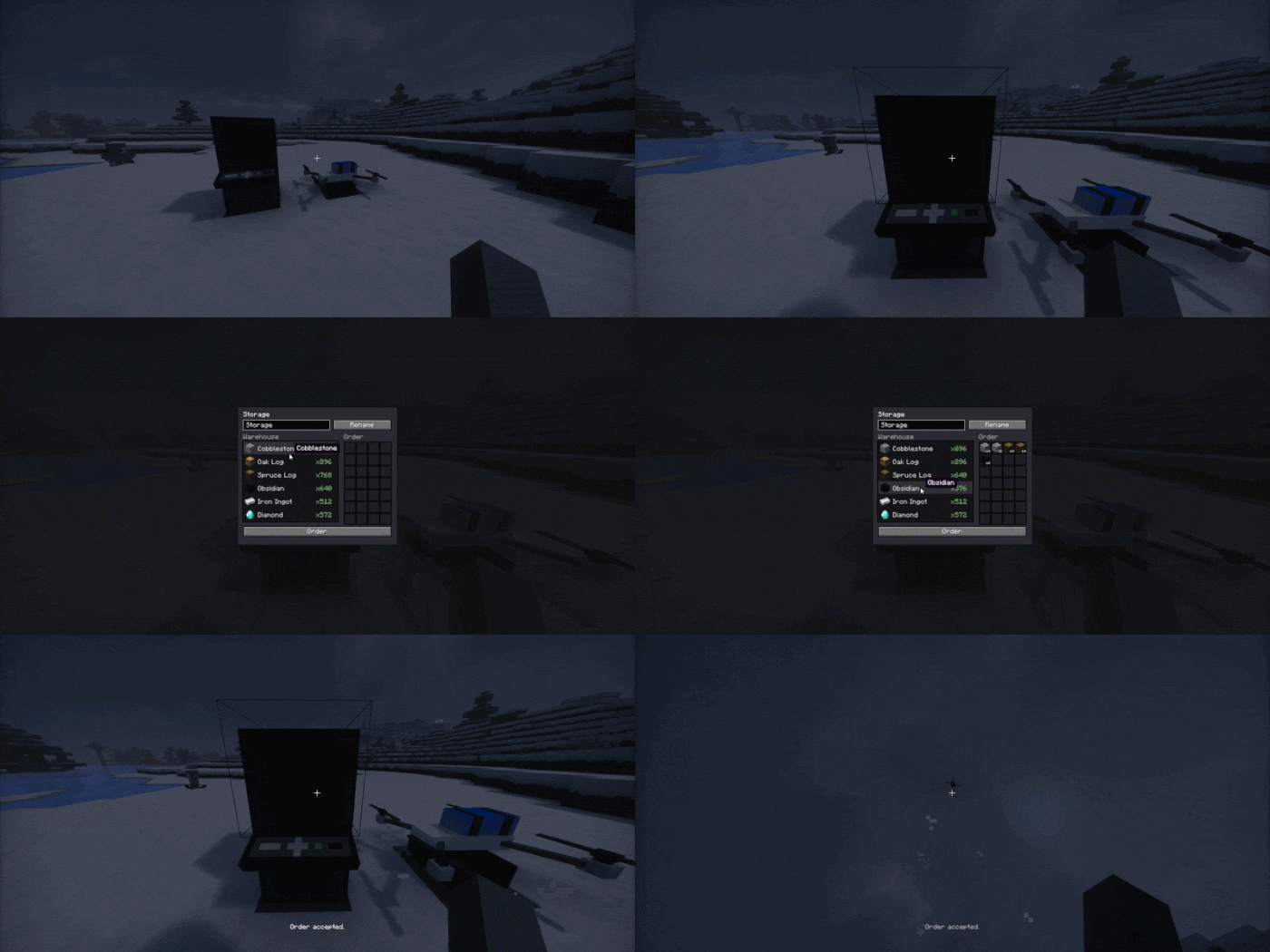
Anti dupe and reservation
When you place an order, the items are immediately taken out of the target storage and held by the order, so they cannot be stolen while the drone is in transit. A terminal that has an active delivery cannot be broken until the delivery finishes.
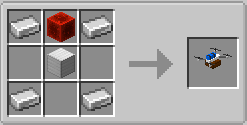
Crafting
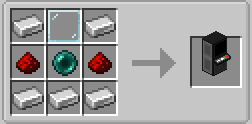
Logistics Terminal:
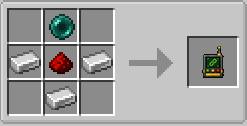
Linking Tool:
Delivery Drone:
Languages
English and Russian are included.
Highlights
From source dataGame versions
Supports 3 Minecraft versions, the newest being 1.21.4.
Loaders
Runs on Forge and NeoForge.
Footprint
Rated a light load on a server.
Drone Logistics on Nxeon
From our catalogue- One-click install
- Supported on Nxeon Minecraft servers. We download it from Modrinth, place it, and restart the server.
- Server side
- Required on the server
- Server type needed
- Forge, NeoForge
- Server load
- light
- Smallest plan we suggest
- Minecraft — 2 GB (2 GB RAM). This follows our own load rating above, not a benchmark.
- Latest build
- 1.0.0, released 2026-08-03
Game versions by loader
| Loader | Game versions | Newest |
|---|---|---|
| NeoForge | 1.21.1 to 1.21.4 (2 versions) | 1.21.4 |
| Forge | 1.20.1 | 1.20.1 |
From 5 recorded builds of Drone Logistics.
Recent builds
| Build | Released | Game versions | Loaders |
|---|---|---|---|
| 1.0.0 | 2026-08-03 | 1.21.4 | NeoForge |
| 1.0.0 | 2026-08-03 | 1.21.1 | NeoForge |
| 1.0.0 | 2026-08-03 | 1.20.1 | Forge |
| 0.1.0 beta | 2026-07-17 | 1.21.1 | NeoForge |
| 0.1.0 beta | 2026-07-12 | 1.20.1 | Forge |
Dependencies
- Required: modrinth project 8BmcQJ2H (modrinth, not in our catalogue)
Declared by the newest build that lists any. Required ones are installed with it on one-click installs.
Run Drone Logistics on a Minecraft server
Pick a server or deploy a new one above; it is installed in one click.
What kind of mod it is
From the catalogVehicles & ships
Cars, boats, aircraft, ships and other things to drive or fly.
Runs on your server
From source side supportModrinth lists Drone Logistics as required on the server. Check its Modrinth page to see whether players need it too.
Compatibility
- Game
- Minecraft
- Loaders
- ForgeNeoForge
- Runs on
- Serverrequired on the server
- Game versions
- 1.21.4 and 2 earlier
Verified at the source
- ✓ModrinthOfficial listing, checked 2026-10-03Open ↗
- ✓AuthoraKyBeFf, as published on Modrinth
- ✓LicenseLicenseRef-All-Rights-ReservedFree









