







About Flowstone
From ModrinthA configurable mod that changes what happens when lava meets water or ice, allowing for the (re)generation of ores and other resources.
Flowstone
Flowstone makes ores renewable resources by modifying what blocks Lava turns into whenever it meets Water (or, in some cases, a block of Blue Ice).
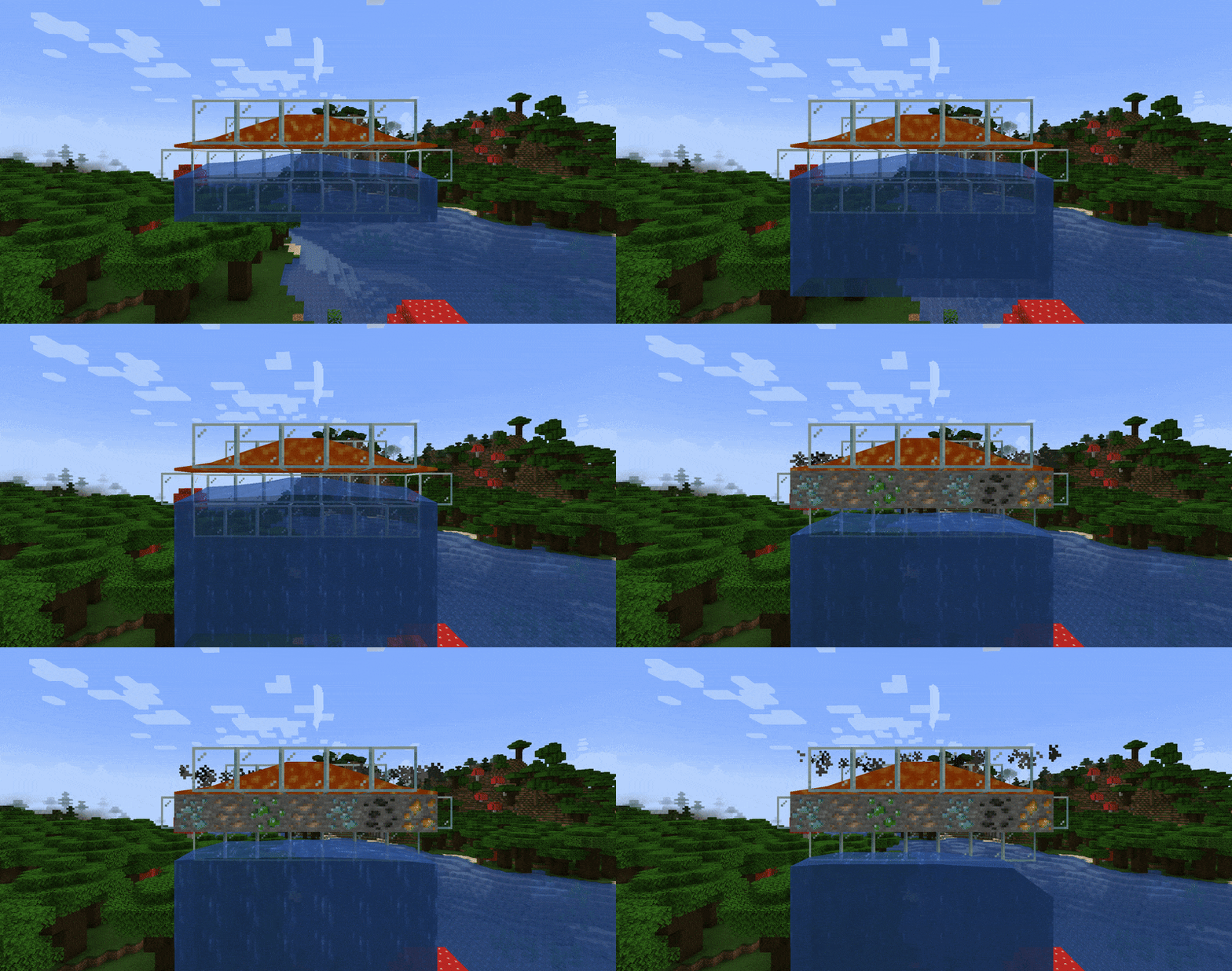
_(In the GIF, I configured Flowstone to always generate some ore instead of Stone, for example purposes. See below for details.)_
Features
Since version 6.3, Flowstone offers several features you can enable or disable separately in the configuration file.
You can usually find Flowstone's configuration file at <your-minecraft-instance>/config/flowstone.json.
Deepslate Generators
"allowDeepslateGenerators": true // enabled by defaultWith this feature enabled, trying to generate Stone or Cobblestone when deep enough underground (in most worlds, below $y=8$) will generate Deepslate and Cobbled Deepslate instead.
> Note > > This feature depends on the world generation options. So, if your world doesn't generate Deepslate (or generates it at a different y-level), this feature will mirror that configuration.
Worldly Generators
"allowWorldlyGenerators": true // enabled by defaultWith this feature enabled, whenever Stone, Deepslate (with the previous feature), or Netherrack (with one of the following features) is about to be generated, it might generate an appropriate ore block instead.
For each ore block (that is, each block under the c:ores tag), the probability of it being generated depends on the world generation configuration, so on a vanilla world it follows the same distribution documented on the wiki.
This feature should automatically be compatible with every mod that adds new ores under the c:ores tag.
Finally, note that only normal ore blocks (like Diamond Ore) can replace Stone, only deepslate ore blocks (like Deepslate Diamond Ore) can replace Deepslate, and only netherrack ore blocks (like Quartz Ore or Ancient Debris) can replace Netherrack.
Custom Generators
"allowCustomGenerators": false // disabled by defaultWith this feature enabled, one can define custom generators through datapacks.
Example
<datapack_name>.zip
├── data
│   └── <datapack_name>
│       └── flowstone
│           └── generators
│               ├── andesite.json
│               ├── diorite.json
│               ├── granite.json
│               └── tuff.json
└── pack.mcmeta
{
// The block to be replaced
"replace": "minecraft:cobbled_deepslate",
// The block to replace the previous with
"with": "minecraft:tuff",
// The cache of replacement
"chance": 0.3
}The rest of this example is on the project source page on GitHub, under the examples folder.
Basalt Generation
"enableBasaltGeneration": false // disabled by defaultI know, I know, Basalt generation is already a vanilla Minecraft feature, but since I freaking hate Basalt for its uselessness, I added this feature to disable its generation. Simple as that.
Netherrack Generation
"enableNetherrackGeneration": true // enabled by defaultWith this feature enabled, whenever Lava meets a block of Blue Ice in the Nether, and no Basalt would be generated, the Lava turns into a block of Netherrack.
End Stone Generation
"enableEndStoneGeneration": true // enabled by defaultWith this feature enabled, whenever Stone or Cobblestone is about to generate in The End, a block of End Stone generates instead.
Alas, this feature makes ores' regeneration impossible in The End. Nonetheless, I set it as enabled by default because I like the idea that The End is _corrupted_ and, thus, that (almost) every block generated within it gets corrupted as well.
Debug Mode
"debugMode": null // hidden and disabled by defaultWhen enabled, this feature forces Flowstone to generate the alternative blocks instead of the default ones, as if setting the chances for those blocks to be generated to 100% (for instance, the GIF at the head of this page was generated with this feature enabled).
Use this feature only when you're testing which blocks _Worldly_ or _Custom_ generators can generate (it works only for those two features), since using it in a normal playthrough is practically cheating.
Highlights
From source dataGame versions
Supports 27 Minecraft versions, the newest being 26.3.
Loaders
Runs on Fabric.
Footprint
Rated a light load on a server.
Flowstone on Nxeon
From our catalogue- One-click install
- Supported on Nxeon Minecraft servers. We download it from Modrinth, place it, and restart the server.
- Server side
- Required on the server
- Server type needed
- Fabric
- Server load
- light
- Smallest plan we suggest
- Minecraft — 2 GB (2 GB RAM). This follows our own load rating above, not a benchmark.
- Latest build
- 6.7+26.3, released 2026-09-18
Game versions by loader
| Loader | Game versions | Newest |
|---|---|---|
| Fabric | 1.20.2 to 26.3 (21 versions) | 26.3 |
From 5 recorded builds of Flowstone.
Recent builds
| Build | Released | Game versions | Loaders |
|---|---|---|---|
| 6.7+26.3 | 2026-09-18 | 26.3 | Fabric |
| 6.7+26.2 | 2026-09-07 | 26.2 | Fabric |
| 6.7+26.1 | 2026-05-31 | 26.1 to 26.1.2 (3 versions) | Fabric |
| 6.6+26.1 | 2026-05-09 | 26.1 to 26.1.2 (3 versions) | Fabric |
| 6.5+1.20.2 | 2025-10-24 | 1.20.2 to 1.21.10 (16 versions) | Fabric |
Dependencies
- Required: modrinth project P7dR8mSH (modrinth, not in our catalogue)
Declared by the newest build that lists any. Required ones are installed with it on one-click installs.
Run Flowstone on a Minecraft server
Pick a server or deploy a new one above; it is installed in one click.
What kind of mod it is
From the catalogWorld generation
Changes or adds to how new terrain, biomes and structures are created.
Runs on your server
From source side supportModrinth lists Flowstone as required on the server. Check its Modrinth page to see whether players need it too.
Compatibility
- Game
- Minecraft
- Loaders
- Fabric
- Runs on
- Serverrequired on the server
- Game versions
- 26.3 and 26 earlier
Verified at the source
- ✓ModrinthOfficial listing, checked 2026-10-02Open ↗
- ✓AuthorNubivago, as published on Modrinth
- ✓LicenseMITFree









