







About FMG-to-MC
From ModrinthTurn maps from Azgaar's Fantasy Map Generator into explorable Minecraft worlds.
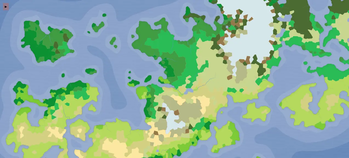
FMG-to-MC connects Azgaar's Fantasy Map Generator to Minecraft's world generation. Export two GeoJSON files from your map — Cells and Rivers — place them in the right folder, and generate a world shaped after the geography you designed.
> ⚠️ The mod is still in alpha, so bugs are expected.
Getting Started
1. Export from Azgaar
Open your map in Azgaar's Fantasy Map Generator and go to Export → JSON → Cells and Rivers.
2. Place the files
In your .minecraft folder (Windows: type %appdata% in File Explorer), create the following structure:
config/fmgtomc/maps/default/
  |- <YourWorld> Cells.geojson
  |- <YourWorld> Rivers.geojson
Any filename works, as long as it contains cells or rivers.
3. Create the world
Launch Minecraft → Create New World → World → set World Type to FMG Fantasy Map → Create World.
> Dedicated server: set level-type=fmgtomc\:fmgtomc in server.properties.
Important Notes
Scale
By default the world runs at roughly 1:125 horizontal scale — 1 block in Minecraft corresponds to about 125 meters on your Azgaar map. Vertical scale compresses far less.
Biomes
Terrain shape and biomes come from your map. Trees, vegetation, ores, and mobs are provided by the mapped vanilla biomes — the generator only shapes terrain, water, and rivers.
Rivers
Only rivers natively generated by Azgaar are supported. Rivers manually drawn may not generate correctly.
Recommended mods (not required)
- FerriteCore
- Sodium
Highlights
From source dataGame versions
Built for Minecraft 1.20.1.
Loaders
Runs on Fabric.
Footprint
Rated a light load on a server.
FMG-to-MC on Nxeon
From our catalogue- One-click install
- Supported on Nxeon Minecraft servers. We download it from Modrinth, place it, and restart the server.
- Server side
- Required on the server
- Server type needed
- Fabric
- Server load
- light
- Smallest plan we suggest
- Minecraft — 2 GB (2 GB RAM). This follows our own load rating above, not a benchmark.
- Latest build
- 0.1.0-alpha (alpha), released 2026-06-14
Game versions by loader
| Loader | Game versions | Newest |
|---|---|---|
| Fabric | 1.20.1 | 1.20.1 |
From 1 recorded build of FMG-to-MC.
Run FMG-to-MC on a Minecraft server
Pick a server or deploy a new one above; it is installed in one click.
What kind of mod it is
From the catalogMaps & scenarios
Custom maps, arenas and scenarios to play on.
Runs on your server
From source side supportModrinth lists FMG-to-MC as required on the server. Check its Modrinth page to see whether players need it too.
Compatibility
- Game
- Minecraft
- Loaders
- Fabric
- Runs on
- Serverrequired on the server
- Game versions
- 1.20.1
Verified at the source
- ✓ModrinthOfficial listing, checked 2026-10-03Open ↗
- ✓Authorv-cigales, as published on Modrinth
- ✓LicenseLGPL-3.0-onlyFree









