







About HeroBlocks-Mods
From ModrinthBundles several helpful quality-of-life features for HeroBlocks: a Furnace Overlay, Quests Overlay, a Farm Timer including display/history, and a map preview in tooltips. All modules can be fine-tuned in the in-game config menu.
This mod bundles several helpful quality-of-life features for the German server HeroBlocks.de: a Furnace Overlay, Quests Overlay, FarmTimer with group farming and detailed history, Container Value Overlay, EnderChest Sorter, QDrive / ME Storage viewer, MapTip previews, FOV Lock, and extensive in-game configuration.
All modules can be fine-tuned directly in the in-game config menu.
English Description
✅ Features
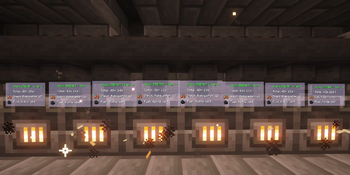
🔥 Furnace Overlay
Shows relevant furnace information directly in the HUD / world
Mark furnaces via hotkey (crosshair) for quick tracking
Configurable furnace detection and display behavior
Optional distance-based scaling
Optional visibility through walls
Optional display only for furnaces in front of you
Manage marked furnaces in a separate menu
PlotSquared visibility filters:
- Only show Furnace Overlays on your own plots
- Show Furnace Overlays on plots where you are trusted
- Both filters can be enabled at the same time
If both plot filters are disabled, the Furnace Overlay behaves normally everywhere
Clear and easy to read with configurable visuals
📜 Quests Overlay
Displays quest blocks (e.g. Daily / Weekly – depending on setup)
Extra colors for value ranges:
- Amount
- Variable
- Progress
Optional bold styling per section
Configurable quest information such as:
- title
- description
- progress
- step counter
- biome
- rewards
Extensive HUD options:
- text
- background
- colors
- size
- layout
⛏️ FarmTimer (Overlay + History)
Start / pause / resume / stop a FarmTimer session using hotkeys or buttons
Configurable FarmTimer duration
Counting mode:
- Block Breaking
- Item Pickup
Standard farming resource lists
Custom FarmTimer lists
Separate Custom lists for Block Breaking and Item Pickup
Custom item prices
Displays collected resources with icons and exact amounts
Resources only appear after they have actually been collected
Money / minimum-drop calculation (Mark) with HUD display
Configurable finish sound
ActionBar feedback when starting, stopping or completing a session
Fully configurable FarmTimer HUD
Session history with delete functions
Click a history entry to open a detailed session view
Detailed history shows:
- collected items
- item icons
- exact amounts
- item identifiers
- session duration
- calculated value
Large history entries are scrollable
👥 FarmTimer Together
Farm together with other players in one synchronized FarmTimer session
Invite players directly through the FarmTimer menu
The group leader controls:
- Start
- Pause / Resume
- Stop
- Timer duration
- selected FarmTimer list
- counting mode
All group members automatically use the leader's active FarmTimer configuration
Shared synchronized countdown for all group members
Supports cross-server FarmTimer groups
Collected resources are synchronized between participants
Individual player contributions are tracked separately
Notifications when:
- a player accepts an invitation
- a player leaves the group
- a player is removed
- the group is disbanded
Group sessions use the same behavior as normal FarmTimer sessions:
- finish sound
- ActionBar messages
- collected resources only appear after they were actually collected
If only one player remains in the group, the FarmTimer automatically behaves like the normal Solo FarmTimer again
Completed group sessions are stored in the history of every participating player
Group history entries include:
- all participating players
- collected items per player
- your own collected items
- your own value
- total group value
- session duration
- FarmTimer mode
- selected FarmTimer list
The detailed group history view shows every player together with all items collected by that player
💰 Container Value Overlay
Shows the total ore / Mark value of a container directly as an on-screen overlay
Supports Standard and Custom prices
Optional top-items breakdown:
- item icons
- item names
Long value information automatically wraps instead of being cut off
Fully configurable:
- position & size
- background color
- transparency
- text color
- text size
Price configuration screens support scrolling and smaller window sizes
📦 EnderChest Sorter (EC Sorter)
Automatically deposits configured materials from your inventory into your EnderChests using the server's /ec commands
Choose how many EnderChests you have (1–9) so only the configured ECs are processed
Start sorting directly with the Store Materials button in your inventory
Configure a separate material list for each EC using a searchable item selection menu with Minecraft item icons
Switch between All Items and Active Items to quickly view or edit the materials assigned to each EC
Link multiple ECs to share the same material rules; earlier ECs are filled first before moving to the next
Copy material settings from a chosen EC to another EC, with confirmation before replacing the target setup
Export and import material lists using shareable preset codes
Optionally include your hotbar items when sorting
Get a notification and an optional warning sound if some materials could not be fully deposited (for example, when an EC is full)
All EC settings are available in the in-game configuration menu
📦 QDrive / ME Storage Display
Client-side ME Storage scanner / viewer for Shulker-based storage networks
Search stored items
Multiple sorting modes
Type filters
Favorites
Displays stored item amounts
Configurable menu background:
- color
- transparency
Configurable grid size using sliders:
- rows
- columns
Optional:
- mute Shulker open / close sounds while scanning
- mute sounds while refreshing
- mute sounds while taking items
Expanded type filter categories, including:
- Blocks
- Tools
- Armor
- Food
- Farming / Plants
- Nether
- End
- Wood
- Stone
- Colored Blocks
- additional item groups
Highlights
From source dataGame versions
Supports 2 Minecraft versions, the newest being 26.2.
Loaders
Runs on Fabric.
Footprint
Rated a light load on a server.
HeroBlocks-Mods on Nxeon
From our catalogue- One-click install
- Supported on Nxeon Minecraft servers. We download it from Modrinth, place it, and restart the server.
- Server side
- Optional on the server
- Server type needed
- Fabric
- Server load
- light
- Smallest plan we suggest
- Minecraft — 2 GB (2 GB RAM). This follows our own load rating above, not a benchmark.
- Latest build
- 1.2.1, released 2026-10-11
Game versions by loader
| Loader | Game versions | Newest |
|---|---|---|
| Fabric | 1.21.11 to 26.2 (2 versions) | 26.2 |
From 6 recorded builds of HeroBlocks-Mods.
Recent builds
| Build | Released | Game versions | Loaders |
|---|---|---|---|
| 1.2.1 | 2026-10-11 | 26.2 | Fabric |
| 1.1.1 | 2026-10-07 | 26.2 | Fabric |
| 1.1.0 beta | 2026-08-20 | 26.2 | Fabric |
| 1.0.7 beta | 2026-02-24 | 1.21.11 | Fabric |
| 1.0.6 beta | 2026-02-19 | 1.21.11 | Fabric |
| 1.0.5 beta | 2026-02-13 | 1.21.11 | Fabric |
Run HeroBlocks-Mods on a Minecraft server
Pick a server or deploy a new one above; it is installed in one click.
What kind of mod it is
From the catalogMaps & scenarios
Custom maps, arenas and scenarios to play on.
Works on a server
From source side supportModrinth lists server-side support for HeroBlocks-Mods as optional: it can run on a server, but isn’t required there.
Compatibility
- Game
- Minecraft
- Loaders
- Fabric
- Runs on
- Serveroptional on the server
- Game versions
- 26.2 and 1 earlier
Verified at the source
- ✓ModrinthOfficial listing, checked 2026-10-11Open ↗
- ✓Authorxandarhd, as published on Modrinth
- ✓LicenseMITFree









