







About Just Enough Backups (JEB)
From ModrinthBackup mod that keeps your worlds safe with automatic and manual backups, with an easy in-game UI to create, manage, and restore them.


Just Enough Backups is a Fabric mod that adds server-side world backups with a usable in-game workflow.
It supports:
- full, partial, and differential backups
- manual backups through commands and UI
- automatic scheduled backups
- configurable public backup/restore announcements
- retention by backup count
- retention by total backup size per world
- restore preparation from the backup browser
- a configurable client HUD popup with live preview
- parallel (multi-threaded) scanning, compression, and restore extraction
- optional Zstandard compression inside ZIP archives
- optional remote backup storage (S3-compatible and WebDAV)
- optional Mod Menu integration
The mod is designed to keep the actual backup logic on the server side while exposing management and configuration through a client UI.
Remote storage
Remote storage is disabled by default. The configuration screen has a dedicated Remote tab with a provider selector, enable switch, and fields for S3 (endpoint, region, bucket, prefix, access key, secret key) and WebDAV (URL, prefix, username, password). For S3, bucket and region are required; the endpoint is optional for AWS and can point to an S3-compatible service. For WebDAV, set the collection URL. Credentials can be configured directly in the screen (secrets are masked) or set in config/justenoughbackups.json or through environment variables, which take precedence and avoid storing plaintext secrets on disk.
Set credentials in the server config or use environment variables, which take precedence:
- S3:
JEB_S3_ACCESS_KEY_IDandJEB_S3_SECRET_ACCESS_KEY - WebDAV:
JEB_WEBDAV_USERNAMEandJEB_WEBDAV_PASSWORD
Use HTTPS for remote endpoints. Plain HTTP is accepted only for loopback development endpoints. Remote backups are published after upload and SHA-256 verification; their catalog contains the metadata and checksum. Retention protects bases required by incremental chains. Restore downloads each required archive as a stream into isolated staging, verifies its checksum, then verifies the reconstructed world before preparing the world replacement. remoteStorage.maxRetries bounds upload attempts; a failed WebDAV upload restarts compression and transfer, while interrupted uploads are not resumed across process restarts. Do not place credentials in shared or committed config files.
Features
Backup types
- Full: creates a complete snapshot of the entire world at the moment of backup. No base backup is required and it serves as the foundation for later incremental backups.
- Partial: creates an incremental backup containing only the files that have changed since the most recent backup of any type (full, partial, or differential). It uses that most recent backup as its base.
- Differential: creates an incremental backup containing only the files that have changed since the most recent full backup. Differential backups are stored in a separate retention bucket from partial backups, allowing independent retention policies.
Dependencies between backups are tracked. Retention and delete operations respect those dependencies, so required base backups are preserved when newer partial or differential backups still depend on them.
Automatic backups
Automatic backups are driven by per-type schedulers (FULL, DIFFERENTIAL, PARTIAL) and can be configured to:
- run independently based on configured intervals for each backup type
- send optional public warning before an automatic backup starts
- pause when no players have been online since the last backup
- run on server start
- run on server stop
Public announcements can be sent to chat, sent to the action bar, or disabled.
Retention policy
Retention can be configured in two ways at the same time:
- count-based retention
- keep the newest
Xfull backups - keep the newest
Xpartial backups - keep the newest
Xdifferential backups - size cap per world
- optional hard cap for the total size of a world's backup folder
- applied to the final published backup set
- respects dependency chains
If a new backup would exceed the configured space cap even after deleting every backup that is allowed to be removed, creation fails instead of publishing an invalid final state.
Performance: parallel processing
Backups and restores use multiple worker threads to speed up large worlds:
- scanning / hashing: the world snapshot scan runs across
threadCountthreads (up to one per CPU core), reading and hashing files in parallel - compression: the ZIP archive is written with parallel compression
- restore extraction: backup ZIP files are extracted across
threadCountthreads
The number of threads is controlled by threadCount in the config and can be set between 1 and the maximum number of CPU threads (default: CPU cores minus two). Lower values reduce CPU usage; higher values speed up large worlds.
ZIP compression uses DEFLATED by default, with deflateCompressionLevel controlling the compression level (1–9, default: 6). compressionMethod: "ZSTANDARD" writes ZIP method 93 entries and zstdCompressionLevel controls the level (1–22, default: 3). Both DEFLATED and ZSTANDARD use parallel multi-threaded compression. For Zstandard, large entries are spilled to temporary scratch files to bound memory usage. Existing DEFLATED archives remain supported. Zstandard archives require the mod's Zstandard reader and may not open in older ZIP utilities.
Backup management UI
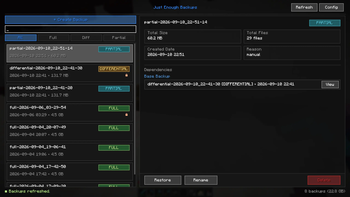
The backup browser includes:
Highlights
From source dataGame versions
Supports 17 Minecraft versions, the newest being 26.3.
Loaders
Runs on Fabric.
Footprint
Rated a light load on a server.
Just Enough Backups (JEB) on Nxeon
From our catalogue- One-click install
- Supported on Nxeon Minecraft servers. We download it from Modrinth, place it, and restart the server.
- Server side
- Optional on the server
- Server type needed
- Fabric
- Server load
- light
- Smallest plan we suggest
- Minecraft — 2 GB (2 GB RAM). This follows our own load rating above, not a benchmark.
- Latest build
- 1.2.0.10+26.3, released 2026-11-01
Game versions by loader
| Loader | Game versions | Newest |
|---|---|---|
| Fabric | 26.1 to 26.3 (5 versions) | 26.3 |
From 8 recorded builds of Just Enough Backups (JEB).
Recent builds
| Build | Released | Game versions | Loaders |
|---|---|---|---|
| 1.2.0.10+26.3 | 2026-11-01 | 26.3 | Fabric |
| 1.2.0.9+26.3 | 2026-10-17 | 26.3 | Fabric |
| 1.2.0.8+26.3 | 2026-10-16 | 26.3 | Fabric |
| 1.2.0.7+26.3 | 2026-09-15 | 26.3 | Fabric |
| 1.2.0.6+26.2 | 2026-09-10 | 26.2 | Fabric |
| 1.2.0.5+26.1 | 2026-09-10 | 26.1 to 26.1.2 (3 versions) | Fabric |
Run Just Enough Backups (JEB) on a Minecraft server
Pick a server or deploy a new one above; it is installed in one click.
What kind of mod it is
From the catalogQuality of life & UI
Small conveniences, tweaks and interface improvements players notice straight away.
Works on a server
From source side supportModrinth lists server-side support for Just Enough Backups (JEB) as optional: it can run on a server, but isn’t required there.
Compatibility
- Game
- Minecraft
- Loaders
- Fabric
- Runs on
- Serveroptional on the server
- Game versions
- 26.3 and 16 earlier
Verified at the source
- ✓ModrinthOfficial listing, checked 2026-11-02Open ↗
- ✓Authorfrandm16, as published on Modrinth
- ✓LicenseMITFree









