






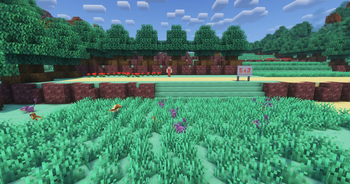

About KantoSpawners
From ModrinthConfigurable Cobblemon Spawner blocks for map makers and server owners!
KantoSpawners
KantoSpawners is a Fabric/Cobblemon utility mod that adds configurable spawner blocks for map makers, adventure servers, and controlled Cobblemon encounters.
This mod was originally created for the CobbleKanto project, where it is used to control encounter areas more precisely than normal biome spawning allows. It can also be used in other Cobblemon maps, servers, minigames, routes, dungeons, event zones, or adventure builds where you want specific species to appear in specific places.
Instead of relying only on biome spawns, KantoSpawners lets creators place a spawner block and configure exactly what it can spawn, how often it tries to spawn, what level range it should use, how many creatures can exist nearby, and whether the spawned creature should immediately start a battle.

Get 25% off your Minecraft server with Shockbyte! Ready to start an epic adventure with your friends? Just click here or on the banner and use promo code “COBBLEKANTO”, plus you’ll be helping us keep improving the mod and developing future projects!
Features
- Configurable Cobblemon spawner block
- Weighted species list using
species:chanceformat - Minimum and maximum level settings
- Shiny chance setting
- Spawn range setting
- Spawn delay setting
- Maximum nearby spawned creatures setting
- Optional aggressive mode for automatic PvE battle starts
- Return-to-spawner behavior to help keep spawned creatures near their area
- Smarter grounded spawn position checks
- Special handling for floating/levitating species
- Creative-mode editor GUI
What It Is For
KantoSpawners is designed for creators who want more control over encounter design.
It is especially useful for:
- custom routes
- caves
- forests
- event areas
- dungeons
- gyms
- boss rooms
- adventure maps
- server progression zones
- recreations or inspired regions
- controlled spawn areas in multiplayer worlds
The goal is not to replace Cobblemon’s natural spawning system, but to give builders and map/mod builders a direct tool for scripted encounters inside dungeons and routes.
How It Works
Place a Kanto Spawner in the world, open its editor, and configure the encounter rules.

The spawner can be configured with:
- species list
- spawn weights
- level range
- shiny chance
- spawn radius
- spawn delay
- nearby creature limit
- aggressive battle behavior
The spawner only tries to spawn when a player is nearby, which helps reduce unnecessary background activity in empty areas + help triggering the "Aggressive" mode.
Spawned creatures are also given return behavior so they do not wander too far away from their intended encounter zone.
Fields
Min Level
The lowest possible level for spawned creatures.
Max Level
The highest possible level for spawned creatures.
Shiny Chance (%)
Chance for a spawned creature to be shiny.
Example:
1means 1%.
Spawn Range
How far from the spawner the creature can appear.
Spawn Delay (ticks)
How often the spawner attempts to spawn.
Minecraft runs at 20 ticks per second, so:
100is about 5 seconds.
Max Cobblemon in Range
The maximum number of Cobblemon entities allowed near the spawner before it stops spawning more.
Species List
A weighted list of species using this format:
pidgey:50,rattata:30,caterpie:20The numbers act as weights, not strict percentages. Higher numbers make that species more likely to be selected.
Aggressive?
When Aggressive? is enabled, the spawner can start a PvE battle between the nearest player and the spawned creature.
This is useful for:
- ambush encounters
- trainer-like wild encounter areas
- dungeon rooms
- challenge paths
- event encounters
- controlled battle zones
Aggressive mode is optional. For normal ambient encounters, leave it disabled.
Behavior Notes
KantoSpawners includes a few safety behaviors designed for adventure maps and multiplayer servers.
Nearby Player Requirement
The spawner only attempts to spawn when a player is nearby.
This prevents inactive map areas from constantly generating entities.
Nearby Spawn Limit
The Max Cobblemon in Range setting prevents too many Cobblemon entities from stacking up around the same spawner.
Return-to-Spawner Behavior
Spawned creatures are encouraged to return toward their spawner if they move too far away from the configured range.
This helps keep routes, rooms, caves, and encounter zones from slowly leaking spawns into unrelated areas.
Spawn Position Logic
The spawner tries to find a valid floor near the spawner height instead of simply spawning entities anywhere in the column.
This helps avoid creatures appearing on ceilings, far above the intended route, or in invalid spaces.
Optional Compatibility
Jade
If Jade is installed, KantoSpawners can show spawner configuration information through its HUD tooltip.
This is useful for admins who want to quickly inspect configured spawners while building or debugging a map.
KantoItems Repel Compatibility
KantoSpawners includes a compatibility hook for the KantoItems Repel effect.
If that effect exists and the player has it active, aggressive battle behavior is prevented.
KantoItems is not required to use KantoSpawners.
KantoNPCs Dialog Protection
KantoSpawners also includes a lightweight protection hook for KantoNPCs dialogue/battle flow.
Highlights
From source dataGame versions
Built for Minecraft 1.21.1.
Loaders
Runs on Fabric and NeoForge.
Footprint
Rated a light load on a server.
KantoSpawners on Nxeon
From our catalogue- One-click install
- Supported on Nxeon Minecraft servers. We download it from Modrinth, place it, and restart the server.
- Server side
- Required on the server
- Server type needed
- Fabric, NeoForge
- Server load
- light
- Smallest plan we suggest
- Minecraft — 2 GB (2 GB RAM). This follows our own load rating above, not a benchmark.
- Latest build
- 0.0.5, released 2026-10-19
Game versions by loader
| Loader | Game versions | Newest |
|---|---|---|
| Fabric | 1.21.1 | 1.21.1 |
| NeoForge | 1.21.1 | 1.21.1 |
From 6 recorded builds of KantoSpawners.
Recent builds
| Build | Released | Game versions | Loaders |
|---|---|---|---|
| 0.0.5 | 2026-10-19 | 1.21.1 | NeoForge |
| 0.0.5 | 2026-10-19 | 1.21.1 | Fabric |
| 0.0.4 | 2026-07-15 | 1.21.1 | Fabric |
| 0.0.3 | 2026-06-15 | 1.21.1 | Fabric |
| 0.0.2 | 2026-06-09 | 1.21.1 | Fabric |
| 0.0.1 | 2026-05-27 | 1.21.1 | Fabric |
Dependencies
- Required: modrinth project MdwFAVRL (modrinth, not in our catalogue)
Declared by the newest build that lists any. Required ones are installed with it on one-click installs.
Run KantoSpawners on a Minecraft server
Pick a server or deploy a new one above; it is installed in one click.
What kind of mod it is
From the catalogMaps & scenarios
Custom maps, arenas and scenarios to play on.
Runs on your server
From source side supportModrinth lists KantoSpawners as required on the server. Check its Modrinth page to see whether players need it too.
Compatibility
- Game
- Minecraft
- Loaders
- FabricNeoForge
- Runs on
- Serverrequired on the server
- Game versions
- 1.21.1
Verified at the source
- ✓ModrinthOfficial listing, checked 2026-10-20Open ↗
- ✓AuthorCobbleKanto, as published on Modrinth
- ✓LicenseLicenseRef-CobbleKanto-Project-Custom-LicenseFree









