







About LiveKit
From HangarReal Time Live Map and Admin Tools
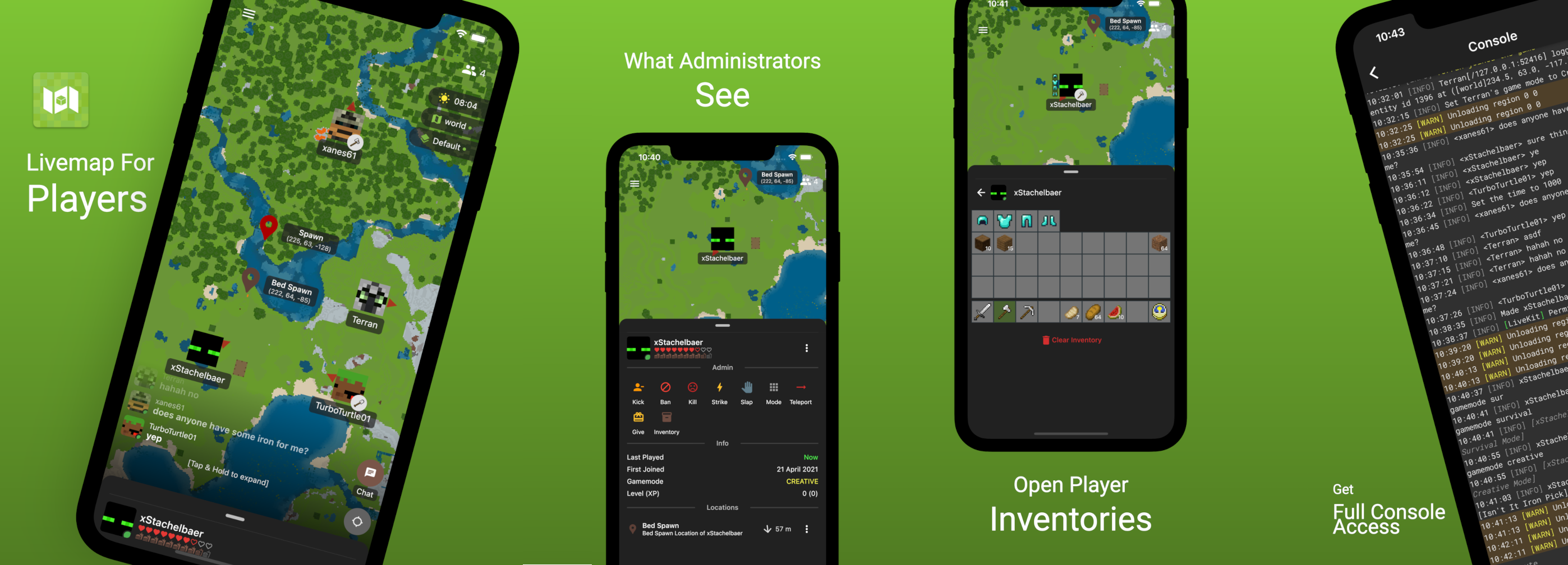


What is LiveKit?
LiveKit is more than just a live map that shows what your players are up to. Administrate your server right out of your pocket, manage your world weather, player bans, whitelisting, open inventories, teleport players and much more! Get started with LiveKit with ease and discover all the features we have to offer. This plugin is in active development with new features coming your way regularly!
Getting started
Server setup
- Download the latest version of the LiveKit plugin -> Move it to your plugins folder
- Reload or restart your server
- Take note of the console output from LiveKit. It will tell you the IP and Port you will need to connect through the app!
App setup
- Download LiveKit App from on of the stores mentioned at the top of this page
- In the App tap on + Connect and enter the IP and Port from the step above
- Follow the instructions in the App, either connect anonymously, or identify which player you are by using the /livekit claim command in-game and entering the code in the app
NOTE: Port forwarding LiveKit port (default 4123) is !recommended!. Port forwarding allows the App to directly connect to your server. If you don’t setup port forwarding, the connection will be proxied through our proxy service, which will impact connection speed and stability
If you are having issues getting started, join our Discord and ask for help!
Setting up your world for rendering
The map is limited by a predefined boundary, so you control how big your rendered map will be. By default the bounds are rectangular and 1024x1024 blocks (or 64x64 chunks, 2x2 regions)
Set your bounds
/livekit <world> bounds <radius> [-r|-c] For example, /livekit main_world bounds 4096 -c would set your rendered map border to a circular (-c) shape, with a radius of 4096 blocks
Start a full render
/livekit <world> render full This will start a full render of the world, inside of your bounds defined with the command above. Don’t overdo your bounds, doing a full render takes a while.
Permissions
If you are using a Vault supported Permissions Plugin (for example LuckPerms) set useVault option to true in the LiveKit config.yml. Make sure to have Vault in your plugins folder.
Permissions for players
Expand for a list of permissions for players
livekit.commands.basic- permission for player commands needed to interact with LiveKit
livekit.module.map - permission to see the live map
livekit.map.info - permission to view block info for a specific block
livekit.module.players - permission to view players on the map (by default you can only see yourself)
livekit.players.other - permission to see other players than yourself on the map
livekit.module.weathertime - permission to see current weather and time of the world
livekit.module.chat - permission to see the chat in the app
livekit.chat.write - permission to chat from the app (only for identified players)
livekit.chat.write_offline - permission to chat from the app while not online on the server
livekit.module.poi - permission to see markers on the map
livekit.poi.personalpins - permission to set personal pins on the map
livekit.module.messaging - permission for private messaging through the app
Permissions for admins
Expand for a list of permissions for admins
livekit.commands.admin - permission for admin commands
livekit.module.admin - permission for admin actions (ban, whitelist, kick, strike, …)
livekit.module.console - permission to access server console through the app
livekit.console.execute - permission to execute console commands
livekit.module.tps - permission to view the server performance page (CPU, RAM, Ticks)
livekit.module.inventory - permission to view and edit player inventories
Commands
Expand for a list of commands
/livekit - check if LiveKit is installed and working correctly. Displays basic info for users to connect to LiveKit (port, password needed, anonymous allowed, claim access) and also links to App or Play store/livekit claim - generates a pin which is used to identify yourself in the app [livekit.commands.basic]
/livekit headrefresh - refreshes a players head skin [livekit.commands.basic]
/livekit pins - lists players personal set pins and dsiplays their IDs (used for deleting) [livekit.poi.personalpins]
/livekit setpin <name> - sets a pin at the current location of the player with the provided name [livekit.poi.personalpin]
/livekit removepin <ID> - removes the specified pin [livekit.poi.personalpin]
/livekit info - displays how many active sessions and active clients (Apps) are connected [livekit.commands.basic]
/livekit map - displays information about the current livemap world and rendering status [livekit.commands.admin]
/livekit map cpu <percent> - specifies how much time (in %) a chunk may use up for rendering. If you are doing a full rendering of the world, this can improve the rendering speed BUT, it will also cause server lag! [livekit.commands.admin]
/livekit <world> - Displays live map info of specified world [livekit.commands.admin]
Highlights
From source dataGame versions
Supports 32 Minecraft versions, the newest being 1.21.8.
Loaders
Runs on Paper.
Footprint
Rated a light load on a server.
LiveKit on Nxeon
From our catalogue- One-click install
- Supported on Nxeon Minecraft servers, for Paper servers. We download it from Hangar, place it, and restart the server.
- Server side
- Required on the server
- Server type needed
- Paper
- Server load
- light
- Smallest plan we suggest
- Minecraft — 2 GB (2 GB RAM). This follows our own load rating above, not a benchmark.
- Latest build
- 1.4.9, released 2025-07-26
Game versions by loader
| Loader | Game versions | Newest |
|---|---|---|
| Paper | 1.16 to 1.21.8 (32 versions) | 1.21.8 |
From 5 recorded builds of LiveKit.
Recent builds
| Build | Released | Game versions | Loaders |
|---|---|---|---|
| 1.4.9 | 2025-07-26 | 1.16 to 1.21.8 (32 versions) | Paper |
| 1.4.8 | 2024-12-22 | 1.16 to 1.21.4 (28 versions) | Paper |
| 1.4.7 | 2024-07-30 | 1.16 to 1.21 (24 versions) | Paper |
| 1.4.6-HOTFIX-1.0 | 2024-07-21 | 1.16 to 1.21 (24 versions) | Paper |
| 1.4.6 | 2024-07-16 | 1.16 to 1.21 (24 versions) | Paper |
Run LiveKit on a Minecraft server
Pick a server or deploy a new one above; it is installed in one click.
What kind of mod it is
From the catalogAdmin & protection
Permissions, moderation, anti-cheat and land protection for the people running the server.
Runs on your server
From source side supportHangar lists LiveKit as required on the server. Check its Hangar page to see whether players need it too.
Compatibility
- Game
- Minecraft
- Loaders
- Paper
- Runs on
- Serverrequired on the server
- Game versions
- 1.21.8 and 31 earlier
- Requires
- One-click install needs a Paper server.
Verified at the source
- ✓HangarOfficial listing, checked 2026-10-01Open ↗
- ✓AuthorxStachelbaer, as published on Hangar
- ✓LicenseUnspecifiedFree









