






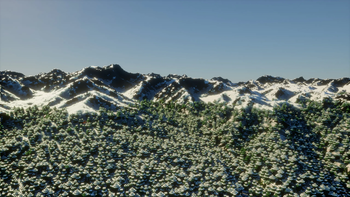

About NeoTerrain Diffusion
From ModrinthA NeoForge port of the newly released Terrain Diffusion mod.
NeoTerrain Diffusion
This project is a NeoForge port of the original Fabric Terrain Diffusion Minecraft mod, which integrates the Terrain Diffusion world generation model into Minecraft.
Current Status
This port currently supports server-side use only.
It is intended for a NeoForge dedicated server. It is not currently a complete client-side replacement for the Fabric mod's world-creation flow, client UI, or single-player setup.
For this server, world setup is done through server.properties instead of the Minecraft client's Create World screen.
Validated Local Server
This implementation has been built and validated for:
- Minecraft
1.21.1 - NeoForge
21.1.233 - Java
21 - Windows 10/11
- DirectML GPU inference
- Dedicated server runtime
Validated jar:
terrain-diffusion-mc-neoforge-2.2.0-neoforge.1-windows+1.21.1.jarThe local server using this mod is:
C:\Users\Collin\Desktop\Server 1.21.1Requirements
- A NeoForge
1.21.1dedicated server - NeoForge
21.1.233or newer in the same21.1.xline - Java 21
- Windows with a DirectML-compatible GPU for the validated build
- About 1.5 GB free VRAM minimum
- About 2.5 GB additional system RAM for model loading
- Internet access on first launch so the model files can download
The validated local server launcher uses this Java 21 runtime:
C:\Users\Collin\AppData\Roaming\ModrinthApp\meta\java_versions\zulu21.48.17-ca-jre21.0.10-win_x64\bin\java.exeGPU Behavior
The Windows build uses DirectML for GPU inference.
A correct startup should log:
Terrain diffusion inference: DirectML
ONNX model 'coarse' loaded on GPU
ONNX model 'base' loaded on GPU
ONNX model 'decoder' loaded on GPU
This port's Windows build is DirectML-first and should not warn about missing CUDA during normal startup. CUDA is not required for this Windows server build.
Server Installation
Place the NeoForge jar in the dedicated server's mods folder.
For this local server, the jar is kept in the linked Modrinth profile mods folder so the server sync step can copy it into:
C:\Users\Collin\Desktop\Server 1.21.1\server-runtime\modsThe sync script also omits known client/render-only mods from the server runtime using:
C:\Users\Collin\Desktop\Server 1.21.1\server-mod-exclusions.txtLocal Server
Run:
C:\Users\Collin\Desktop\Server 1.21.1\Start-Server.batThat launcher:
- Syncs server-compatible mods from the Modrinth profile.
- Keeps excluded client/render jars out of
server-runtime\mods. - Starts the NeoForge dedicated server with Java 21.
Creating A Terrain Diffusion Server World
Because this is currently a server-side port, configure the world in server.properties.
Current local server configuration:
level-name=terrain-diffusion-world
level-type=terrain-diffusion-mc\:terrain_diffusion
The active file is:
C:\Users\Collin\Desktop\Server 1.21.1\server-runtime\server.propertiesOn first launch, the mod downloads and prepares model files under:
C:\Users\Collin\Desktop\Server 1.21.1\server-runtime\terrain-diffusion-modelsConfiguration
The server config is created at:
config\terrain-diffusion-mc.propertiesFor this local server, the full path is:
C:\Users\Collin\Desktop\Server 1.21.1\server-runtime\config\terrain-diffusion-mc.propertiesCurrent tuned values:
# Inference device: "cpu", "gpu", or "auto".
# On the Windows build, "gpu" means DirectML.
inference.device=gpu

# Keep all three models loaded on GPU instead of recreating DirectML sessions
# between pipeline stages. This is faster when enough VRAM is available.
inference.offload_models=false

# Validate SHA-256 for model files already on disk.
validate_model=true

# Local web UI port for /td-explore.
explorer.port=19801

# Terrain generation region side length in blocks. Must be a power of 2.
tile_size=256

# Spawn land-search coarse-pixel region sizes.
spawn_search.initial_size=16
spawn_search.max_size=128
If GPU memory becomes tight, set:
inference.offload_models=trueThat lowers peak VRAM use but may slow generation.
Terrain Explorer
The port includes the server-side terrain explorer command:
/td-exploreRun it in game. The server prints a local web UI link, usually:
http://localhost:19801Use the explorer to scout continents, mountains, islands, climates, and useful coordinates before traveling in game.
World Scale
The server-side port supports world scale values 1..6.
The default scale is 2.
For dedicated-server worlds, the selected scale is stored in the world save:
terrain-diffusion-world\data\terrain_diffusion_world_settings.datScale behavior:
scale=1is more compressed and runs Terrain Diffusion more often.scale=2is the default balance for playability and performance.- Higher scale values cover more blocks per generated terrain sample and shift
more work toward Minecraft's CPU-side world generation.
Because this port is currently server-side only, there is no supported client world-creation Customize screen for changing scale in this setup. Treat scale as part of the server world save.
Common Issues
CUDA not available
This Windows DirectML build should not emit that warning. If it appears, the server is probably running an old jar or the wrong build variant. Reinstall the Windows DirectML jar and rerun the server mod sync.
DirectML not available
Update the GPU driver and confirm the machine has a DirectML-compatible GPU. To start without GPU acceleration for troubleshooting, set:
inference.device=cpuCPU inference is much slower and is not recommended for regular server use.
A dynamic link library (DLL) initialization routine failed
Highlights
From source dataGame versions
Built for Minecraft 1.21.1.
Loaders
Runs on NeoForge.
Footprint
Rated a light load on a server.
NeoTerrain Diffusion on Nxeon
From our catalogue- One-click install
- Supported on Nxeon Minecraft servers. We download it from Modrinth, place it, and restart the server.
- Server side
- Required on the server
- Server type needed
- NeoForge
- Server load
- light
- Smallest plan we suggest
- Minecraft — 2 GB (2 GB RAM). This follows our own load rating above, not a benchmark.
- Latest build
- 2.2.0-neoforge.1-windows+1.21.1 (alpha), released 2026-06-14
Game versions by loader
| Loader | Game versions | Newest |
|---|---|---|
| NeoForge | 1.21.1 | 1.21.1 |
From 1 recorded build of NeoTerrain Diffusion.
Run NeoTerrain Diffusion on a Minecraft server
Pick a server or deploy a new one above; it is installed in one click.
What kind of mod it is
From the catalogWorld generation
Changes or adds to how new terrain, biomes and structures are created.
Runs on your server
From source side supportModrinth lists NeoTerrain Diffusion as required on the server. Check its Modrinth page to see whether players need it too.
Compatibility
- Game
- Minecraft
- Loaders
- NeoForge
- Runs on
- Serverrequired on the server
- Game versions
- 1.21.1
Verified at the source
- ✓ModrinthOfficial listing, checked 2026-10-02Open ↗
- ✓Authorcblegoboy, as published on Modrinth
- ✓LicenseMITFree









