







About One Enough Block
From ModrinthEasily specify replacing one block with another.
One Enough Block
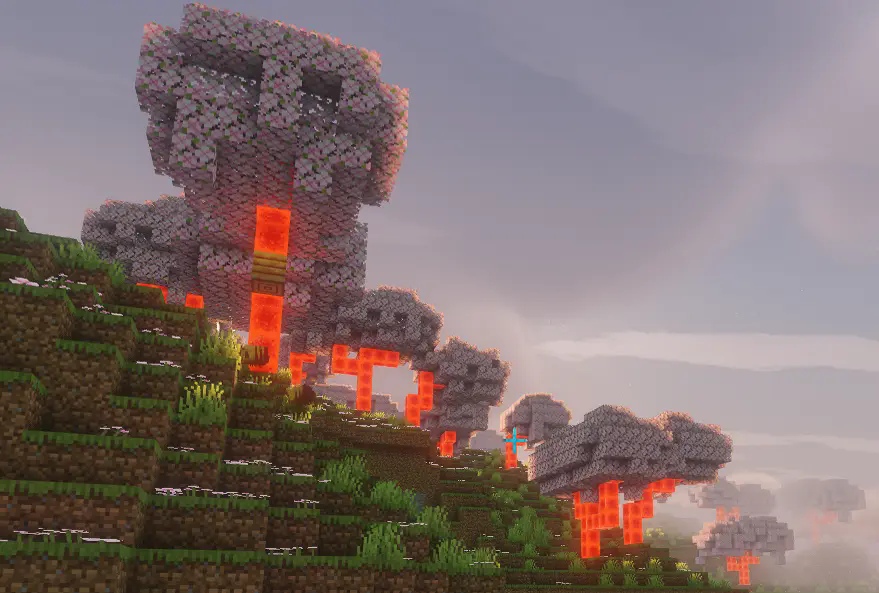
Does your modpack have three kinds of orange trees or four kinds of silver ore? Or do you just want to wipe out useless naturally generated ores like copper?
With One Enough Block, you can conveniently specify which blocks should be replaced with others — easily, flexibly, and powerfully.
Main Features
Load Method 1: via configuration file. Reload using the /reload command.
Path: config/OEB/example.json
[
  {
    "match": [
      "manametalmod:ManaTreeLog",
      "#minecraft:logs"
    ],
    "result": "minecraft:redstone_block"
  },
  {
    "match": ["#minecraft:logs"],
    "result": "minecraft:redstone_block"
  }
]
Load Method 2: via datapack (available since v1.1.0). Requires OEI as a dependency — note that the structure has changed!
Path: data/oeb/replacements/example.json
[
  {
    "matchBlock": ["#minecraft:logs"],
    "resultBlock": "minecraft:redstone_block"
  }
]
Simply list the block IDs you want to replace in the "match" array, and specify the target block under "result". The replacement will automatically take effect in-game.
Supports tag-based matching, allowing you to replace all blocks under a tag at once. Even fluids can be replaced!
> Note: Since version 1.1.0, an in-game replacement rule editor is built in! > Press CTRL + R by default to open the UI and enjoy a brain-free, zero-code editing experience.(Switch Function -> Page OEB)
Use Cases
Block replacement occurs when creating worlds or loading new chunks, making it ideal for modifying naturally generated blocks such as ores, plants, or structure blocks.
Replacement also applies to any block placement — when a player places a block, it will be immediately replaced if it matches a rule.
Additionally, existing blocks in the world can be replaced retroactively. This feature is disabled by default, but can be enabled in the config file.
Future Plans
None for now.
Highlights
From source dataGame versions
Supports 3 Minecraft versions, the newest being 26.1.2.
Loaders
Runs on Forge and NeoForge.
Footprint
Rated a light load on a server.
One Enough Block on Nxeon
From our catalogue- One-click install
- Supported on Nxeon Minecraft servers. We download it from Modrinth, place it, and restart the server.
- Server side
- Required on the server
- Server type needed
- Forge, NeoForge
- Server load
- light
- Smallest plan we suggest
- Minecraft — 2 GB (2 GB RAM). This follows our own load rating above, not a benchmark.
- Latest build
- 1.0.0, released 2026-08-03
Game versions by loader
| Loader | Game versions | Newest |
|---|---|---|
| NeoForge | 1.21.1 to 26.1.2 (2 versions) | 26.1.2 |
| Forge | 1.20.1 | 1.20.1 |
From 5 recorded builds of One Enough Block.
Recent builds
| Build | Released | Game versions | Loaders |
|---|---|---|---|
| 1.0.0 | 2026-08-03 | 26.1.2 | NeoForge |
| 1.1.3.1-hotfix | 2026-04-06 | 1.20.1 | Forge |
| 1.1.3.1 | 2026-03-26 | 1.20.1 | Forge |
| 1.1.3 | 2026-01-19 | 1.20.1 | Forge |
| 1.1.2-hotfix | 2026-01-17 | 1.21.1 | NeoForge |
Dependencies
- Required: modrinth project 7pCNymxz (modrinth, not in our catalogue)
Declared by the newest build that lists any. Required ones are installed with it on one-click installs.
Run One Enough Block on a Minecraft server
Pick a server or deploy a new one above; it is installed in one click.
What kind of mod it is
From the catalogBuilding & decoration
Blocks, furniture, decorations and building tools.
Runs on your server
From source side supportModrinth lists One Enough Block as required on the server. Check its Modrinth page to see whether players need it too.
Compatibility
- Game
- Minecraft
- Loaders
- ForgeNeoForge
- Runs on
- Serverrequired on the server
- Game versions
- 26.1.2 and 2 earlier
Verified at the source
- ✓ModrinthOfficial listing, checked 2026-10-01Open ↗
- ✓AuthorMerrySnow, as published on Modrinth
- ✓LicenseGPL-3.0-onlyFree









