







About Petite Inventory
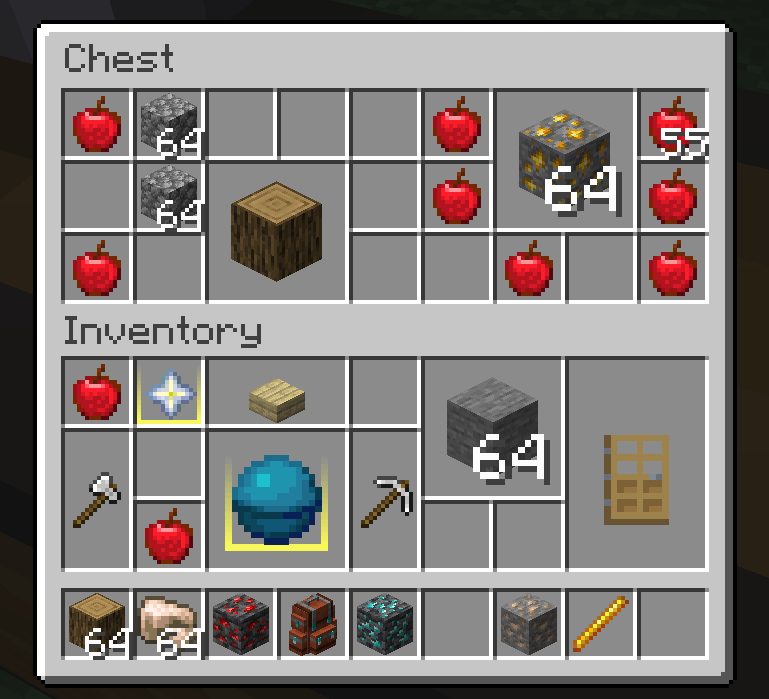
From ModrinthProvides a Resident Evil 4 / Diablo–style inventory layout, where a single item can occupy multiple slots, and adjusts the corresponding replacement and transfer operations.
Real Inventory / Petite Inventory
PetiteInventory provides container layouts inspired by games such as Resident Evil 4, Diablo, and Delta Force. A single item can occupy multiple slots, with matching replacement, stacking, and transfer rules. The mod also provides footprint rotation, item background colors, and a visual editor.
Main Features
The editor mode is recommended, but the layout can also be configured directly through the rule files.
On first launch, the default rule files are generated at:
- Item footprints:
config/PetiteInventory/border_items.json - Item colors:
config/PetiteInventory/border_colors.json
The rule format is intentionally simple and supports item IDs, item tags, and exact NBT matches. Rules can be reloaded with /reload.
When the layout is enabled, items occupy their configured rectangular footprints. The player inventory is controlled separately for balance. To enable the layout for another container, point at one of its slots and press the copy key (default: U) to copy the screen identifier, then add that identifier to the configuration.
Containers using the layout receive the following operation improvements:
- Moving one item over another allows replacement when the target area has no conflicting item.
- When using a Shift quick transfer, the mod searches for an empty area that can hold the item if stacking is not possible.
- The hotbar is excluded by default so it keeps its conventional vanilla behavior.
- After picking up a non-square item, use the mouse wheel or press
Rto flip the current item instance. This does not change the configured rule.
Edit Mode
Use /petiteinventory edit to toggle edit mode. When the cursor reaches a resizable edge or corner, a highlight border appears and the item can be resized like a Windows window. Changes take effect immediately.
Right-click an item to open the preset color palette and change its background color. The palette currently contains preset colors only. You can also edit border_colors.json directly to assign colors by item ID, tag, or a TACZ GunId.
Hold Ctrl to select multiple items and drag to select an area. Ctrl+Shift extends the selection. With multiple items selected, right-click applies a color to all targets; holding right-click for 0.5 seconds enters batch footprint editing, where the selected rectangle becomes the footprint for every selected item.
In edit mode, each container screen displays a layout toggle at the top. It controls whether that screen uses the Petite layout and takes effect immediately. The player inventory and hotbar remain independently configurable.
Two commands control the default screen behavior:
/petiteinventory blacklist: force blacklist mode, enabling the layout for every container until individual screens are disabled./petiteinventory whitelist: force whitelist mode, disabling the layout for every container until individual screens are enabled.
Compatibility Notes
- Sophisticated Backpacks is specifically adapted, including item footprints, highlights, and footprint-aware quick transfer. TACZ firearms support size and background-color matching through their NBT
GunId. - Item Borders can be used alongside PetiteInventory, and JEI recipe and search behavior is left unchanged.
- Because of the mod's design, sorting, slot-expansion, and other inventory-structure mods may cause compatibility issues.
- Automatic sorting conflicts with PetiteInventory's manual-organization design, so perfect compatibility cannot be guaranteed.
- Click-dragging items is disabled in containers that use the Petite layout. It may return if the interaction problems are solved later.
- If an important container from another mod stops working, report its screen identifier and reproduction steps.
Roadmap
- Port to more Minecraft versions and loaders.
- Support more inventory expansion mechanisms.
- Add dedicated adapters for more third-party container screens.
- Explore irregular, Tetris-like item footprints.
Highlights
From source dataGame versions
Supports 8 Minecraft versions, the newest being 26.1.
Loaders
Runs on Forge and NeoForge.
Footprint
Rated a light load on a server.
Petite Inventory on Nxeon
From our catalogue- One-click install
- Supported on Nxeon Minecraft servers. We download it from Modrinth, place it, and restart the server.
- Server side
- Required on the server
- Server type needed
- Forge, NeoForge
- Server load
- light
- Smallest plan we suggest
- Minecraft — 2 GB (2 GB RAM). This follows our own load rating above, not a benchmark.
- Latest build
- 1.1.1, released 2026-09-04
Game versions by loader
| Loader | Game versions | Newest |
|---|---|---|
| Forge | 1.20.1 to 1.20.6 (6 versions) | 1.20.6 |
| NeoForge | 1.21.1 to 26.1 (2 versions) | 26.1 |
From 5 recorded builds of Petite Inventory.
Recent builds
| Build | Released | Game versions | Loaders |
|---|---|---|---|
| 1.1.1 | 2026-09-04 | 26.1 | NeoForge |
| 1.1.1 | 2026-09-04 | 1.20.1 | Forge |
| 1.1.1 | 2026-09-04 | 1.21.1 | NeoForge |
| 1.1.0 | 2026-08-04 | 1.20.1 to 1.20.6 (6 versions) | Forge |
| 1.0.5 | 2025-12-21 | 1.20.1 to 1.20.6 (6 versions) | Forge |
Run Petite Inventory on a Minecraft server
Pick a server or deploy a new one above; it is installed in one click.
What kind of mod it is
From the catalogQuality of life & UI
Small conveniences, tweaks and interface improvements players notice straight away.
Runs on your server
From source side supportModrinth lists Petite Inventory as required on the server. Check its Modrinth page to see whether players need it too.
Compatibility
- Game
- Minecraft
- Loaders
- ForgeNeoForge
- Runs on
- Serverrequired on the server
- Game versions
- 26.1 and 7 earlier
Verified at the source
- ✓ModrinthOfficial listing, checked 2026-10-02Open ↗
- ✓AuthorMerrySnow, as published on Modrinth
- ✓LicenseLicenseRef-All-Rights-ReservedFree









