







About PowerRocket
From ModrinthA comprehensive flight assist mod featuring 6 tiers of power rockets, elytra boost, auto-protection systems, and fully customizable HUD displays.
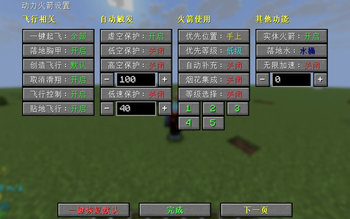
Adds 5 tiers of power rockets, crafted from paper, fire charges and gunpowder, providing thrust far beyond vanilla firework rockets. All features can be configured in the in-game settings screen (press ' or open it through Mod Menu).
Power Rockets
- Tier I: Paper + Fire Charge + Gunpowder ×2
- Tier II–V: Previous tier + Fire Charge + Gunpowder ×2
Speed and acceleration increase with every tier. In the settings you can choose whether to prefer the rocket in your hand or in your inventory, whether to prefer high or low tiers, and you can filter which tiers (1–5) are allowed.
Flight
- One-Key Takeoff — when enabled, pressing the key automatically performs: equip elytra → jump → fire a rocket (off / firework / all). "Firework" only triggers on the Firework Rocket key; "all" also triggers on the Power Rocket key. Only works when not gliding and not riding.
- Landing Chestplate — after a glide ends and you land, automatically swaps the chestplate in your inventory with the elytra.
- Creative Flight — when off, creative-mode players cannot fly either (default / off).
- Cancel Glide — while gliding, press Backward (S) + Jump (Space) together to cancel the elytra glide.
- Flight Control — while gliding, W/S controls pitch and A/D controls yaw; hold Space for 20 ticks to automatically level out.
- Ground Hugging Flight — within 1 block of the ground and looking 0–30° downward, automatically raises fall speed to 0.1 to prevent crashing; paused while sneaking.
Auto Protections
- Void Protection — fires a rocket straight up when your Y goes below the world's minimum height.
- High Altitude Protection — fires a 45° rocket when falling from above the configured height (customizable, no upper or lower limit, default 100).
- Low Altitude Protection — fires a 45° rocket when falling 3–5 blocks above the ground.
- Low Speed Protection — fires a rocket along your view when your gliding speed drops below the threshold but you are still moving (threshold adjustable 0–9999, step 5, default 15).
With Firework Integration enabled, Low Speed Protection can use vanilla firework rockets from your inventory instead.
Rocket Usage
- Preferred Slot — prefer the rocket in your hand or in your inventory.
- Preferred Tier — prefer high or low tier rockets.
- Auto Refill — when the corresponding rocket count is 0, automatically crafts from materials (off / firework / power); disables itself when materials run out.
- Firework Integration — the Power Rocket key will also use firework rockets from your inventory.
- Tier Selection — filter which rocket tiers (1–5) are allowed.
Other Features
- Entity Rocket — hold a power rocket in your main hand and flint and steel in your other hand, then right-click to fire a continuously accelerating giant fireball. It deals impact damage and explodes on hit, and self-detonates after 4 seconds. (Requires an operator to enable it in the settings.)
- Fall Protection — when falling from a height, automatically places a water or powder snow bucket below you as a cushion, and collects it after landing (off / water / snow; the water mode does not work in the Nether).
- Infinite Acceleration — when enabled, hold the Infinite Acceleration key to accelerate continuously along your view; 2^n m/s, where n is the input value. (Requires an operator to enable it in the settings.)
HUD
Displayed at the bottom-left of the screen, stacked from bottom to top, each toggleable individually: Speed, Height, Horizontal Coords, Pitch, Direction, Game Time, Real Time, FPS.
Other Display
- Firework Rocket, Power Rocket and Totem counts (including shulker box contents), and Elytra Durability (remaining durability of the equipped elytra) — also shown at the bottom-left.
- Jet Particles — toggle for the engine particle effect while flying.
- Trail Particles — trailing particles behind you while flying (off / white / colorful).
- Damage Display — shows the target's name and damage on hit; "non-explosion" shows it on the action bar, "all" shows it in a list on the right side of the screen (off / non-explosion / all).
- Custom Crosshair — replaces the vanilla crosshair, shown only in first-person and third-person-back views (off / green / yellow).
Visual Effects
- Transparent View — makes your own player invisible (local view only).
- Rotation Animation — the player model rotates when launching a rocket (off / on).
- Flight Shake — the player model shakes randomly while flying (stronger at higher speeds).
Player Navigation
Automatically locks onto the nearest player in the same dimension, turns your view toward the target, and shows a target marker with distance on screen.
- Single click the Player Navigation key — enable / pause / resume
- Double click — switch target
- Long press — disable
- The target marker is blue when the target is grounded and pink when airborne.
Keybinds
| Function | Default Key | |---|---| | Use Power Rocket | Unbound | | Open Settings | ' | | Vertical Launch | Unbound | | Vertical Down Launch | Unbound | | Diagonal Up Launch (45°) | Unbound | | Backward Launch | Unbound | | Firework Rocket Key | Unbound | | Player Navigation | Unbound | | Infinite Acceleration | Unbound | Direction keys: Vertical Up / Vertical Down launch straight up or down, Diagonal 45° launches at a 45° upward angle, and Backward launches opposite your view direction. The direction keys and the Power Rocket key use power rockets (the Power Rocket key can also use firework rockets when Firework Integration is enabled), while the separate Firework Rocket key fires vanilla fireworks. All features can be configured in the settings screen (press ' or open it through Mod Menu); the screen also provides a Reset to Defaults button that restores all settings to their default values.
Highlights
From source dataGame versions
Supports 3 Minecraft versions, the newest being 26.2.
Loaders
Runs on Fabric.
Footprint
Rated a light load on a server.
PowerRocket on Nxeon
From our catalogue- One-click install
- Supported on Nxeon Minecraft servers. We download it from Modrinth, place it, and restart the server.
- Server side
- Required on the server
- Server type needed
- Fabric
- Server load
- light
- Smallest plan we suggest
- Minecraft — 2 GB (2 GB RAM). This follows our own load rating above, not a benchmark.
- Latest build
- 26.2-1.3.0, released 2026-09-13
Game versions by loader
| Loader | Game versions | Newest |
|---|---|---|
| Fabric | 1.21.1 to 26.2 (3 versions) | 26.2 |
From 5 recorded builds of PowerRocket.
Recent builds
| Build | Released | Game versions | Loaders |
|---|---|---|---|
| 26.2-1.3.0 | 2026-09-13 | 26.2 | Fabric |
| 1.21.11-1.3.0 | 2026-09-13 | 1.21.11 | Fabric |
| 1.21.1-1.2.5 | 2026-07-26 | 1.21.1 | Fabric |
| 26.2-1.2.5 | 2026-07-19 | 26.2 | Fabric |
| 1.21.11-1.2.5 | 2026-07-19 | 1.21.11 | Fabric |
Run PowerRocket on a Minecraft server
Pick a server or deploy a new one above; it is installed in one click.
What kind of mod it is
From the catalogTechnology & automation
Machines, power, logistics and automation.
Runs on your server
From source side supportModrinth lists PowerRocket as required on the server. Check its Modrinth page to see whether players need it too.
Compatibility
- Game
- Minecraft
- Loaders
- Fabric
- Runs on
- Serverrequired on the server
- Game versions
- 26.2 and 2 earlier
Verified at the source
- ✓ModrinthOfficial listing, checked 2026-10-03Open ↗
- ✓Authorjfyx2025, as published on Modrinth
- ✓LicenseMITFree









