







About RingWorld
From ModrinthA map modification that turns the overworld into a finite, seamles loop.
RingWorld
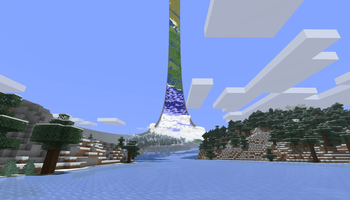
RingWorld wraps the Overworld into a ring. Keep travelling around it and you’ll come back to where you started. Look up and you can see the other side.
Build across the join, sail through it, or chase a mob around the whole ring. Blocks, redstone, water and projectiles work across it too. Walls run along the two edges, while the Nether and End stay unchanged.
Make it your ring
Choose a preset or set your own dimensions:
- Small: 2,048 blocks around, 128 across.
- Medium: 16,384 blocks around, 256 across. Our recommended starting point.
- Large: 32,768 blocks around, 512 across.
Preview your seed and wall style before creating the world. Choose wall materials, adjust their height and decay, and pick a RingWorld Structure, Masonry or Gradient pattern. The default RingWorld Structure walls include embedded machinery, channels and structural details. The underside uses matching materials too.
You can also choose sky and sun presets, add a continuous river around the ring, or increase structure density. Nearby block correction reduces squeezed and stretched blocks on smaller rings. It defaults on and can be adjusted in Display settings.
Building beyond the side walls is enabled by default. The World settings menu and an operator command control it for the whole world, including multiplayer. Turning it off keeps existing builds.
See the world overhead
The Ring Atlas shows terrain beyond your normal render distance as a low-poly 3D model. It updates as the world changes, so you can see distant terrain without keeping every chunk loaded around you.
Real chunks become playable first. While background generation runs, a seed-based biome map fills the distant ring and gains detail progressively. The full 3D Atlas appears once generation is complete and verified. Check its progress in the corner of the screen or open RingWorld from the pause menu. Progress is saved, so generation can resume later.
Atlas generation uses processor time and disk space. Larger rings take longer; the time depends on the host machine. Automatic generation speed starts with four concurrent chunk requests and slows down under sustained performance pressure, recovering when there is capacity again. You can also set the rate manually.
Choose Low, Medium or High Atlas detail in Display settings or with a command. This is a personal performance setting: players on the same server can choose different levels. The distant Atlas is hidden underwater so normal water fog keeps its appearance.
Thin floating platforms made from recognized manufactured materials are left out of the Atlas to prevent artificial mountains underneath them. Nearby real blocks still render normally; natural terrain and unrecognized materials remain in the distant model.
Versions and compatibility
RingWorld 1.4 supports Minecraft 26.1, 26.1.1, 26.1.2, 26.2 and 26.3, on Fabric and NeoForge. A separate Minecraft 1.21.1 backport is also available in beta; the commands below describe the 1.4 release.
Shader compatibility has improved by preserving Minecraft’s shared shader state. Sodium support is experimental. This does not mean that Iris or shader packs are generally supported. See the compatibility notes for tested configurations and limits.
Open source under MPL-2.0.
Compatibility warning: RingWorld heavily modifies Minecraft’s rendering and world generation. It may conflict with other mods that change those systems, including shaders and rendering or world-generation replacements.
Slash commands
Commands below apply to RingWorld 1.4. In examples, | separates choices; type just one choice. Replace values in <angle brackets> with a number. Values in [square brackets] are optional.
Personal display settings
These affect your client only and do not require operator permissions.
| Command | What it does | | --- | --- | | /ringworld lod or /ringworld lod show | Shows your Atlas detail setting and the server’s sampling resolution. | | /ringworld lod low / /ringworld lod medium / /ringworld lod high | Selects one of the three Atlas detail levels. | | /ringworld lod reset | Returns Atlas detail to Medium. | | /ringworld distortion or /ringworld distortion show | Shows nearby block correction and its range. | | /ringworld distortion on / /ringworld distortion off | Enables or disables nearby block correction. Enabled by default; changes appearance only. | | /ringworld distortion distance <1–8> | Sets the correction range in chunks in each direction. Default: 3. | | /ringworld ringlights or /ringworld ringlights show | Shows your distant Atlas lighting profile. | | /ringworld ringlights <falloff> [peak] | Advanced Atlas light tuning. Falloff: 0.5–6.0. Peak brightness: 0.1–3.0; omitted peak uses 1.25. | | /ringworld ringlights reset | Restores the midpoint Atlas lighting profile. |
World and server controls
These require cheats in singleplayer or operator permission level 2 on a server. Changes apply to the world, not just your client.
Highlights
From source dataGame versions
Supports 6 Minecraft versions, the newest being 26.3.
Loaders
Runs on Fabric and NeoForge.
Footprint
Rated a light load on a server.
RingWorld on Nxeon
From our catalogue- One-click install
- Supported on Nxeon Minecraft servers. We download it from Modrinth, place it, and restart the server.
- Server side
- Required on the server
- Server type needed
- Fabric, NeoForge
- Server load
- light
- Smallest plan we suggest
- Minecraft — 2 GB (2 GB RAM). This follows our own load rating above, not a benchmark.
- Latest build
- 1.4.0-neoforge+mc1.21.1, released 2026-10-20
Game versions by loader
| Loader | Game versions | Newest |
|---|---|---|
| Fabric | 1.21.1 to 26.3 (6 versions) | 26.3 |
| NeoForge | 1.21.1 to 26.3 (6 versions) | 26.3 |
From 12 recorded builds of RingWorld.
Recent builds
| Build | Released | Game versions | Loaders |
|---|---|---|---|
| 1.4.0-neoforge+mc1.21.1 | 2026-10-20 | 1.21.1 | NeoForge |
| 1.4.0-fabric+mc1.21.1 | 2026-10-20 | 1.21.1 | Fabric |
| 1.4.0-neoforge+mc26.3 | 2026-10-14 | 26.3 | NeoForge |
| 1.4.0-fabric+mc26.3 | 2026-10-14 | 26.3 | Fabric |
| 1.4.0-neoforge+mc26.2 | 2026-10-14 | 26.2 | NeoForge |
| 1.4.0-fabric+mc26.2 | 2026-10-14 | 26.2 | Fabric |
Dependencies
- Required: modrinth project P7dR8mSH (modrinth, not in our catalogue)
Declared by the newest build that lists any. Required ones are installed with it on one-click installs.
Run RingWorld on a Minecraft server
Pick a server or deploy a new one above; it is installed in one click.
What kind of mod it is
From the catalogMaps & scenarios
Custom maps, arenas and scenarios to play on.
Runs on your server
From source side supportModrinth lists RingWorld as required on the server. Check its Modrinth page to see whether players need it too.
Compatibility
- Game
- Minecraft
- Loaders
- FabricNeoForge
- Runs on
- Serverrequired on the server
- Game versions
- 26.3 and 5 earlier
Verified at the source
- ✓ModrinthOfficial listing, checked 2026-10-21Open ↗
- ✓AuthorDelaser, as published on Modrinth
- ✓LicenseMPL-2.0Free









