







About Sakura Updater
From ModrinthSakura Updater — a lightweight auto-sync mod with one-click updates, mirror/push sync, and a visual update UI. Sakura Updater — 是一个轻量级的自动同步mod,具有一键更新,镜像/推送同步和视觉更新UI

SakuraUpdater
(中文版请向下滚动 | Scroll down for Chinese version)
Introduction
SakuraUpdater is a NeoForge Minecraft mod that enables automatic synchronization of mod files between a server and clients, allowing players to receive server updates automatically, similar to other games.
Features
- [x] 🔄 Automatic server update checks
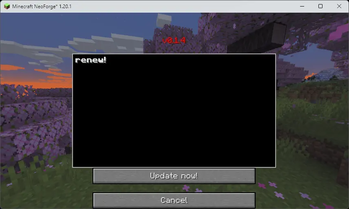
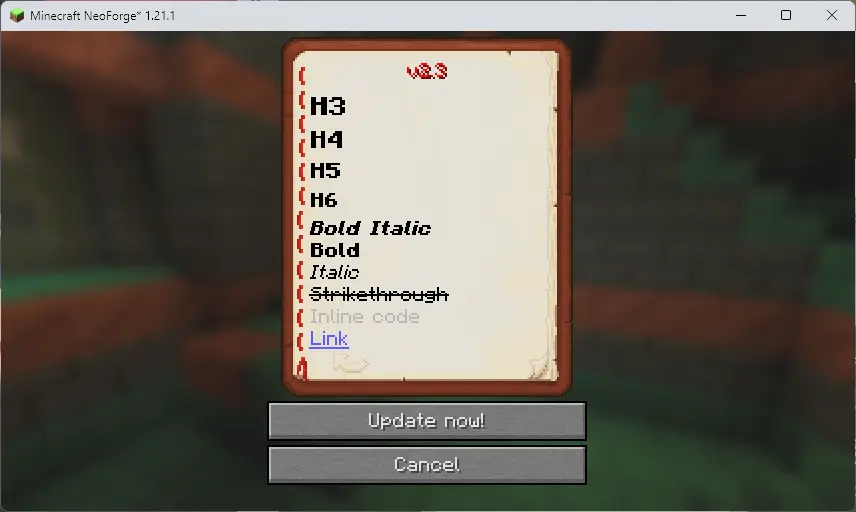
- [x] 🕒 Display update logs in the update UI
- [x] 📁 Multiple sync modes supported (mirror, push, ignore)
- [x] 🎮 Graphical update UI
- [x] ⚙️ Configurable client and server settings
- [x] 🚀 The server can run independently
Installation
Server-side installation
- Place
sakuraupdater-[version].jarinto the server'smodsfolder. - Start the server. Configuration files will be generated on first run.
- Edit the server configuration file at
config/sakuraupdater-server.toml.
Client-side installation
- Place
sakuraupdater-[version].jarinto the client'smodsfolder. - Start the game. Configuration files will be generated on first run.
- Edit the client configuration file at
config/sakuraupdater-client.toml.
Server-side independent operation
- Place
sakuraupdater-[version].jarinto a separate folder. - Run the server independently with
java -jar sakuraupdater-[version].jar. - Edit the standalone server configuration file at
sakuraupdater-common.toml.
Runtime dependencies
The same JAR supports NeoForge and java -jar standalone operation. Dependencies are no longer bundled. Standalone startup obtains SQLite JDBC 3.46.0.0, Gson 2.10, NightConfig core/toml 3.8.1, and SLF4J api/simple 2.0.9. NeoForge servers only obtain SQLite when opening the database; ordinary clients do not download these libraries.
First startup needs internet access: downloads try Aliyun Central (https://maven.aliyun.com/repository/central/) first, then Maven Central (https://repo.maven.apache.org/maven2/). Files are cached in lib/ relative to the process working directory. Every file is checked against a pinned SHA-256 before use; valid caches work offline and are not downloaded again.
To override the download source, set SAKURAUPDATER_MAVEN_REPO to an HTTP(S) Maven repository root before starting Java. For example, in PowerShell:
$env:SAKURAUPDATER_MAVEN_REPO = "https://maven.aliyun.com/repository/central/"
java -jar sakuraupdater-[version].jar
A nonblank value replaces both default sources; if it fails, no public-source fallback is attempted. Unset or blank values retain the default Aliyun → Maven Central order. A trailing slash is optional. The URL must not include credentials, query parameters, or a fragment. This applies to standalone and NeoForge processes; restart the process after changing the variable. SHA-256 checks still apply to custom sources.
Without internet, complete valid caches allow normal startup with no network requests. Missing or corrupt required files trigger a download attempt; if every configured source fails, startup stops at that dependency. Each source is attempted once, with a 10-second connection timeout and a 60-second read timeout (these are not an overall startup deadline). Standalone startup exits with code 1; a NeoForge server reports a mod initialization error and cannot finish startup. Existing database files are not deleted. Ordinary clients do not require these downloads. An accessible LAN Maven repository can also supply missing files without public internet access.
For offline setup, copy the required versioned JAR files into lib/ from a previously successful installation. Keep the exact filenames (for example, sqlite-jdbc-3.46.0.0.jar); standalone mode needs all six files. Existing valid lib/ files from older releases can be reused. Lock files may remain and should not be removed while the application is running.
If acquisition fails, the log names the library, attempted URLs, and causes. Check network access and write permissions for lib/, or prepopulate verified files, then restart. Corrupt files are replaced only after a complete, verified download. A missing dependency or database initialization failure stops server startup. JARs are loaded directly; SQLite extracts its platform native library automatically, so its JVM temporary directory must be writable.
Configuration
Server configuration (sakuraupdater-server.toml)
# File server port
port = 25564

# Sync directory configuration, format: ["target_dir:mode:source_dir:extra_source_dir:..."]
# Mode explanations:
# - mirror: mirror mode, fully synchronize source directory to the target directory
# - push: push mode, push server files to clients
# - pull: pull mode, pull files from clients to the server
# - ignore: ignore mode, ignore files matching the regex. Since the path is included, ".*filename$" is recommended.
SYNC_DIR = [
    "mods:mirror",                           # synchronize the mods folder
    "config:push:clientconfig:config",       # push config and clientconfig to the client
    "resourcepacks:mirror",                  # synchronize resourcepacks folder
    "mods:ignore:.*abc\.jar$"                # ignore files in mods ending with 'abc.jar'
]
Client configuration (sakuraupdater-client.toml)
# Server host address
host = "localhost"

# Server port (should match the sakuraupdater-server.toml configuration, especially if using frp or other proxies)
port = 25564

# Current client version (managed automatically; do not edit manually)
now_version = ""
Usage
1. Server administrator operations
Highlights
From source dataGame versions
Supports 17 Minecraft versions, the newest being 1.21.11.
Loaders
Runs on Forge and NeoForge.
Footprint
Rated a light load on a server.
Sakura Updater on Nxeon
From our catalogue- One-click install
- Supported on Nxeon Minecraft servers. We download it from Modrinth, place it, and restart the server.
- Server side
- Required on the server
- Server type needed
- Forge, NeoForge
- Server load
- light
- Smallest plan we suggest
- Minecraft — 2 GB (2 GB RAM). This follows our own load rating above, not a benchmark.
- Latest build
- v0.3.7-1.20.1, released 2026-10-21
Game versions by loader
| Loader | Game versions | Newest |
|---|---|---|
| NeoForge | 1.21.1 to 1.21.11 (11 versions) | 1.21.11 |
| Forge | 1.20.1 to 1.20.6 (6 versions) | 1.20.6 |
From 7 recorded builds of Sakura Updater.
Recent builds
| Build | Released | Game versions | Loaders |
|---|---|---|---|
| v0.3.7-1.20.1 | 2026-10-21 | 1.20.1 to 1.20.6 (6 versions) | Forge |
| v0.3.7-1.21.1 | 2026-10-21 | 1.21.1 to 1.21.11 (11 versions) | NeoForge |
| v0.3.6-1.20.1 | 2026-09-25 | 1.20.1 to 1.20.6 (6 versions) | Forge |
| v0.3.6-1.21.1 | 2026-09-25 | 1.21.1 to 1.21.11 (11 versions) | NeoForge |
| v0.3.5-1.21.1 | 2026-09-22 | 1.21.1 to 1.21.11 (11 versions) | NeoForge |
| v0.3.5-1.20.1 | 2026-09-22 | 1.20.1 to 1.20.6 (6 versions) | Forge |
Run Sakura Updater on a Minecraft server
Pick a server or deploy a new one above; it is installed in one click.
What kind of mod it is
From the catalogQuality of life & UI
Small conveniences, tweaks and interface improvements players notice straight away.
Runs on your server
From source side supportModrinth lists Sakura Updater as required on the server. Check its Modrinth page to see whether players need it too.
Compatibility
- Game
- Minecraft
- Loaders
- ForgeNeoForge
- Runs on
- Serverrequired on the server
- Game versions
- 1.21.11 and 16 earlier
Verified at the source
- ✓ModrinthOfficial listing, checked 2026-10-22Open ↗
- ✓AuthorXiaoJiang0208, as published on Modrinth
- ✓LicenseLGPL-3.0-onlyFree









