







About SCP: Facility
From ModrinthBuild your own SCP Foundation with a lot of new blocks, systems and even personnel!
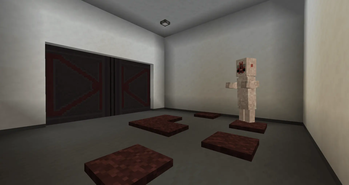
SCP: Facility adds A LOT of new blocks, items and systems to build your own SCP Foundation. It includes a wide variety of building blocks, decorations, functional systems, keycards, and personnel to simulate a fully operational site. From simple containment rooms to complex facilities with working security systems, events, and also some Groups of Interest, like the Chaos Insurgency, this mod allows you to create and control your own SCP Foundation Site!
Updates continue on Curseforge ##
- A mod made by Zcoper
- Mod created with MCreator!
- Requires Geckolib
● Visit my Discord Server! https://discord.gg/akP56NtmVQ
● Important FaQ
Spoiler
► How do I disable the red screen from alarms?
You can disable the Overlay Screen from alarms and events by setting the gamerule "EnableAlarmOverlay" to false
► How do I disable the music from events?
You can disable the Event music by setting the gamerule "EnableFacilityEventMusic" to false
► How do I disable the Chaos Insurgency to hack C.A.S.S.I.E?
The Chaos Insurgency can hack C.A.S.S.I.E. if they are within a 6 block radius. They will try moving to C.A.S.S.I.E. within a 50 block radius.
You can disable the hacking by setting the gamerule "EnableCassieHack" to false
► How do I disable the Text Messages from C.A.S.S.I.E?
You can disable the Chat messages from C.A.S.S.I.E. by setting the gamerule "EnableCassieMessages" to false
► How do I disable the MTF to spawn?
You can disable the MTF spawning by setting the gamerule "EnableMTFSpawn" to false
► How do I disable the Chaos Insurgency to spawn?
You can disable the Chaos Insurgency spawning by setting the gamerule "EnableChaosInsurgencySpawn" to false
► How do I disable the GOC to spawn?
You can disable the GOC spawning by setting the gamerule "EnableGOCSpawn" to false
► How do I disable the Serpents Hand to spawn?
You can disable the Serpents Hand spawning by setting the gamerule "EnableSerpentsHandSpawn" to false
► How do I disable the Ambient Noises?
The Ambient Noises or Mood Noises can be played during a lockdown. You can disable the Ambient Noises by setting the gamerule "EnableFacilityMoodSounds" to false
► How do I reset C.A.S.S.I.E?
You can use the command "/reset_cassie" to reset all the systems.
This could be useful if you somehow break the system.
► How do I mark doors and gates to specific zones?
You can mark doors and gates to three zones by placing the doors or gates on specific blocks
● Light Containment Zone: Any Block ● Heavy Containment Zone: Metal block, metal grate, foundation bricks ● Entrance Zone: Foundation floor tiles
► How do I avoid the Decontamination Gas?
You can avoid the gas by standing outside of the facility or wearing a full Gas Hazmat Suit.
► How do I give scanners a security level?
You just have to place a Keycard scanner and right click it with a keycard that has the level you want the scanner to detect.
For example: You want a Keycard scanner with security level 3, you have to click the scanner with a Keycard with the level 3. Keycards with higher security level can also access the scanner after setting the security level to 3.
Same goes for Hand Scanners. Just right click it with an empty hand and the Hand Scanner will set the ID to your playername. Only you can activate this Scanner now.
► How do I disable the Lockdown, Decontamination or else?
You can disable a lockdown or decontamination by entering C.A.S.S.I.E. Menu and click on Lockdown or Decontamination.
► What can I do with C.A.S.S.I.E?
C.A.S.S.I.E. is an important block you need. When you have C.A.S.S.I.E. you will get notified about events with messages.
You can also right click C.A.S.S.I.E. to turn it on and enter the menu, but first you have to login with a code. After that, you can choose 6 options.
- Lockdown = Closes all doors, gates and disables foundation buttons, tesla gates, keycard scanners, computers, alpha warhead panels.
- Decontamination = An event where the facility will be locked down after a while and start releasing toxic gas that kills everything inside.
- Doors = Can open or close all doors and gates at once.
- Tesla Gate = Can activate or deactivate all tesla gates
- Restart = Only necessary if C.A.S.S.I.E. got hacked.
- Shut down = Shuts down C.A.S.S.I.E.
If there is a green marker next to the option, this will mean that the following option is already engaged, tesla gates are active or doors and gates are closed.
To disable Lockdown, Decontamination, Tesla Gates or opening/closing all doors, you need to click the option again.
If the text is in a dark gray, that means the following option can't be clicked, due to other actions like a Lockdown, Hack or Decontamination.
► Which events are present in the mod?
There are 4 types of events that can happen:
- Lockdown. This event will close all doors and gates and cannot be opened. Foundation buttons, tesla gates, scanners, computers or alpha warhead panels won't work either. This event is often the result of other events or by C.A.S.S.I.E. You can disable this event with C.A.S.S.I.E. During this event, you can hear Ambient Noises.
- Facility overall Decontamination: This event will release toxic gas into the facility. This event can be triggered or disabled with C.A.S.S.I.E.
- Alpha Warhead Emergency Detonation Sequence: This event will explode the Alpha Warheads which results in a HUGE crater. Be careful with this event. It can be triggered or deactivated by using the Alpha Warhead Panel. Deactivation only works before the Lockdown takes place.
Highlights
From source dataGame versions
Supports 3 Minecraft versions, the newest being 1.20.1.
Loaders
Runs on Forge.
Footprint
Rated a light load on a server.
SCP: Facility on Nxeon
From our catalogue- One-click install
- Supported on Nxeon Minecraft servers. We download it from Modrinth, place it, and restart the server.
- Server side
- Required on the server
- Server type needed
- Forge
- Server load
- light
- Smallest plan we suggest
- Minecraft — 2 GB (2 GB RAM). This follows our own load rating above, not a benchmark.
- Latest build
- 1.0.0, released 2026-06-07
Game versions by loader
| Loader | Game versions | Newest |
|---|---|---|
| Forge | 1.19.2 to 1.20.1 (3 versions) | 1.20.1 |
From 3 recorded builds of SCP: Facility.
Recent builds
| Build | Released | Game versions | Loaders |
|---|---|---|---|
| 1.0.0 | 2026-06-07 | 1.19.2 | Forge |
| 1.0.0 | 2026-06-07 | 1.19.4 | Forge |
| 1.0.0 | 2026-06-07 | 1.20.1 | Forge |
Dependencies
- Required: modrinth project 8BmcQJ2H (modrinth, not in our catalogue)
Declared by the newest build that lists any. Required ones are installed with it on one-click installs.
Run SCP: Facility on a Minecraft server
Pick a server or deploy a new one above; it is installed in one click.
What kind of mod it is
From the catalogBuilding & decoration
Blocks, furniture, decorations and building tools.
Runs on your server
From source side supportModrinth lists SCP: Facility as required on the server. Check its Modrinth page to see whether players need it too.
Compatibility
- Game
- Minecraft
- Loaders
- Forge
- Runs on
- Serverrequired on the server
- Game versions
- 1.20.1 and 2 earlier
Verified at the source
- ✓ModrinthOfficial listing, checked 2026-10-02Open ↗
- ✓AuthorZcoper, as published on Modrinth
- ✓LicenseLicenseRef-All-Rights-ReservedFree









